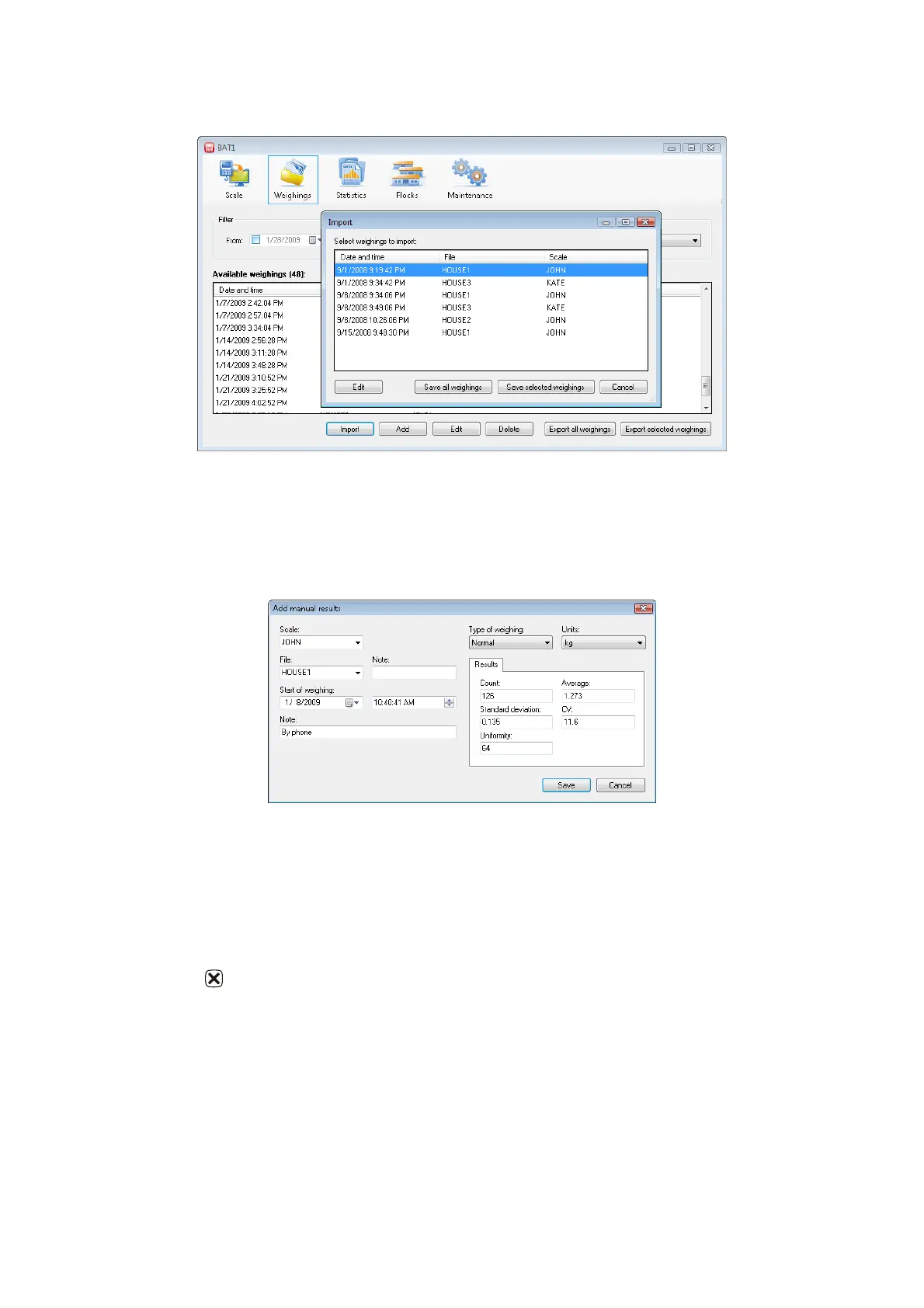
Importing data
Click the Import button and select the file sent from the farm in the dialog box. Click Open, and the contents
will be displayed.
Click Save all weighings and all data will be saved in the database. The imported data can be checked in the
Available weighings table by clicking the Edit button.
Manual data entry
Weighing results can also be manually entered into the database. Click Add and the manual entry dialog box
will be displayed.
Enter the weighing results and click Save. Repeat to enter data from all weighed files. We recommend filling
the Note field (bottom left) related to the data origin (such as “by phone” etc.). Click Save.
9. Troubleshooting
9.1. Scale
1. After suspension of the hook, the scale does not show zero weight
- shortly hold for setting zero value
2. The scale shows wrong weight
- calibrate the scale, see chapter 7.4
3. The scale shows a significantly smaller weight than expected
- disable the mode of weighing small chickens
4. It is not possible to set weighing with sorting
- the weighing mode with the saving of sex is selected, select another mode
5. The value of the weight is overwritten on the display after weighing
- disable the mode of weighing with sorting
6. After the bird is hung, the scale does not save the weight
- the manual saving mode is enabled, select automatic mode



 To Next Page