LabQuest
®
3 User Manual
www.vernier.com/labq3 7
III. CONNECTING SENSORS
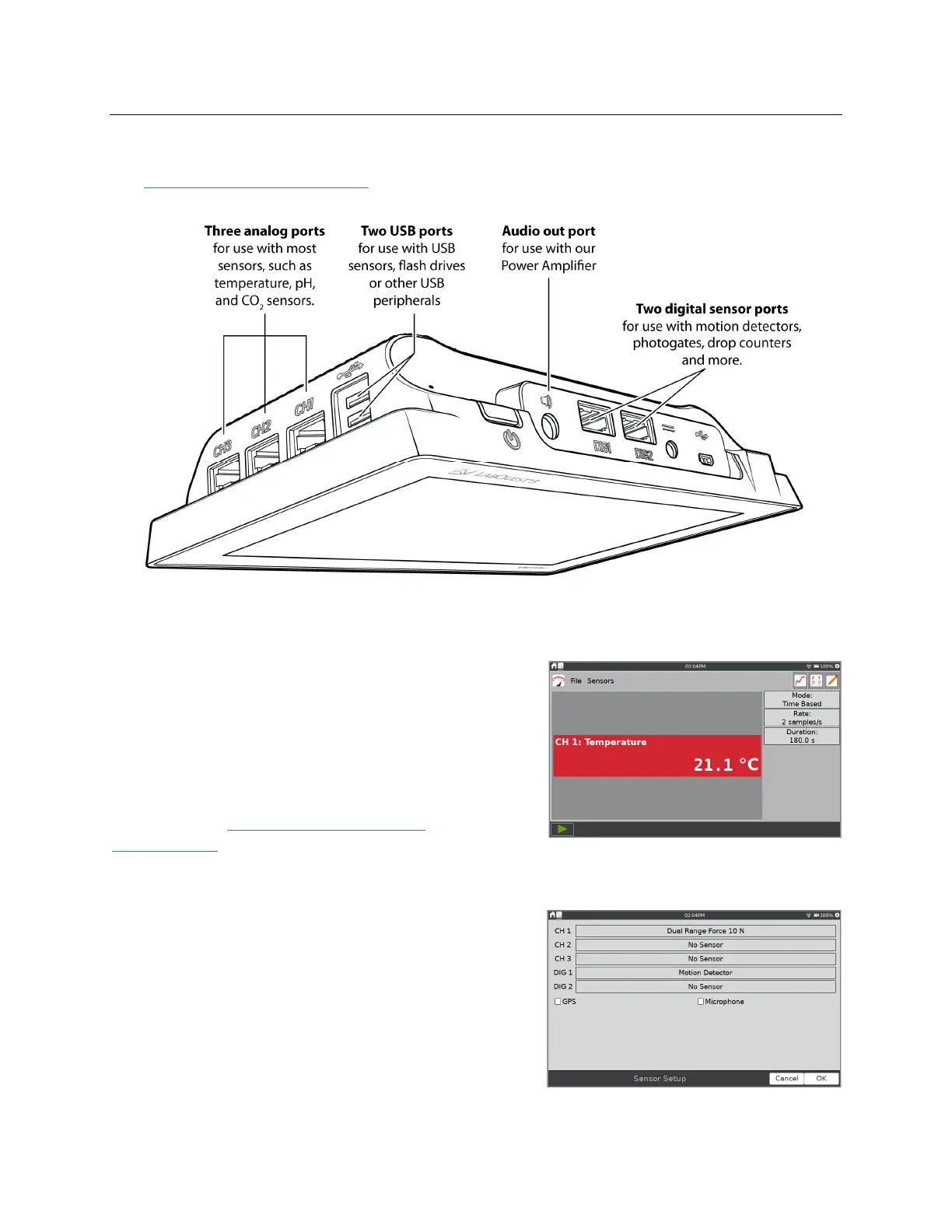
See www.vernier.com/lq3-sensors for a list of sensors compatible with LabQuest 3.
Wired Sensors
Connect your wired sensor to the appropriate sensor
port. LabQuest App displays a meter and sets the
default collection rate for the sensor.
TIP! If connecting a Go Direct
®
sensor that includes
multiple sensor channels, you may need to modify the
Sensor Channel configuration to use some of the built-
in sensors. See Go Direct Sensor Channel
Configuration.
Manual Sensor Setup
If your wired analog (BTA) or digital (BTD) sensor is
not automatically identified by the LabQuest App, you
can set up the sensor manually.
Choose Sensor Setup from the Sensors menu. Tap the
field displaying No Sensor for the channel to which
your sensor is connected. Choose the appropriate
sensor from the list and tap OK.


 To Next Page