LabQuest
®
3 User Manual
www.vernier.com/labq3 61
The Automatic profile option is the default option. When using this profile, the power
configuration is detected, and the appropriate power profile is applied. Note that LabQuest
cannot distinguish between power coming from an AC adapter or an external backup battery
such as the LabQuest Battery Boost 3. When using an external battery, you may want to use the
Battery profile to conserve power of the external battery.
Here is a summary of the power profile stages to conserve power:
Battery AC
Not in Use Collecting Data Not in Use Collecting Data
Dim screen
after 1 minute after 1 minute after 2 minutes after 5 minutes
Screen off
after 3 minutes after 3 minutes after 5 minutes after 15 minutes
Suspend
after 30 minutes never after 60 minutes never
Shut down
after 2 days never after 2 days never
If you are setting up LabQuest for display, you may not want the unit to dim at all. To do that,
connect your unit to AC power and choose the option to not dim the screen while on AC power.
TIP! We do not recommend using this option when using an external battery backup as your
batteries will drain rapidly.
Troubleshooting Battery Issues
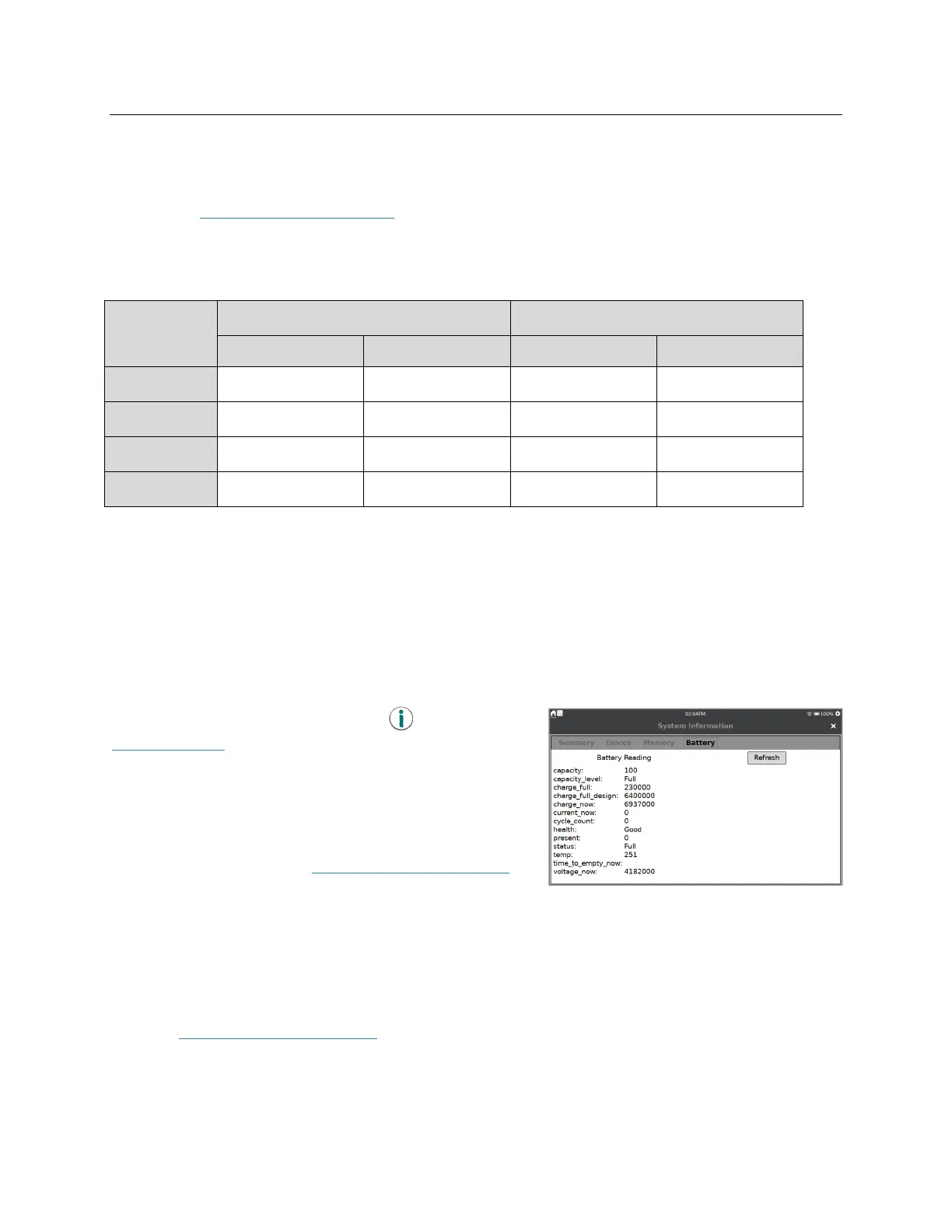
Launch the System Information app, , from the
Settings screen. Tap the Battery tab to view details
about the battery.
The battery readings do not update automatically. Tap
Refresh to update the information on the screen.
For more information, see www.vernier.com/til/8479
.
Case and Screen Maintenance
LabQuest is water and shock resistant. Do not submerge LabQuest in liquids or allow liquids to
sit on the screen for any extended time. Wipe it clean with a damp cloth only; do not use any
solvents including ammonia or glass cleaners. For information on disinfecting your LabQuest
unit, see www.vernier.com/til/6551.


 To Next Page