Using the LabQuest
®
App
14 Vernier Software & Technology
Modifying the Data-Collection Settings
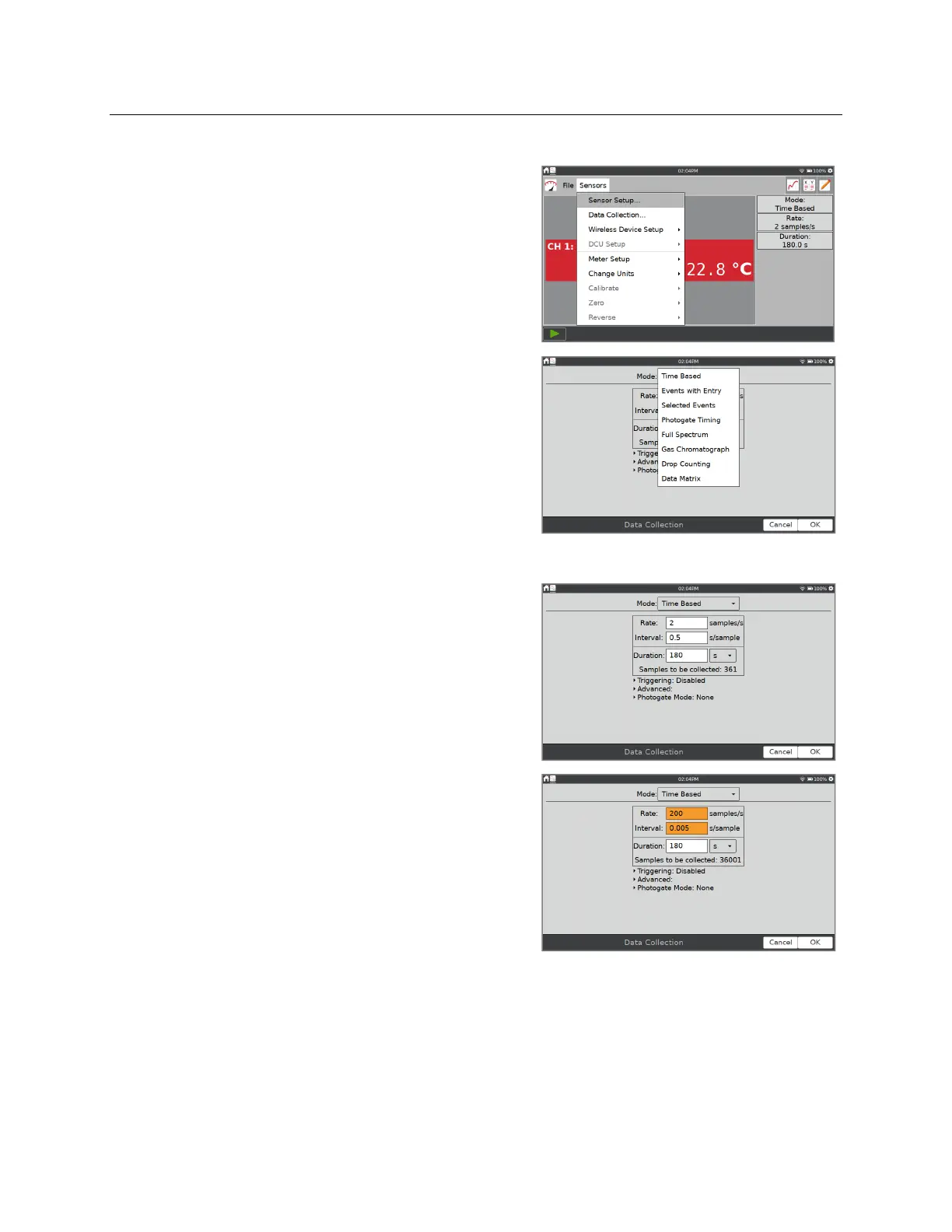
For most sensors, the default data-collection mode is
Time Based. The default collection rate for the
connected sensor is automatically set up when
LabQuest identifies the sensor. To modify the data-
collection settings, tap the summary box, or choose
Data Collection from the Sensors menu.
The parameters listed in the Data Collection dialog
depend on the mode selected.
Data-collection modes include Time Based, Events
with Entry, Selected Events, Photogate Timing, Full
Spectrum, Gas Chromatograph, Drop Counting, and
Data Matrix.
Mode: Time Based
Time-based data collection is the default data-
collection mode for most sensors. In this mode, sensor
readings are recorded at regular time intervals.
Adjustable parameters for this mode include the rate
(or interval) and duration of data collection. The total
number of samples to be collected based on these
parameters is displayed.
Warning Messages—
Under some circumstances, the
Rate, Interval, and Duration fields may be orange or
red. The orange highlight indicates that the rate has
been set to a value slower or faster than what is
recommended for the connected sensor or that the
number of samples could lead to performance issues.
You can still collect data using these settings;
however, you may have undesirable results.


 To Next Page