LabQuest
®
3 User Manual
www.vernier.com/labq3 15
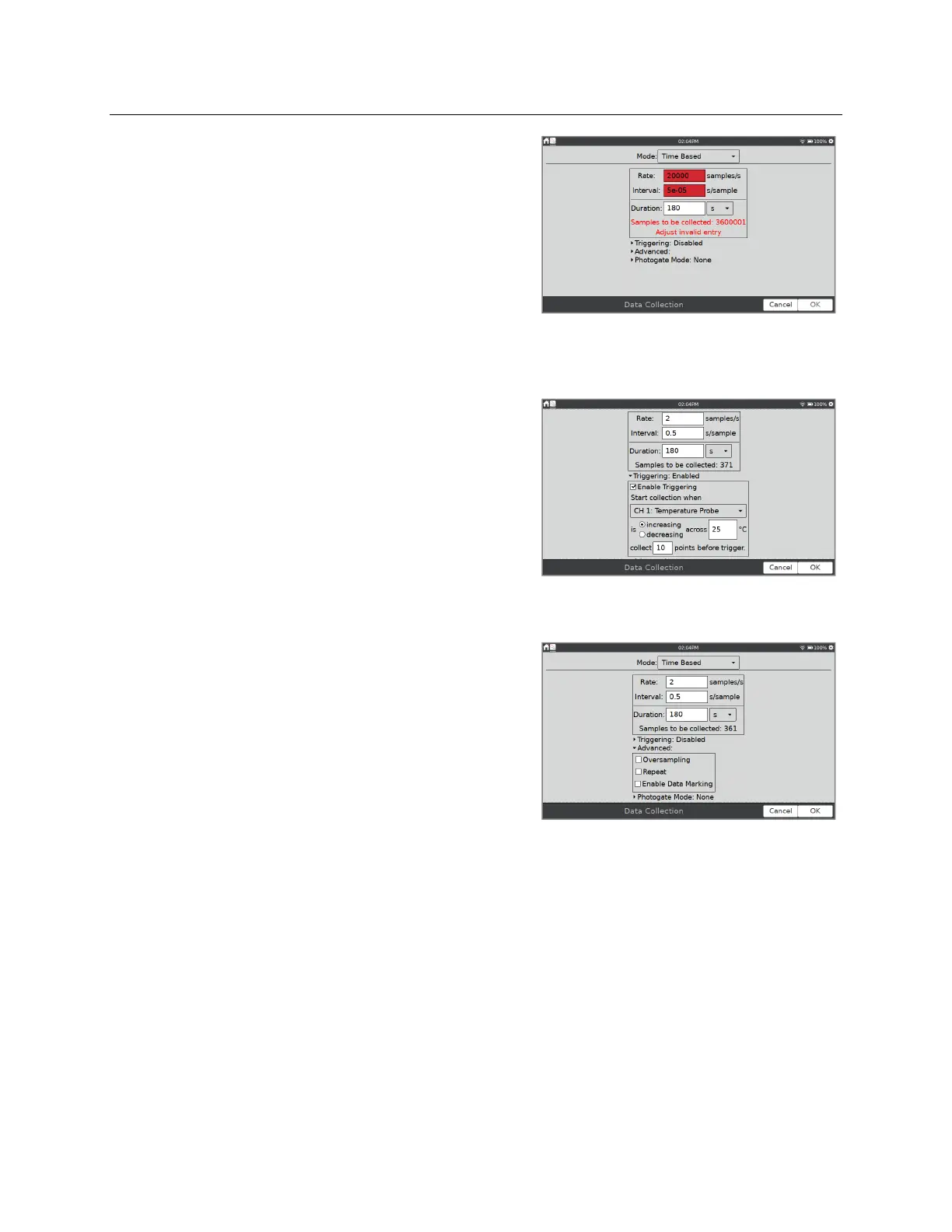
The red highlight indicates one of the following and
you cannot apply the changes until the warning
condition has been resolved:
The rate has been set to a value slower or faster
than what a connected device and/or sensor
configuration can support.
The number of samples exceeds the storage
available.
The number of samples exceeds 2000 (for rates
faster than 80,000 samples/s).
Triggering
—Triggering is only available in the Time-
Based mode. When enabled, LabQuest waits for a
trigger condition to be met before recording data. To
set the trigger, choose the sensor and set the threshold
conditions. You can also set the number of points to
be saved before the trigger condition is met.
Advanced
—The Advanced field has three options that can be independently enabled by
selecting the associated check box.
Oversampling
can be used with data-collection
rates less than ten samples per second. When
enabled, the sensor samples at a rate higher than
your selected rate. The app averages those
readings and reports an average value for each
collection interval.
Oversampling can be used to reduce
measurement noise by combining a burst of
readings into one value. As an example,
oversampling can sometimes reduce the
influence of unseen but real variations, such as
those from a flickering light source.
Repeat
can be used when the data-collection rate is at most 500 samples per second. When
enabled, a new data-collection run is started as soon as the current run has ended. This
setting is helpful for exploratory investigations.
TIP! Data for each run is overwritten when a new run is started.


 To Next Page