Using the LabQuest
®
App
18 Vernier Software & Technology
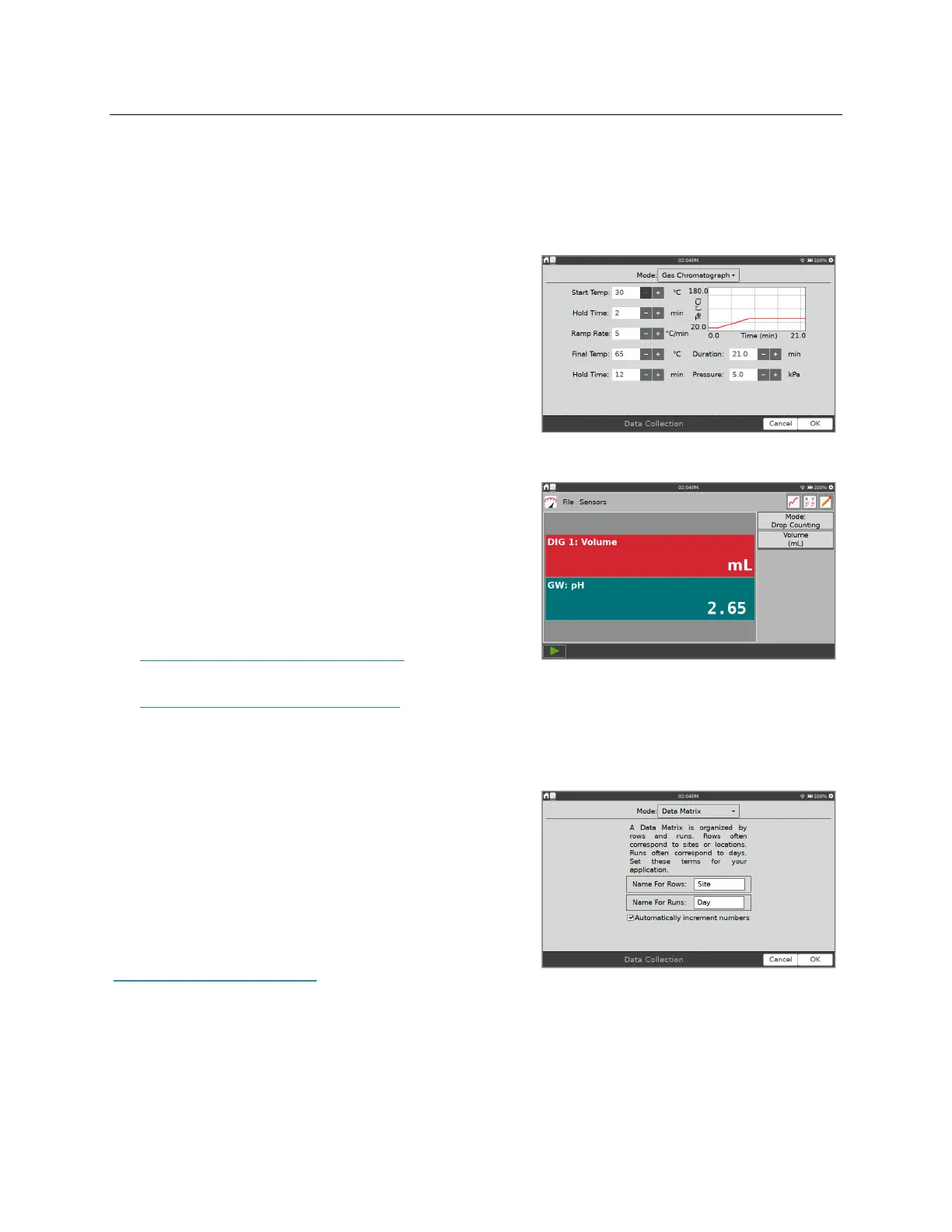
Mode: Gas Chromatograph
When a Vernier mini gas chromatograph (e.g., Vernier Mini GC™ Plus) is detected, LabQuest
App defaults to the Gas Chromatograph mode. In this mode, various parameters are available
for the user to establish a temperature and pressure profile adequate for the current experiment.
When starting data collection, a set of default
parameters is displayed. Tap the parameter field to
enter a new value, or adjust the default value using the
buttons. These values are reflected in the preview of
the time-dependent temperature graph displayed to the
right. After setting the parameters, tap OK to initiate
the warm up.
Mode: Drop Counting
LabQuest App defaults to this mode when a Vernier
Drop Counter or Go Direct Drop Counter are
connected. When using this mode, data points are
recorded every time a drop is detected by the drop
counter. For information on calibrating a drop counter,
see
Vernier Drop Counter
www.vernier.com/manuals/vdc-btd
Go Direct Drop Counter
www.vernier.com/manuals/gdx-dc
Mode: Data Matrix
This mode is helpful for field work. It provides a way
to collect data referenced to two parameters, such as
the locations of your sampling sites and the dates they
are sampled. You can collect data from up to eight
sensors by adding and removing sensors during data
collection.
For more detailed information, see
www.vernier.com/til/2366/.


 To Next Page