Using the LabQuest
®
App
20 Vernier Software & Technology
Meter Type
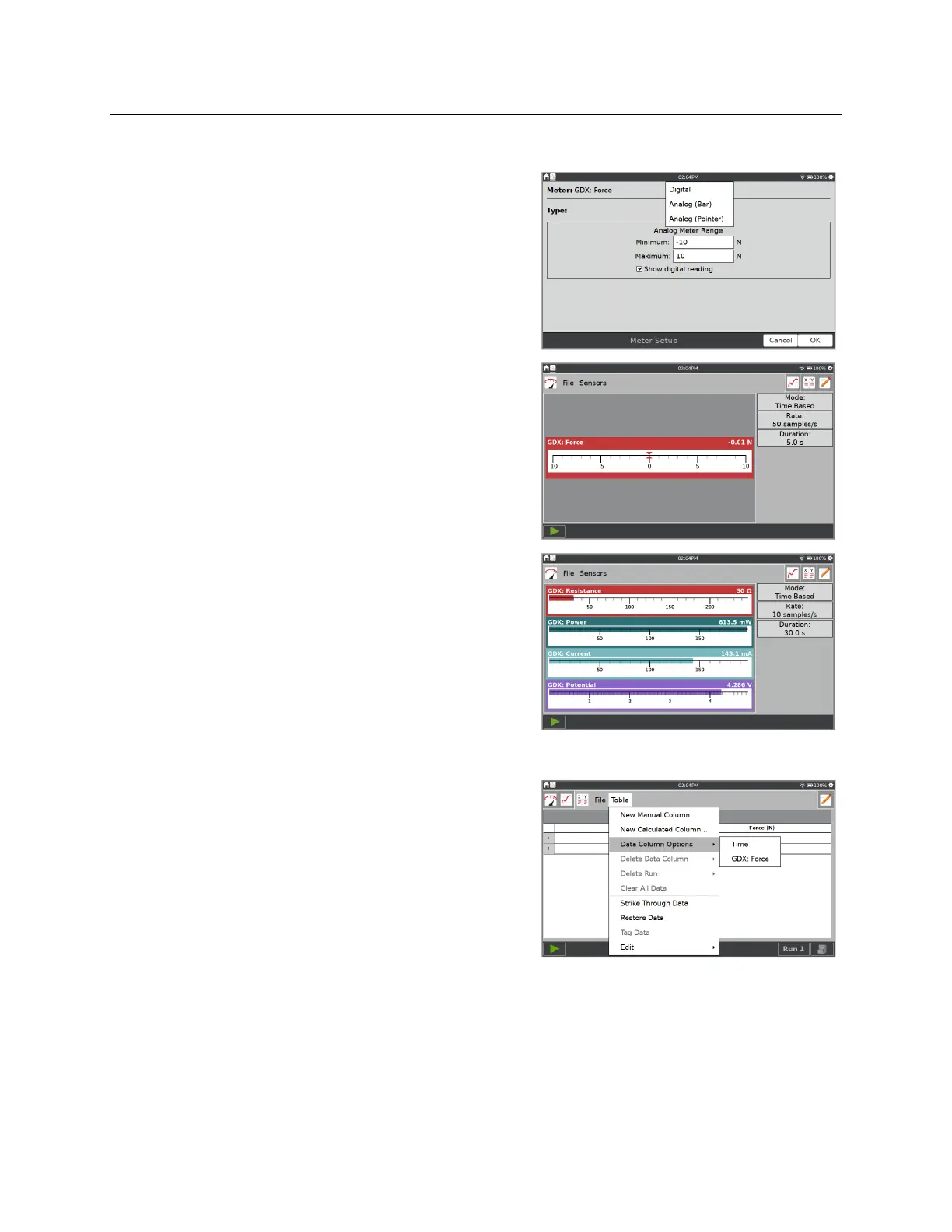
The default meter style is a digital meter. You can also
display the meter as an analog meter.
To display an analog meter, tap the meter and choose
Meter Setup.
Meter Type
—Choose Digital, Analog (Bar) or
Analog (Pointer).
Analog Meter Range
—Enter the minimum and
maximum values for the numeric range displayed
on the analog meter. The default values are the
same as those used with the default graph setup.
Show digital reading
—When selected, this option
displays the digital sensor reading on the analog
meter.
TIP! Vernier energy sensors use analog meters by
default. All other sensors use digital meters.
Meter Name and Displayed Precision
The column name and default display precision are
intentionally determined based on the specific sensor.
You can change these values as needed.
From the Table screen, select Data Column Options
from the Table menu. Select the column that
corresponds to the meter you want to change.


 To Next Page