3
Operating Manual Reprint
BEFORE YOU BEGIN
Battery Pack Installation and Removal
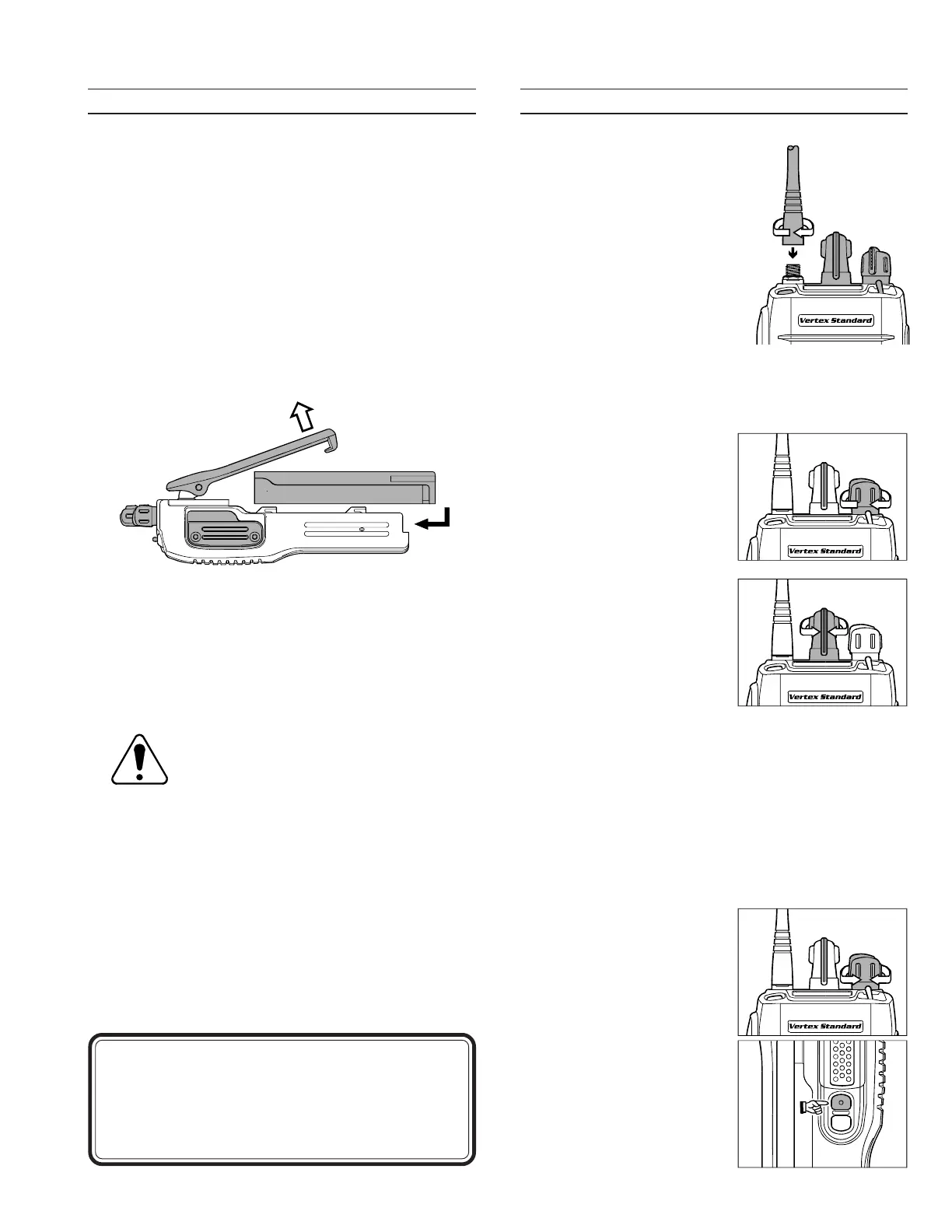
To install the battery, hold the transceiver with
your left hand, so your palm is over the speaker
and your thumb is on the top of the belt clip. Care-
fully mate the battery four insertion slots with
their corresponding alignment tabs on the trans-
ceiver case, while tilting the Belt Clip outward.
Proper alignment occurs with the battery pack
offset about 1/2 inch from the top edge of the bat-
tery compartment.
Guide the pack to the tabs with a slight inward
pressure, then slide the battery pack upward, un-
til it locks in place with a “Click.”
To remove the battery, turn the radio off and re-
move any protective cases. Slide the Battery Pack
Latch on the bottom of the radio toward the front
panel while sliding the battery down about 1/2
inch. Then lift the battery out from the radio while
unfolding the Belt Clip.
Do not attempt to open any of the re-
chargeable Lithium-Ion pack, as they
could explode if accidentally short-cir-
cuited.
Low Battery Indication
As the battery discharges during use, the voltage
gradually becomes lower. When the battery voltage
reaches 6.0 volts, it is time to substitute a freshly
charged battery and recharge the depleted pack. The
LED indicator on the top of the radio will blink red
when the battery voltage is low (6 Volts or lower).
OPERATION
Preliminary Steps
Install a charged battery
pack onto the transceiver, as
described previously.
Screw the supplied antenna
onto the Antenna jack.
Never attempt to operate
this transceiver without an
antenna connected.
If you have a Speaker/Mi-
crophone, we recommend
that it not be connected until you are familiar with
the basic operation of the VX-600.
Operation Quick Start
Turn the top panel’s VOL/
PWR knob clockwise to
turn on the radio on.
Turn the top panel’s CH se-
lector knob to choose the
desired operating channel.
If you want to select the
operating channel from a
different Memory Chan-
nel Group, pressing the
Soft key (assigned to the Memory Group Up or
Down function) to select the Memory Channel
Group to be you want before selecting the operat-
ing channel.
Note: Some models are programmed so that the
operating channels are selected by the Soft key
and the memory channel group is selected by the
channe selector knob. For further details, contact
your VERTEX STANDARD dealer.
Rotate the VOL/PWR
knob to set the volume
level. If no signal is
present, press and hold in
the MONITOR button
(under the PTT switch)
more than 2 seconds;
background noise will
now be heard, and you
may use this to set the
VOL/PWR knob for the
desired audio level. Press
and hold the MONITOR
CAUTION
Danger of explosion if battery is incorrectly re-
placed.
Replace only with the same or equivalent type.
Tilt the Belt Clip
Insert the Battery Pack







 To Next Page