Vertiv | Liebert CRV+ | User Manual 50
Chapter 3 System Operation & General Maintenance
This section contains content related to the Controller, basic System maintenance, and Routine
Troubleshooting which enables the customer to get to grips with the functioning of the equipment. It
helps customers gain insight into the inner workings of the product comprising of information such as
System Setup, Alarm menus, and basic Maintenance.
3.1.1 Micro-Controller
The Micro-controller for CRV+ air conditioners comes packed with potential features that help monitor
and manage the AC unit.
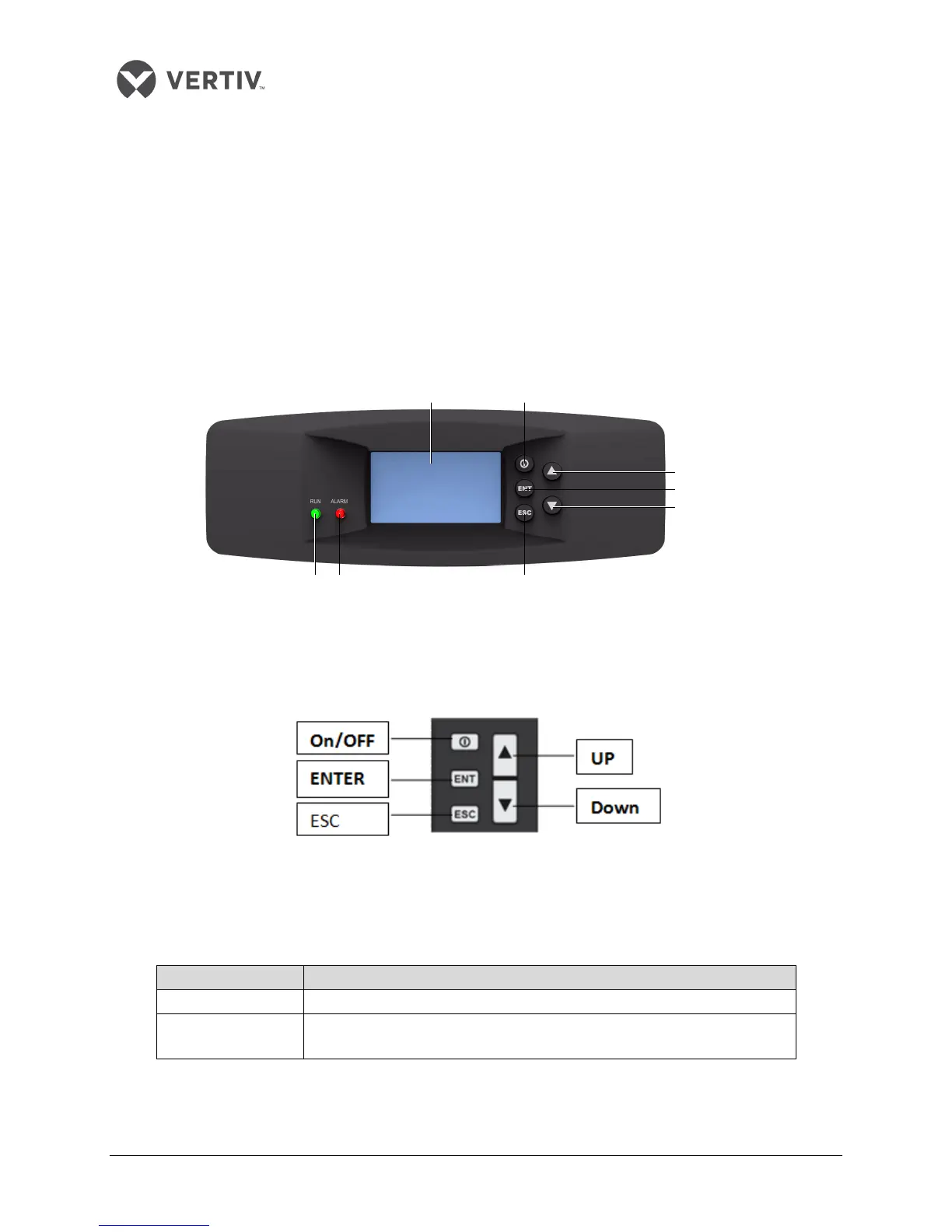
Figure 3-1 depicts the appearance of the micro-processing controller:
Figure 3-1 Appearance of the micro controller
3.1.2 Control buttons
The micro-controller provides 5 control buttons as depicted in Figure 3-2:
Figure 3-2 Control Buttons
The table in Listing 3.1 includes the detailed functions of the control buttons:
Listing 3.1
ON/OFF button Press this button for 3s to turn on or turn off the AC unit
Enter button (ENT) Enter the selected menu screen. Validate the parameter setting value
Run indicator
Alarm indicator ESC button
ENT button
ON/OFF buttonLCD screen
UP button
DOWN button









 To Next Page