Vertiv | Liebert CRV+ | User Manual 23
2.3.4 Installation Procedures
The CRV+ series of air conditioners is used between racks and one side of it is adjacent to the server
cabinet. The CRV+ series of Air Conditioners is especially used in small-and medium-range data centers,
computer rooms, and similar ecosystems.
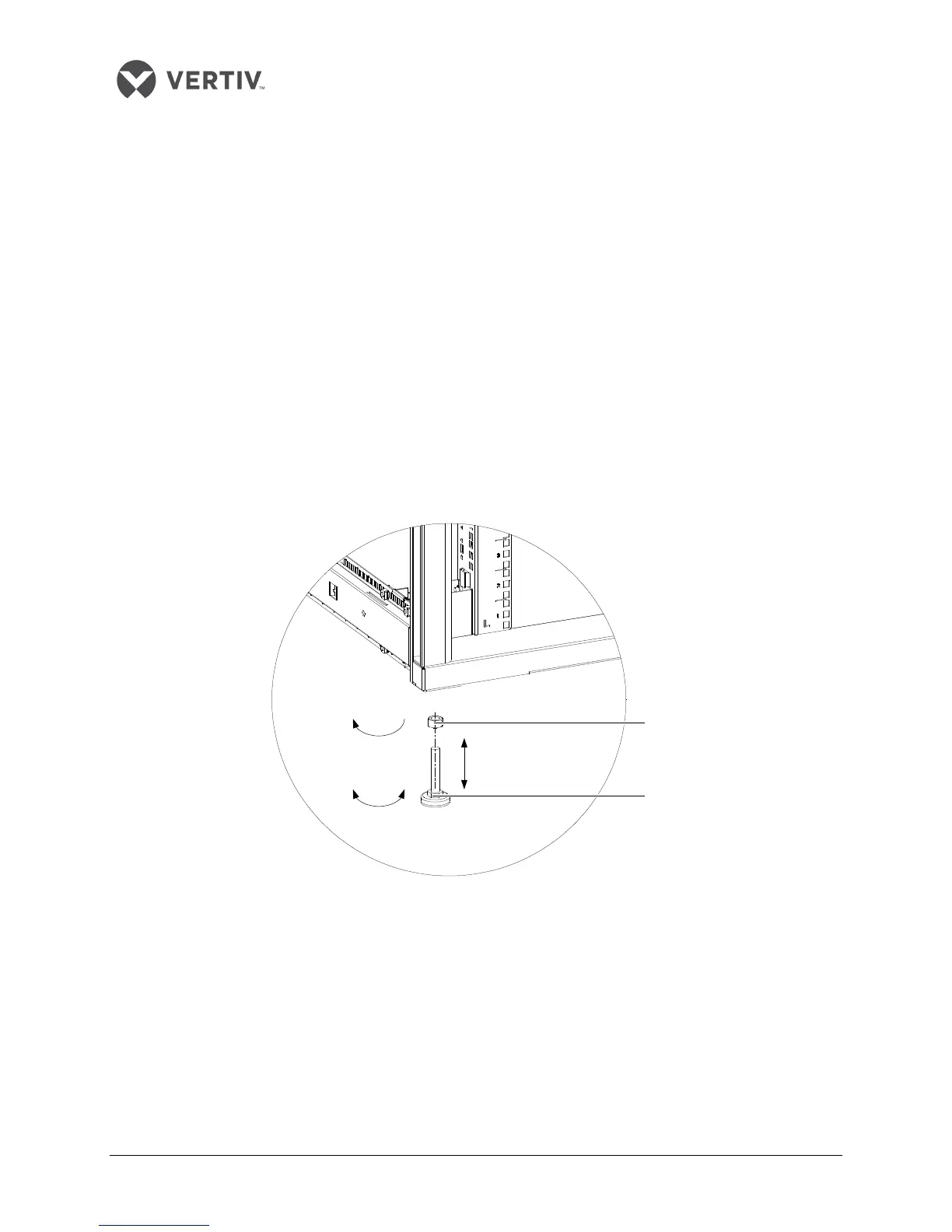
Leveling the cabinet
Once all the components of the cabinet have been installed, level the cabinet. The following section is a
step-by-step illustration of the process of leveling the cabinet:
Place the cabinet in the desired location (preferably an open ground). Use a movable wrench to
loosen the fixing nuts on the four foot bolts in a clockwise sequence.
Rotate the hexagon bolts on the bottom of the feet clockwise or counter-clockwise till the feet
rises or drops to an appropriate position. Use a gradienter to ensure that the cabinet is in a
uniform level state.
Refer to the Figure 2-13
to understand the process better:
Figure 2-13 Leveling the cabinet
Screw down the fixing nuts on the feet bolts counter-clockwise and the leveling gets completed. If
the machine room has a mounting bracket, and its width does not exceed 30mm, remove the feet
and fix the cabinet onto the mounting bracket.
Closkwise
Hexagon bolt
Fixing nut
Counter closewise
or clockwise
The feet rise or drop









 To Next Page