Troubleshooting
18 ©2013 Viking Preferred Service
To avoid risk of electrical shock, personal injury, or death, disconnect electrical power source to unit, unless test
procedures require power to be connected. Discharge capacitor through a resistor before attempting to service.
Ensure all ground wires are connected before certifying unit as repaired and/or operational.
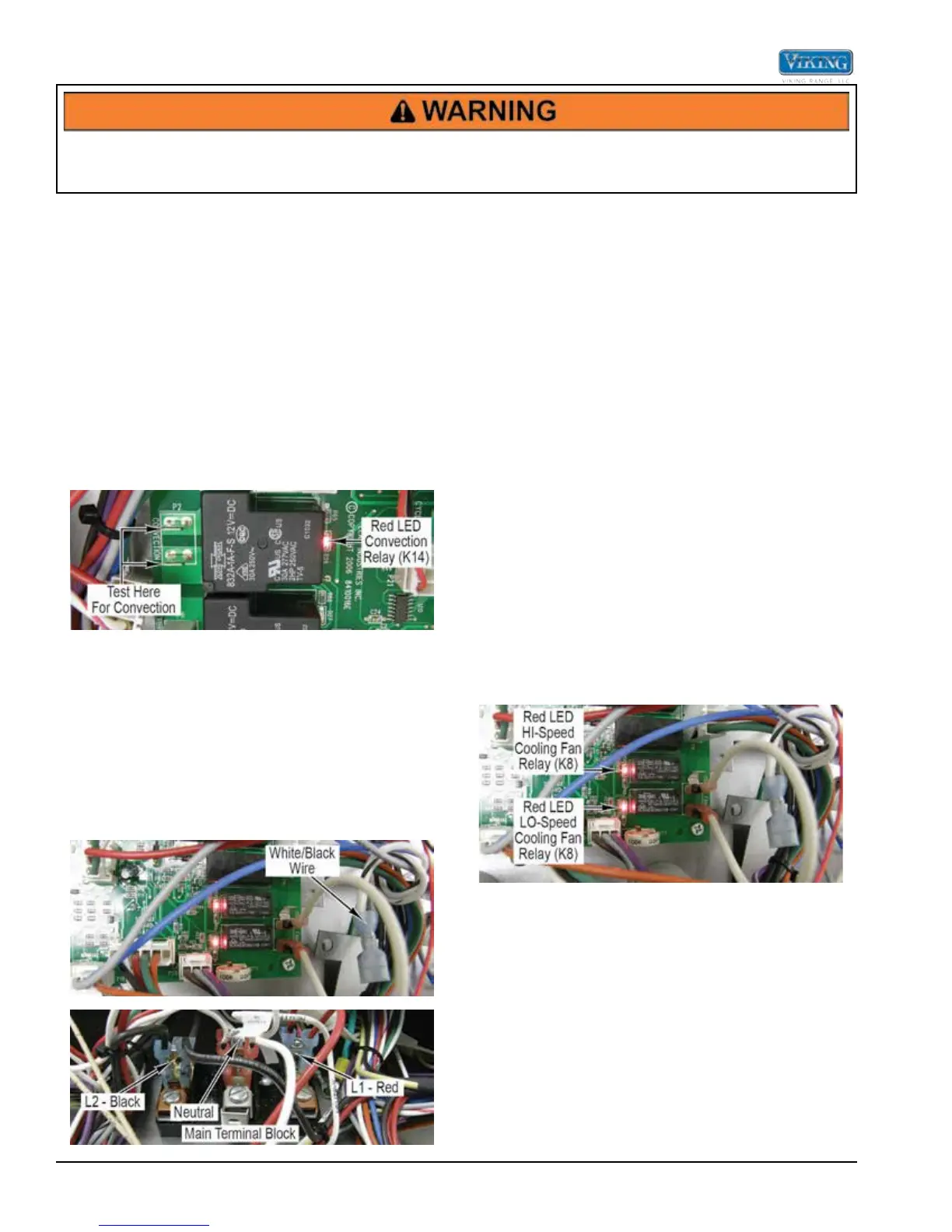
Convection Relay
When the convection element is selected by the oven
control board, 12 VDC is sent to the convection relay
coils. A red LED in front of each coil verifies coil voltage
is being sent to that particular relay. This does not
indicate however that the relay is functioning. When the
convection element relay is energized, (L1-red) power
is sent through the relay to the convection element. (L2
power is controlled by the line break relay.)
To test, select a cooking program. When the convection
relay contact is energized (red LED lit at base of relay),
check for 240 VAC between the yellow wire at the line
break relay and the white wire on P2. If 0 VAC is read,
disconnect power and remove P2 Molex plug.
Reconnect power and using your ohmeter, check for
continuity between the two relay contacts (refer to photo,
above). If you read infinite ohms (∞) when the relay is
energized, this indicates a faulty relay and you will need
to replace the control board. If you read 0 ohms, the
relay contact is closing.
Cooling Fan
Locate the P11 terminal connections on the control
board. The P11 connections will have a terminal
containing a white/black wire.
With the white/black wire removed from the P11 board
connection, use an ohmeter to measure resistance
between the white/black wire and neutral on the terminal
block. The resistance should be approximately 18 ohms
(single ovens) or 9 ohms (double ovens). If no resistance
is read, remove fan to repair/replace (Follow the cooling
fan disassembly procedure).
With the white/black wire attached to the P11 board
connection, use a voltmeter to measure voltage between
the white/black wires on the board and neutral on the
terminal block. The voltage should be 120 VAC. If 120
VAC is present and no fan rotation, replace the cooling
fan (follow cooling fan disassembly procedure). If no
voltage is present, verify wiring. If wiring is OK, replace
the oven control board.
Cooling Fan Relay
The oven control board is designed to operate a two-
speed cooling motor. The oven utilizes a one-speed
motor so both the HI and LO speeds are jumped
together on the board. On initial startup, the oven control
board selects the fan power relay (K8) and the LO speed
(K9). When the oven temp reaches 250˚F temp, the
board will switch the speed relay to HI. However, both
are jumped together so this change is not noticed. If a
fan error is shown, proceed with the test shown below.
When the unit is switched ON, 12 VDC is sent to both
relay coils. A red LED in front of each coil verifies coil
voltage is being sent to that particular relay. This does
not indicate however that the relays are functioning.
To test, connect power. With your meter set for AC
voltage, check between neutral and the white/black
wires (refer to photo below). The reading should be 120
VAC. If 0 volts are shown and the red LED is lit, then the
oven control board is defective.


 To Next Page