Disassembly
©2013 Viking Preferred Service 39
To avoid risk of electrical shock, personal injury, or death, disconnect electrical power source to unit, unless test
procedures require power to be connected. Discharge capacitor through a resistor before attempting to service.
Ensure all ground wires are connected before certifying unit as repaired and/or operational.
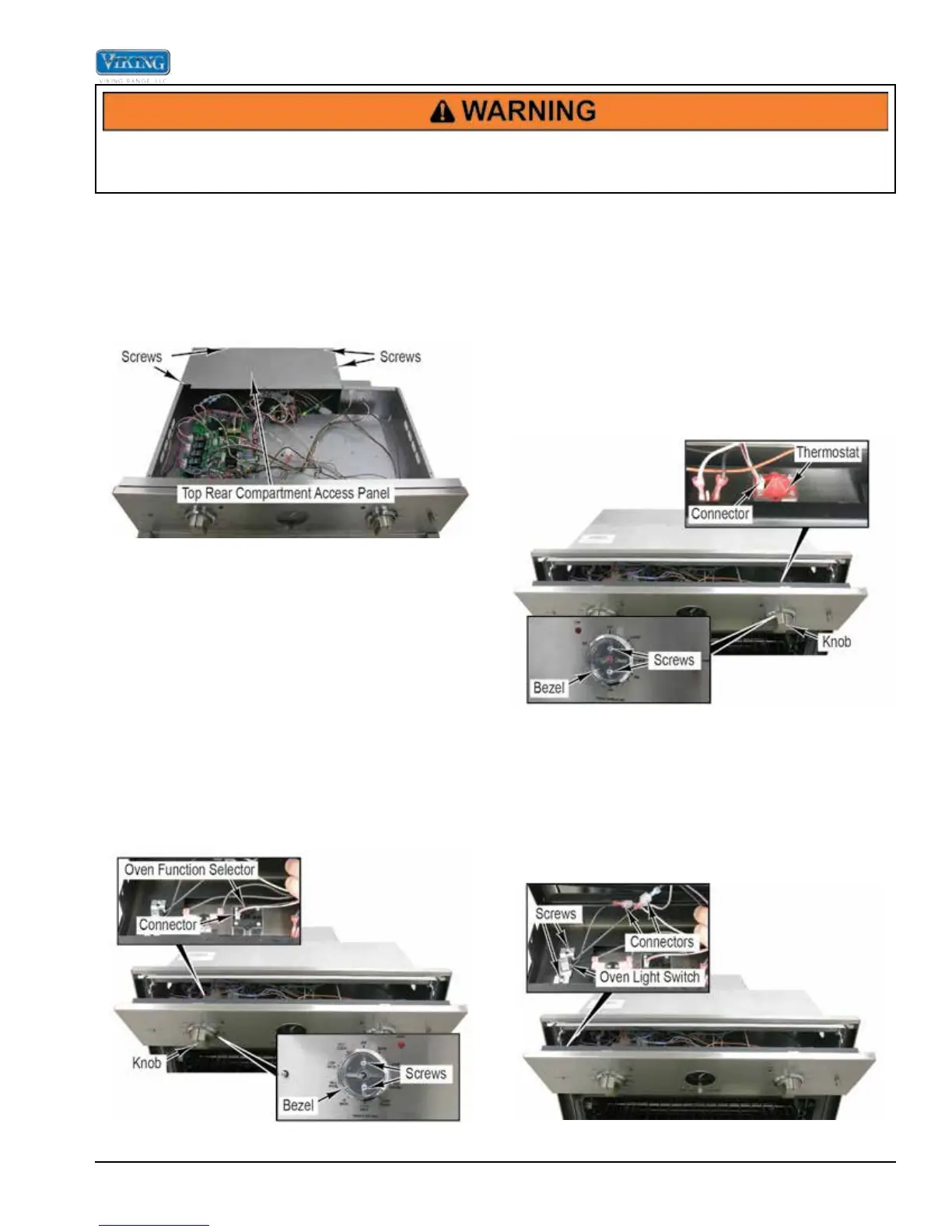
Complete Control Board Area Access
1. Completely remove the oven from the installation
(see Complete Oven Removal).
2. Remove front component access panel (see Partial
Control Board Area Access).
3. Remove four screws and the top rear component
access panel.
4. Reverse procedure for installation.
Oven Function Selector Removal
The Oven Function Selector is located on the control
panel. It is used to select the oven function (i.e., Bake,
Broil, and TruConvec, etc). It is a potentiometer and
has a black cover on the rear to distinguish it from the
thermostat which has a red cover.
1. Access the control panel area (see Control Panel
Access).
2. With the knob in the off position, remove the knob
from the oven function selector.
3. Remove two screws, bezel, and the oven function
selector from the control panel.
4. Disconnect connector from the oven function
selector.
5. Reverse procedure for installation.
Oven Thermostat Removal
The Oven Thermostat is located on the control panel. It
is used to set the oven temperature. It is a potentiometer
and has a red cover on the rear to distinguish it from the
oven function selector which has a black cover.
1. Access the control panel area (see Control Panel
Access).
2. With the knob in the off position, remove the knob
from the thermostat.
3. Remove two screws, bezel, and the thermostat from
the control panel.
4. Disconnect connector from the thermostat.
5. Reverse procedure for installation.
Oven Light Switch Removal
The Oven Light Switch is located on the control panel. It
is used to turn the oven lights on or off.
1. Access the control panel area (see Control Panel
Access).
2. Disconnect the light switch wires at the connectors.
3. Remove screws and light switch from control panel.
4. Reverse procedure for installation.


 To Next Page