General Information
©2013 Viking Preferred Service 9
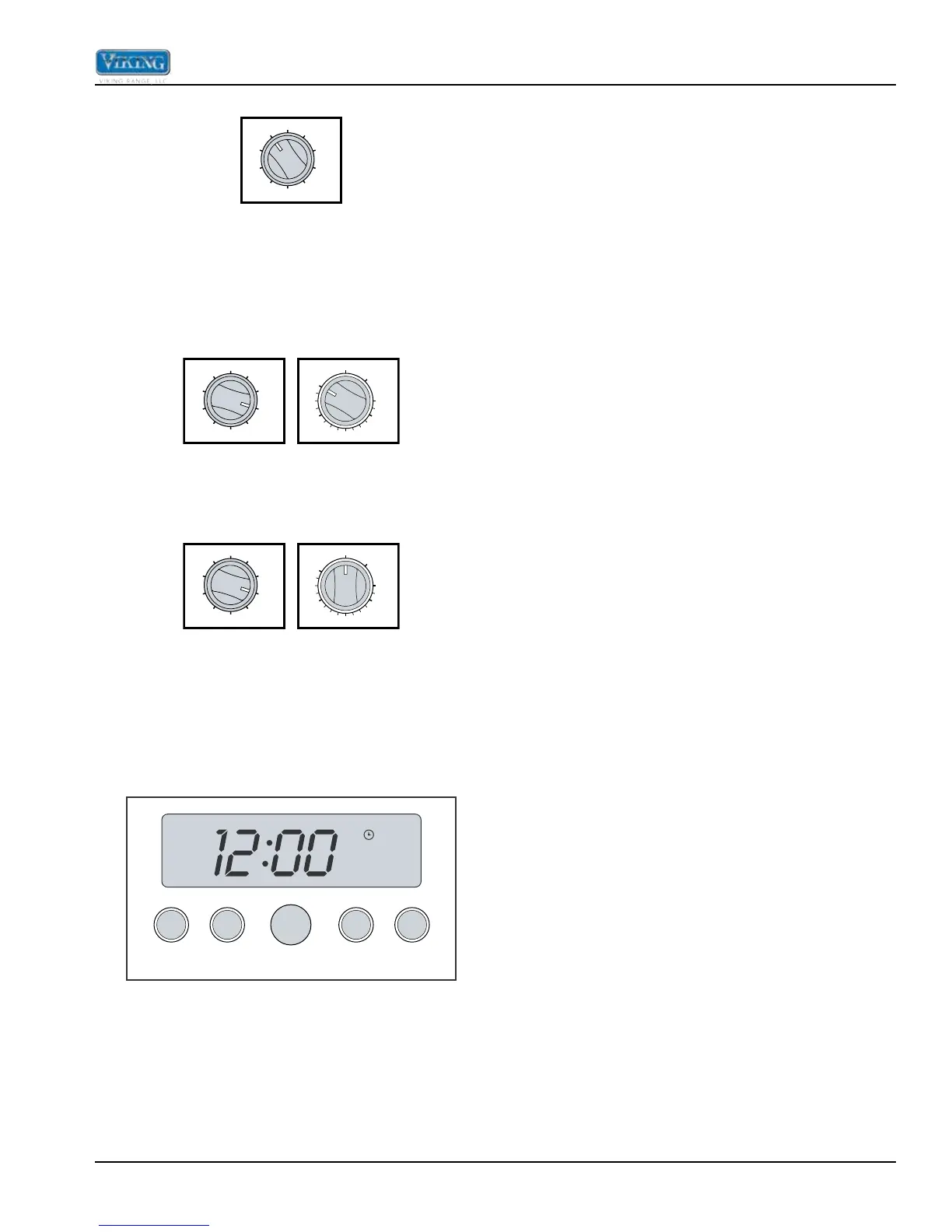
Self-Clean
SELF
CLEAN
LOW
BROIL
MED
BROIL
HI
BROIL
CONV.
BROIL
CONV.
ROAST
TRU
CONVEC
CONV.
BAKE
BAKE
OFF
During the self-clean cycle, the oven reaches elevated
temperatures using the broil and bake elements. The
broil elements use approximately 240V and remain
on during the self-clean cycle. The bake elements use
approximately 240V and cycle on for a few seconds at
various times during the cleaning process.
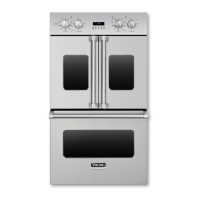
Convection Dehydrate
SELF
CLEAN
LOW
BROIL
MED
BROIL
HI
BROIL
CONV.
BROIL
CONV.
ROAST
TRU
CONVEC
CONV.
BAKE
BAKE
OFF
200
300
400
500
BROIL
CLEAN
OFF
With the selector set to TruConvec and the temperature
control on 200°F, warm air is circulated by the convection
fan.
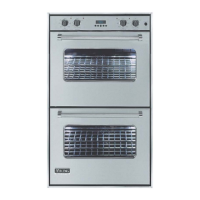
Convection Defrost
SELF
CLEAN
LOW
BROIL
MED
BROIL
HI
BROIL
CONV.
BROIL
CONV.
ROAST
TRU
CONVEC
CONV.
BAKE
BAKE
OFF
200
300
400
500
BROIL
CLEAN
OFF
Only the convection fan operates. No elements are on.
The convection fan cycles on in one direction for a time,
cycles off, and then cycles on in the opposite direction.
This cycle then repeats.
Clocks and Timers (Digital Display)
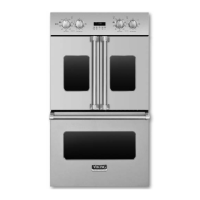
Electronic Timing Center Digital Display (Select
Models)
SET
CLOCK MIN/SEC
TIMER
SET
BAKE
TIME
START
TIME
The Electronic Timing Center is used to program and
control all timing functions. It has five display and
programming modes that are activated by the four
push buttons and the “SET” knob. Both the Bake Hours
mode and the Min/Sec Timer mode can be used to time
cooking periods. These features can even be used at
the same time when both ovens are in use. However,
only Bake Hours and Self-Cleaning modes shut the oven
off automatically when the timed program is over. For
example, you can time bake a casserole in the upper
oven using the Bake Hours mode, while broiling in the
lower oven using the Min/Sec Timer. One oven can also
be cleaned while timing foods in the other oven using the
Min/Sec Timer.
Setting the Min/Sec Timer
The Min/Sec Timer is designed for accurate timing and is
ideal for baking delicate items such as biscuits, cookies,
and popovers, and for precise broiling. The Min/Sec
Timer can be used at the same time the Bake Hours
or Start Time functions are in use. It can be used for
timing up to 24 hours. When setting the timer, the time
displayed will increase in 1 minute increments. When
the timer counts down to 1 minute, the timer alarm will
give two short beeps and the display changes from
hours:minutes to seconds only.
To program the Min/Sec Timer
1. Press the “MIN/SEC TIMER” button. The timer will
display :00 and the word TIMER will be displayed in
the lower right corner.
2. Turn the “SET” knob until the desired duration time is
displayed.
The Min/Sec Timer is now programmed. The alarm will
sound at the end of the countdown. The program can be
cancelled anytime by setting the remaining time to :00.
To change back to the time-ofday, press the “CLOCK”
button. Notice that a small clock will be displayed in
the upper right corner to indicate that a program is in
progress. The display will return automatically to the Min/
Sec Timer after a few seconds.
Timer Alarm
At the end of a Min/Sec Timer program or Bake
Hours program, the alarm will consist of three beeps
followed by two beeps every 10 seconds until the “MIN/
SEC TIMER” button is pressed. Whenever a valid
function key is pressed or when a control function
starts automatically, one beep will be sounded. When
an invalid function key is pressed, two beeps will be
sounded.
Setting the Automatic Start Time Bake Program
The Bake Hours and Start Time modes of the timer can
be used to automatically turn the oven on and off at a
preselected time. The Automatic Time Bake program is
ideal for foods with no danger of spoilage during the time
the oven is left off.
To Set The Automatic Time Bake Program:
1. Set the start time:
A) For Single Ovens – Program the start time by
pressing the “START TIME” button and turning the
“SET” knob until the desired start time is displayed.
This is the time of day you want the food to begin
cooking.


 To Next Page