PAGE 10
© 2014 OJ Electronics A/S
Auto Operation
The system will operate in auto operation unless you choose to override the
scheduled events.
During auto operation, the temperature is controlled automatically according to the
programmed heating schedule – see “Heating Schedule”.
During auto operation, “Manual” and “Comfort” modes are accessible from the
home screen.
The function of the buttons and symbols shown on the home screen varies
according to the chosen operating mode.
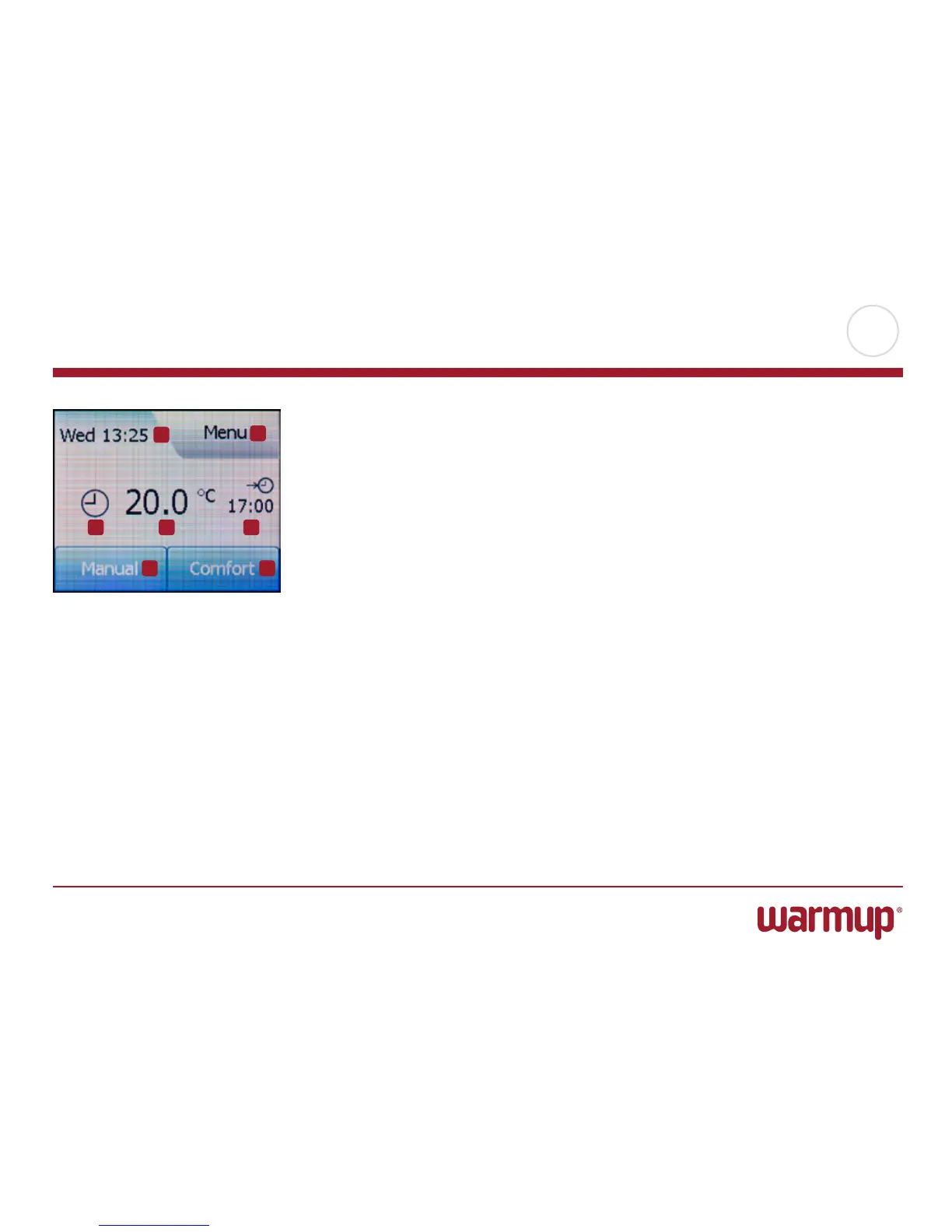
Auto Operation:
1. Day and time info.
2. Tap here to access the menus.
3. Symbol showing current operating mode (clock = Auto Operation).
4. Current target/setpoint temperature (if shown in red, heating is being provided).
5. Time of next scheduled event change.
6. Tap here to access manual override.
7. Tap here to access temporary comfort modes (Comfort and Boost)
1
2
3 4 5
6 7



 To Next Page