PAGE 12
© 2014 OJ Electronics A/S
Comfort Mode
You can use comfort mode on special occasions when you want to extend an event
during auto operation e.g. for a party or when you want to stay up late.
You can manually set a comfort temperature and the thermostat will then maintain
this temperature for a chosen period of time - from 1 to 23 hours.
1. From the Auto Operation home screen - tap the “Comfort” button to access the
comfort menu.
2. Choose “Comfort”.
3. Tap “√” to confirm that you wish to override the auto heating schedule.
4. Use the “Up Arrow” or “Down Arrow” button to select the required temperature.
Confirm with “OK”.
5. Use the “Up Arrow” or “Down Arrow” button to set the required duration of com-
fort mode. Confirm with “ OK”.
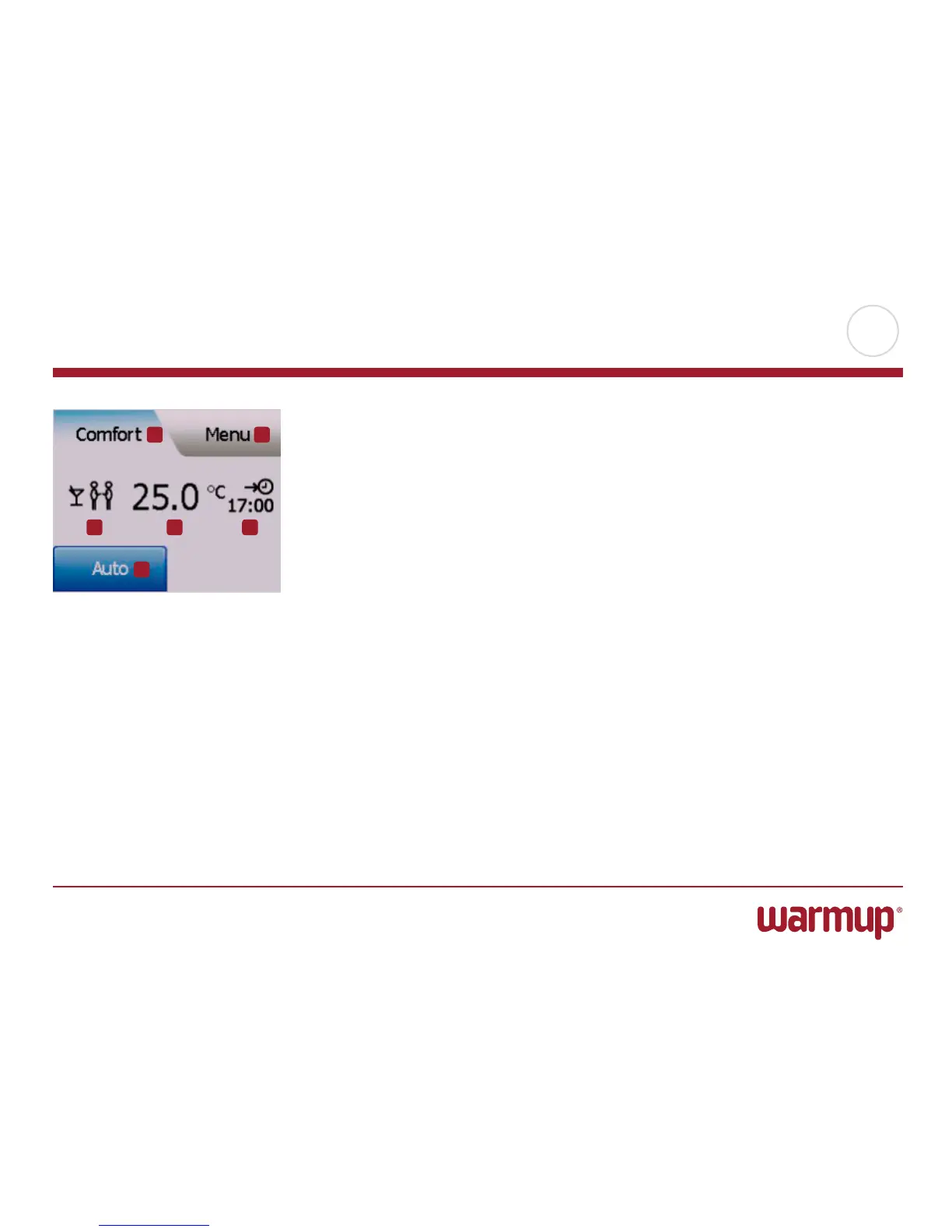
While in comfort mode an “Auto” button is shown on the home screen. Press this
button to return the thermostat to auto operation.
The function of the buttons and symbols shown on the home screen varies according
to the chosen operating mode. Comfort Mode:
1. Indication of comfort mode.
2. Tap here to access the menus.
3. Symbol showing current operating mode (party = Comfort Mode).
4. Current target/setpoint temperature (if shown in red, heating is being provided).
5. The time at which the thermostat will return to auto operation.
6. Tap here to return to auto operation.
1 2
3 4 5
6



 To Next Page