PAGE 11
© 2014 OJ Electronics A/S
Manual Override
Manual override allows you to disable auto operation and maintain a specified tem-
perature around the clock.
1. From the Auto Operation home screen - tap the “Manual” button to access
manual override. You have now overridden the programmed event schedule.
Manual override will continue until the thermostat is manually changed back to
auto operation.
2. Use the “Up Arrow” or “Down Arrow” button to select the required temperature.
Then simply leave the thermostat as it is.
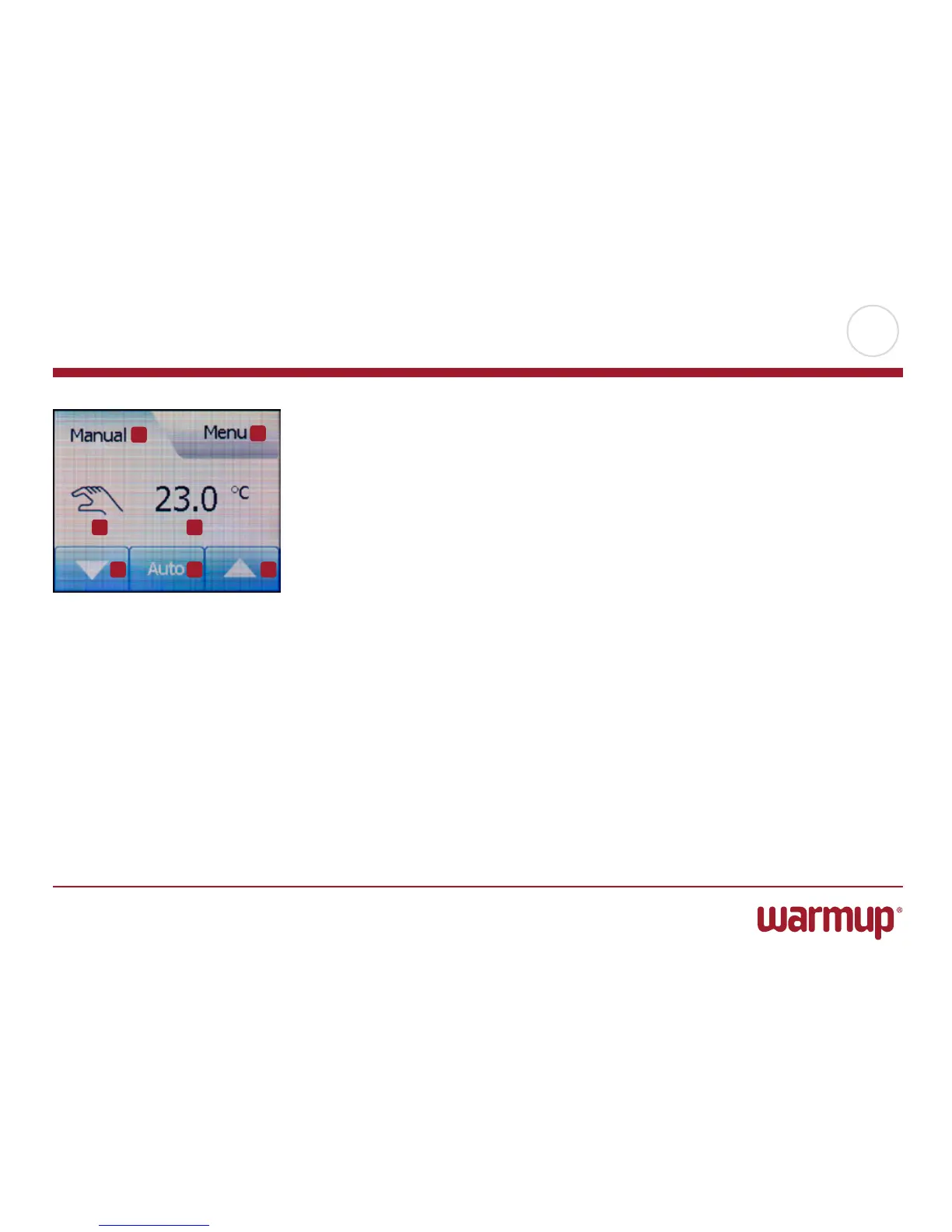
While in manual override an “Auto” button is shown between the arrow buttons on
the home screen. Press this button to return the thermostat to auto operation.
The function of the buttons and symbols shown on the home screen varies accord-
ing to the chosen operating mode.
Manual Override:
1. Indication of manual override.
2. Tap here to access the menus.
3. Symbol showing current operating mode (hand = Manual Override).
4. Current target/setpoint temperature (if shown in red, heating is being provided).
5. Tap here to decrease the target/setpoint temperature.
6. Tap here to return to auto operation.
7. Tap here to increase the target/setpoint temperature.
1
2
3 4
5 6 7



 To Next Page