EasyManua.ls Logo

WAVECONTROL SMP3 - Main Screen

WAVECONTROL SMP3
99 pages
Print Icon
To Next Page IconTo Next Page
To Previous Page IconTo Previous Page
Loading...
User’s Manual Electromagnetic Field Meter SMP3 P. 16
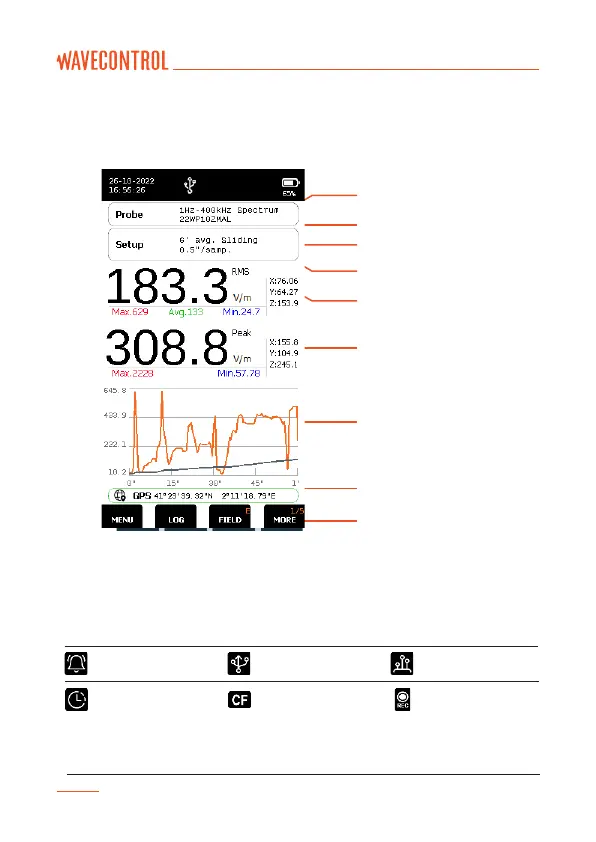
5.2. Main screen
The main screen provides instantaneous and continuous information on the
electromagnetic field being measured.
Battery
Icons
Date and time
Probe information
Measurement information
Field information
(Double value display)
Graph
GPS information
Functions
Figure 8: Main screen
Date and time: date and time of the apparatus.
Icons: the below icons provide information about the unit.
Scheduled
measurement
activated
Correction factors
applied
Logging has started
(Measurement is
ongoing)
Note: CF means the connected field probe internal correction factors are being applied.
Alarm is activated
USB is connected
Fibre connection
available

Related product manuals