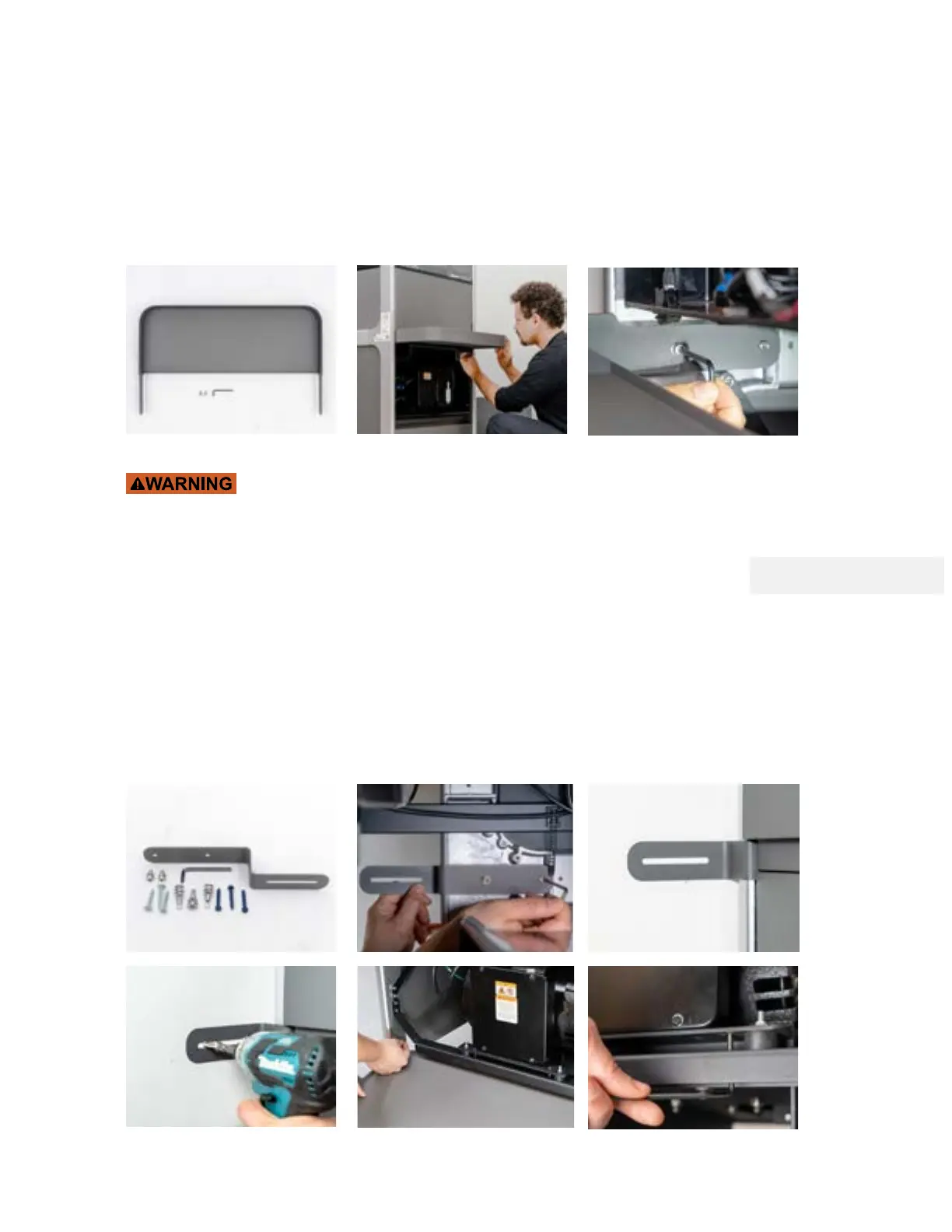
Install the Tool Tray and anchor WAZER Pro to the Wall
Now it is a good time to install the Tool Tray comes with the machine
To install Tool Tray
• Grab the Tool Tray and 2 screws from the box.
• Align the two holes to the set screws on the Cast Knuckles on the Machine, then fasten the
two screws.
Position WAZER Pro into its final location.
Make sure the water hoses and Power Cables are neatly routed behind the
unit. When WAZER Pro is filled with water it will weigh approximately 730 lbs (330kg). To ensure
the safety of the WAZER Pro and its users, WAZER requires you to anchor the machine to a wall or
solid structure with the provided bracket and hardware.
To anchor WAZER:
1. Install the Wall Mount Bracket using the provided hardware. The bracket is installed on the
back-left side of WAZER with a 4 mm Allen key.
2. Move WAZER Pro into position and use the included hardware to anchor the Wall Mount onto
the wall. Wall anchors for both drywall and concrete are provided.
3. Use the 4 mm allen key to remove the 4 bolts holding the Pump Base Plate to the Side Rails.
Running WAZER Pro with transport bolt attached will result in loud noise and vibration to the
whole machine.
Note 4 Pg.17
42



 To Next Page