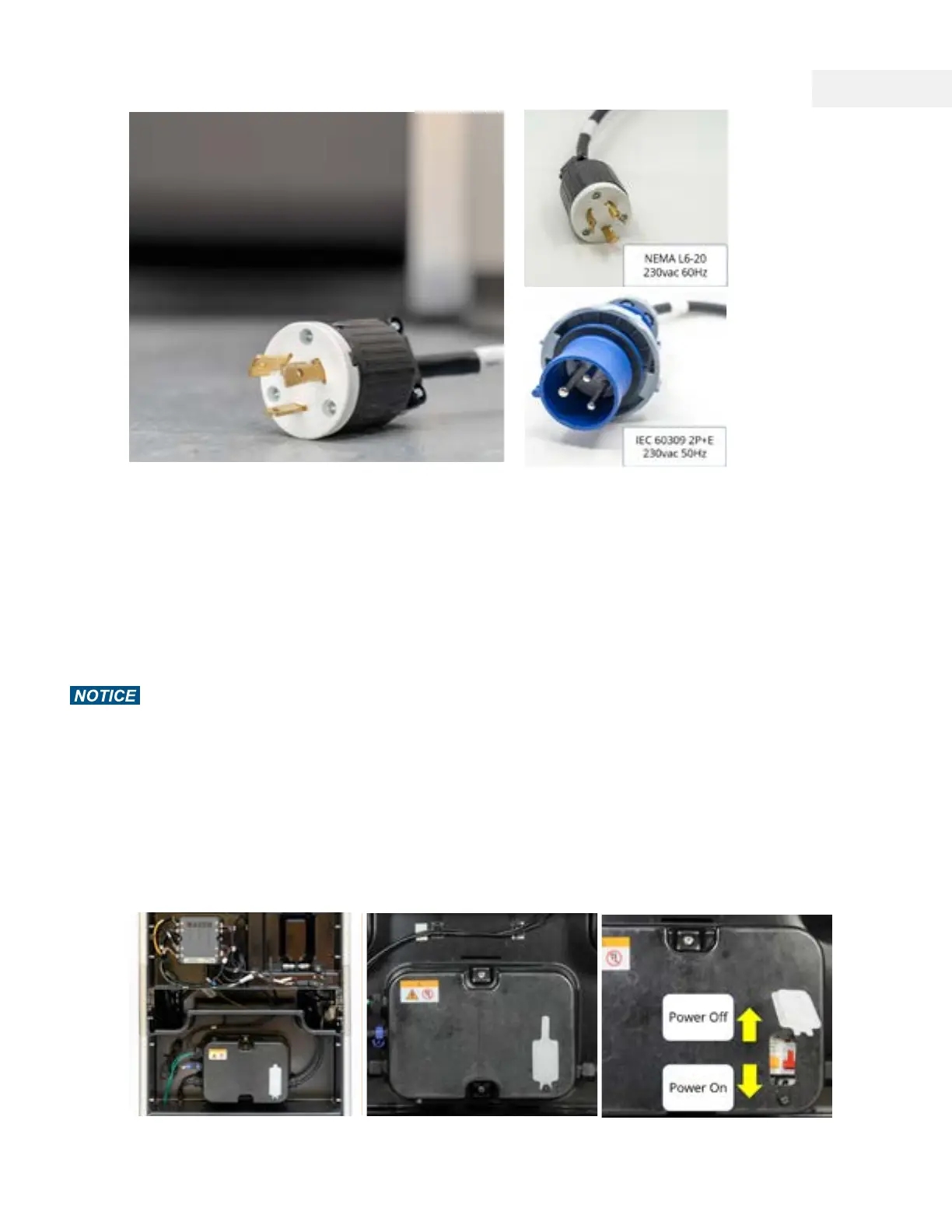
Power Cables
There are one electrical connections you need to make with WAZER Pro:
1. Connect the WAZER Pro Power Cable
• If you have the correct receptacle in your facility, you may simply plug the power cable
into the receptacle. Both the NEMA 6-20 (60Hz) and IEC 60309 (50Hz) Plugs have twist-
lock.
• Flip the lever down on the RCBO/GFCI to engage the breaker. At this point, the machine will
not switch on. A yellow LED indicating "Power" will light up on the controller.
• Test the RCBO function by pressing “test“ button once. There will be a slight "Pop" sound.
• Close the rubber cover back on. We recommended to check this safety function every time
WAZER Pro is turned on.
The plug must be plugged into a matching outlet that is properly installed and grounded in
accordance with all local codes and ordinates.
If power cable is damaged or worn, stop installation or operation IMMEDIATELY. Contact WAZER
support to have it replaced.
Make sure switch is in “off” position before plugging in.
*Please double check to make sure the local power supply t the model you have purchased,
before you plug WAZER Pro in.
Note 7 Pg.19
40



 To Next Page