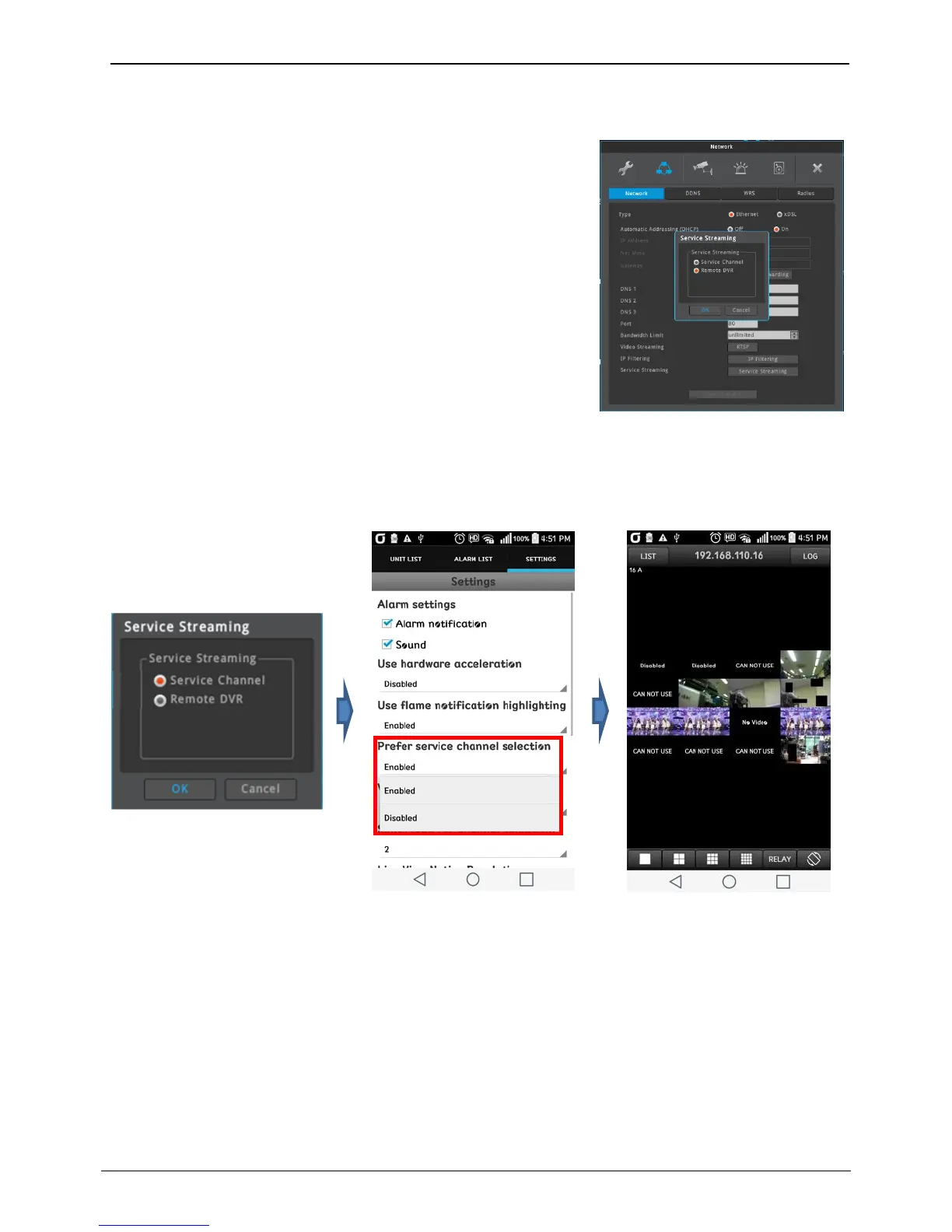
Service streaming (Service Channel/Remote DVR)
User can select ‘Service Channel’ to provide multi channel realtime
monitoring on mobile application or ‘Remote DVR’ to control and
monitor the NVR from remote location.
Service Channel (to be supported)
Each channel can be 30 fps (realtime monitoring) at mobile viewer even
if multi division mode is selected. Please be sure that NVR is set to
‘Service Channel’ and mobile viewer is set to ‘enabled’ for service channel.
1. Go to [Menu – Network – Service Streaming] and select ‘Service
Channel’
2. If Service Streaming setting is changed, reboot is required.
3. Download the mobile viewer from App Store or PlayStore and
install it on your smart phone.
4. Execute mobile viewer and register the unit (NVR).
5. Please enable the service channel on setting tab.
6. Touch the registered unit, then service channel will be displayed when multi-division.
<Caution>
1. The name of mobile viewer is shown in 5 page.
2. Refer [Mobile Application] section to know the unit registration method.
3. Rebooting is required when the setting of service streaming is changed.
4. Service channel is supported from mobile viewer 4.0 or above.



 To Next Page