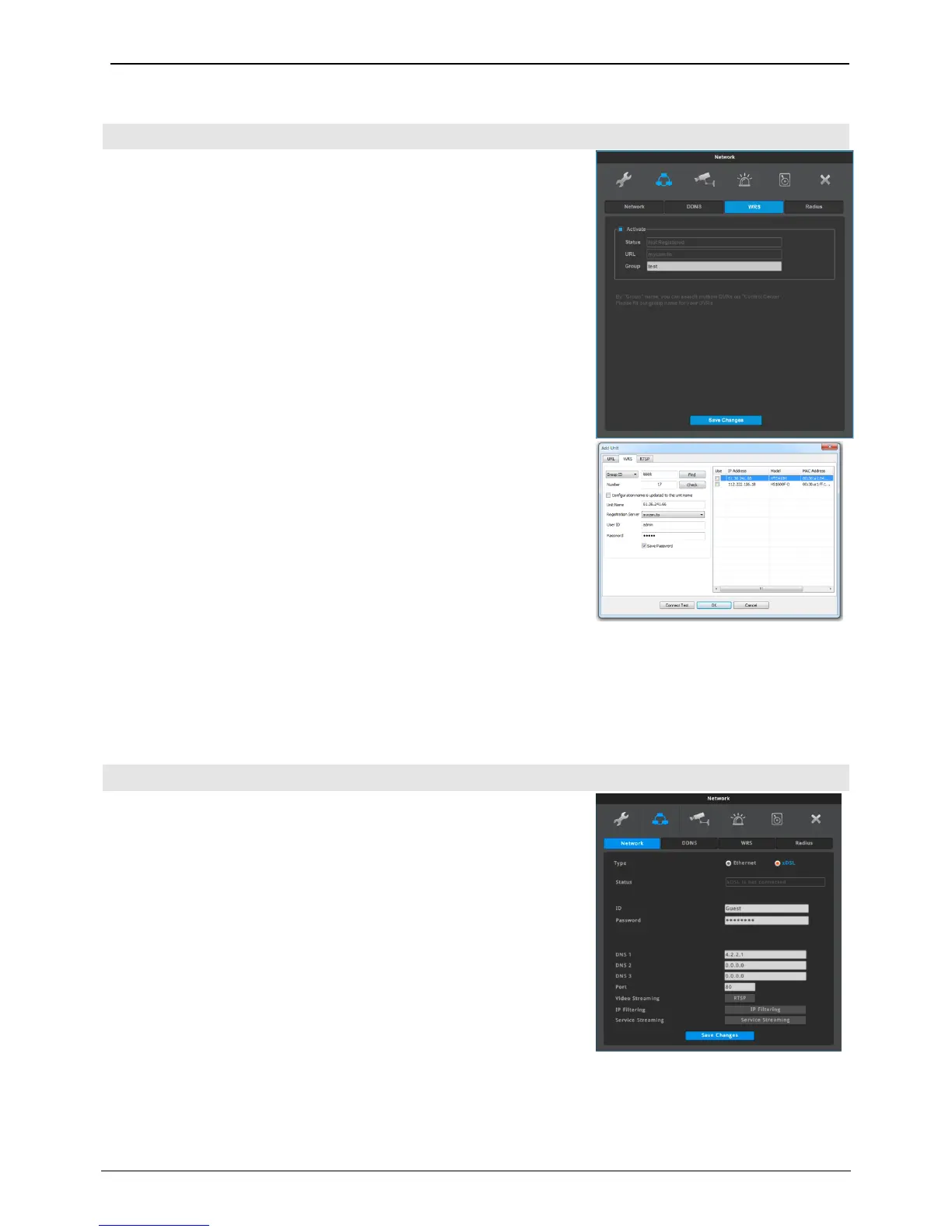
If a NVR is connected to cable modem or xDSL modem, ISP (Internet
Service Provider) may change NVR’s IP address unexpectedly. So, the
user can not get the IP address of the NVR.
If a user register a NVR to WRS server, the user can easily connect
the NVR by using Control Center.
WRS Setting
1. Change NVR’s port which is not in use (e.g. 8000)
2. Configure router’s port forwarding setting. (i.e. port 8000 should be
connected to NVR)
3. Enable WRS service at NVR menu.
4. Enter a Group name (e.g. test)
5. Execute Control Center Monitor program, and execute “Add Unit”.
6. Select “Server [WRS] Search” at this menu.
7. Enter the Group name (e.g. test) into Group name input box, and
execute Search.
8. Find your NVR by checking MAC address or Serial number, and enter
NVR’s account information.
9. You could find the added unit at the tree menu and if you click the
icon, you can get video from the NVR.
Group
Group name must be a specific name.
Even if NVR has dynamic IP address, Control Center can easily connect
the NVR by using the Group name.
Status
It shows WRS registration status of the NVR.
NVR is connected to xDSL line and use PPPoE type, please change
type by xDSL and configure user ID and Password. User ID and
Password should be same as xDSL.
User ID/Passwor
Configure user ID and Password when NVR is connected to xDSL.
Status
It shows connection status of NVR.



 To Next Page