Failsafe mode
MFL is equipped with failsafe ports to connect a redundant additional MFL link.
Failsafe switches in MFL allow RF re-routing if a fault happens (i.e. no power supply, no RF power or no optical
power). All RF and optical signals are then re-routed on the redundant links automatically.
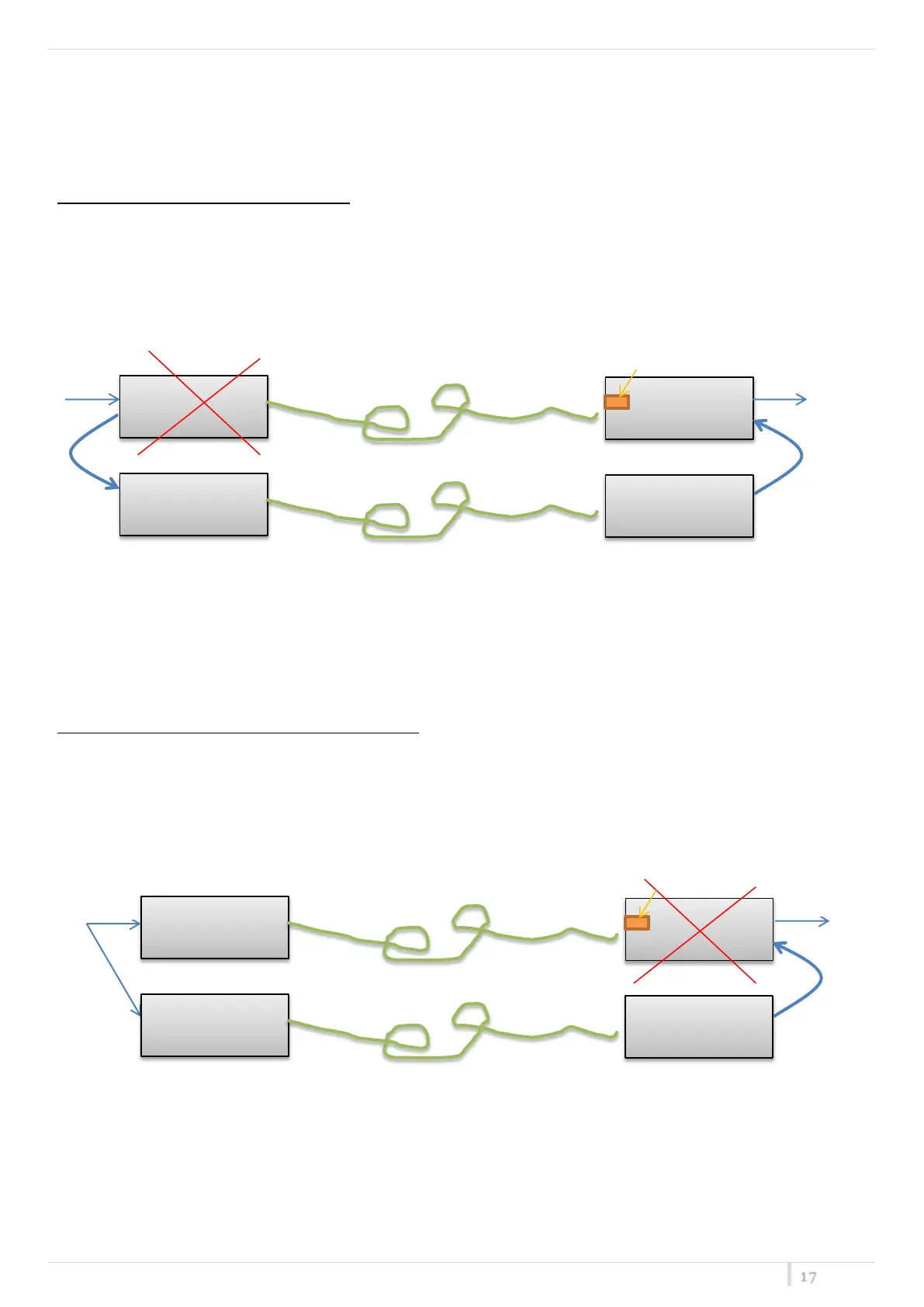
To keep safe the system against PSU fault:
Connect TX module of MFL link2 to failsafe port of TX module Link1.
Connect RX module of MFL link2 to failsafe port of RX module Link1.
If a fault occurs on PSU (power supply unit) of MFL Link1, RF signal in input of MFL link1 is switched automatically to
the failtsafe port as RF input of MFL Link2.
So when RX module of MFL Link1 recognizes that there is no optical power in input, it takes the signal from failsafe
port. Pay attention to enable failsafe on RX module of MFL Link1.
To keep safe the system against fault on RX module:
Split RF signal in input to TX modules of Link1 and Link2.
Connect RX module of MFL link2 to failsafe port of RX module Link1.
Enable failsafe on RX module
Enable failsafe on RX module


 To Next Page