CONFIGURATION EXAMPLES:
IFB TRANSMISSION – MODE: IFB
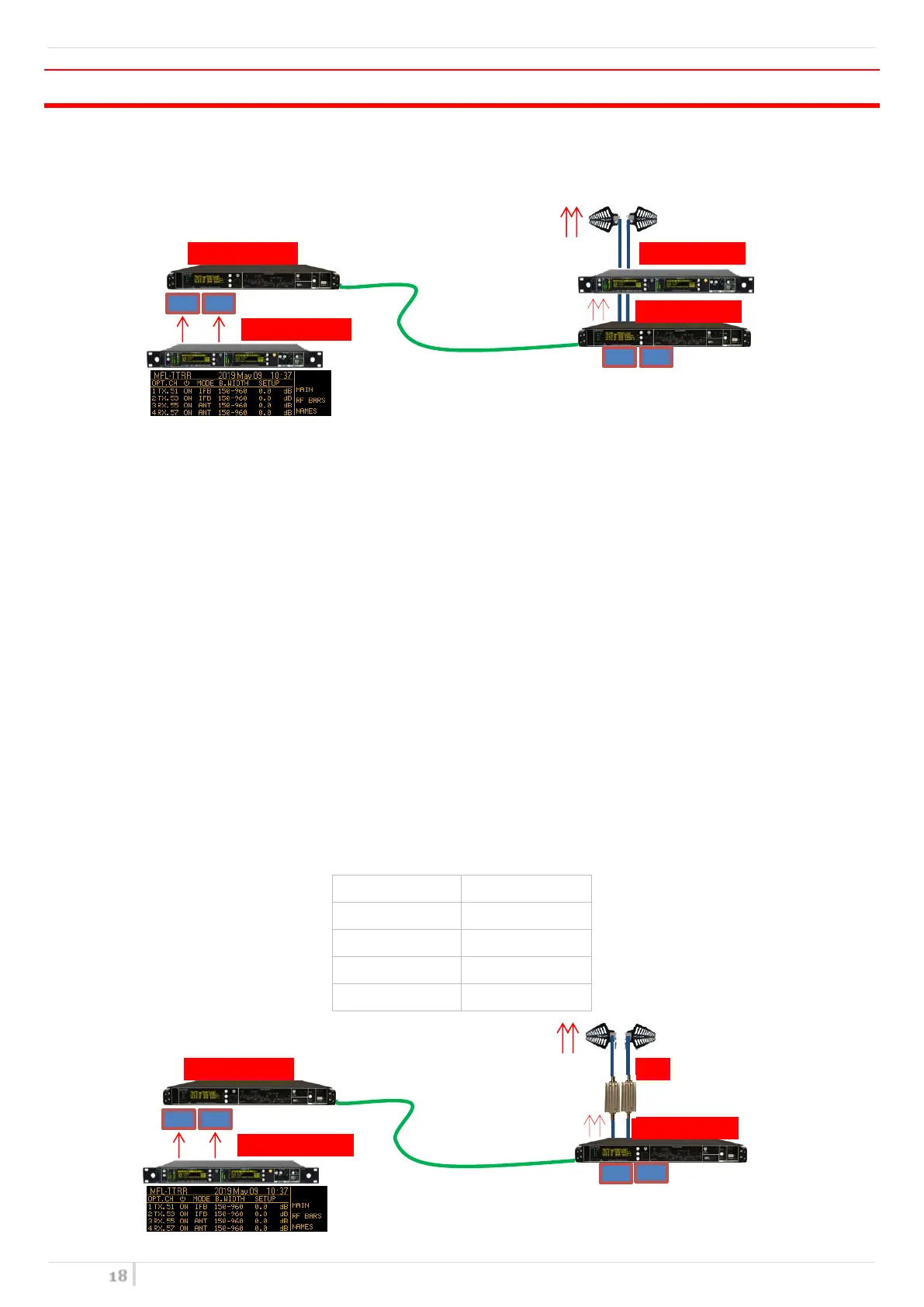
This configuration allows to transmit IFB signals to a remote area.
Above an example of 2 IFB transmission.
In this configuration in the local area each transmitter is connected to a single Tx optical module and the MUX
combines the optical signal in one fiber. In the remote area the DEMUX split the optical signal to 2 RX opt. modules
which convert it into RF. Next, the RF signals are amplified with MTK952 in Slave configuration.
NOTE: Other amplifiers type can be used like PAW, MPA221. Verify if they need DC power and enabled it on the RX
modules.
System setup and configuration:
LOCAL AREA
Connect the 2 transmitters to the 2 TX optical modules (RF input power approx. 0dBm)
Configure the 2 TX opt. modules in MODE IFB, Gain = 0dB
Connect the single mode fiber SC/APC between local MFL and remote MFL
REMOTE AREA
Configure the 2 RX opt. module in MODE IFB, Gain = 0dB
Set RF power on the MTK952 Slave.
If used PAW amplifiers:
o enabled Booster in the “OPT. CHANNEL > Booster” menu
o set the RF Gain using “OPT. CHANNEL > Gain” o “SETUP” menu


 To Next Page