Optical Receiver Module
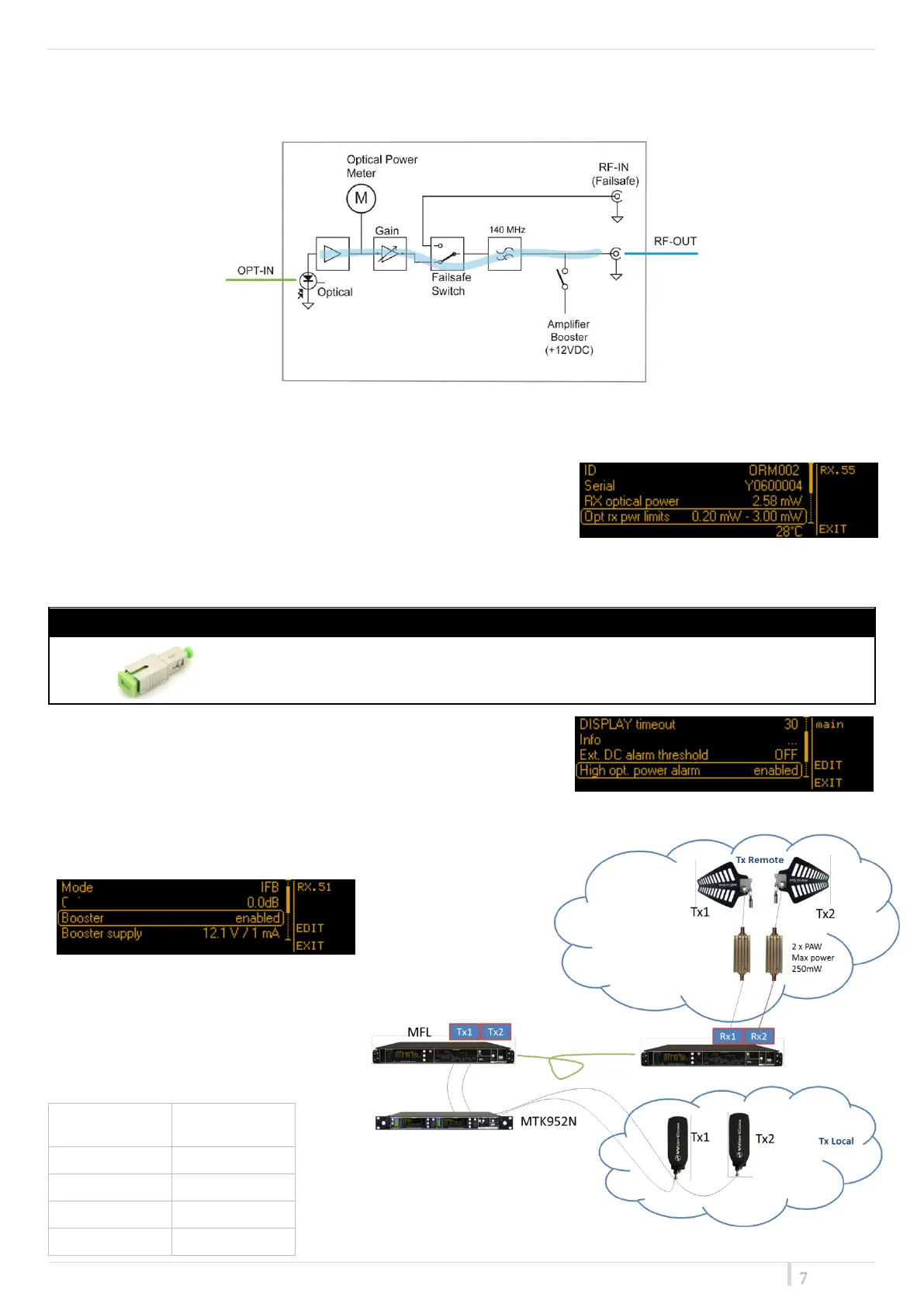
Optical RX module is designed to convert optical signal into RF signal.
The module is equipped with a Optical Power Meter which measures in real time the received optical power.
Receiver module is designed to work in a range approx. 0.3mW ÷ 3mW (-5dBm÷5dBm). Optical power limits of RX
module can be verify in the menu “RX Link > Receiver param”.
It is advisable to work in this range to minimize the noise generated by
the fiber system and reduce intermodulation issue.
An alarm occurs on the display if detected power is out of this range. If the optical power received is too high, we
suggest to add an optical attenuator as show below:
2dB ATTENUATOR SC/APC-SC/APC
By MAIN menu, it is possible to disable the High opt. power alarm. This
parameter is set to enabled as default settings.
Internal RF amplifier allows to adjust gain in 0.5dB steps. Gain range
depends on the hardware revision of the module and configuration set (ANT/IFB/<n>IFB).
In TRANSMITTING IFB mode DC power for
external amplifier can be enabled.
i.e. PAW:
PAW powered by MFL, provides from 10mW to
200mW according to the MFL-RX module gain
setting
Common settings:
P
opt
: 0.3 mW ÷ 3 mW
-5 dBm ÷ 5 dBm


 To Next Page