Alarm List
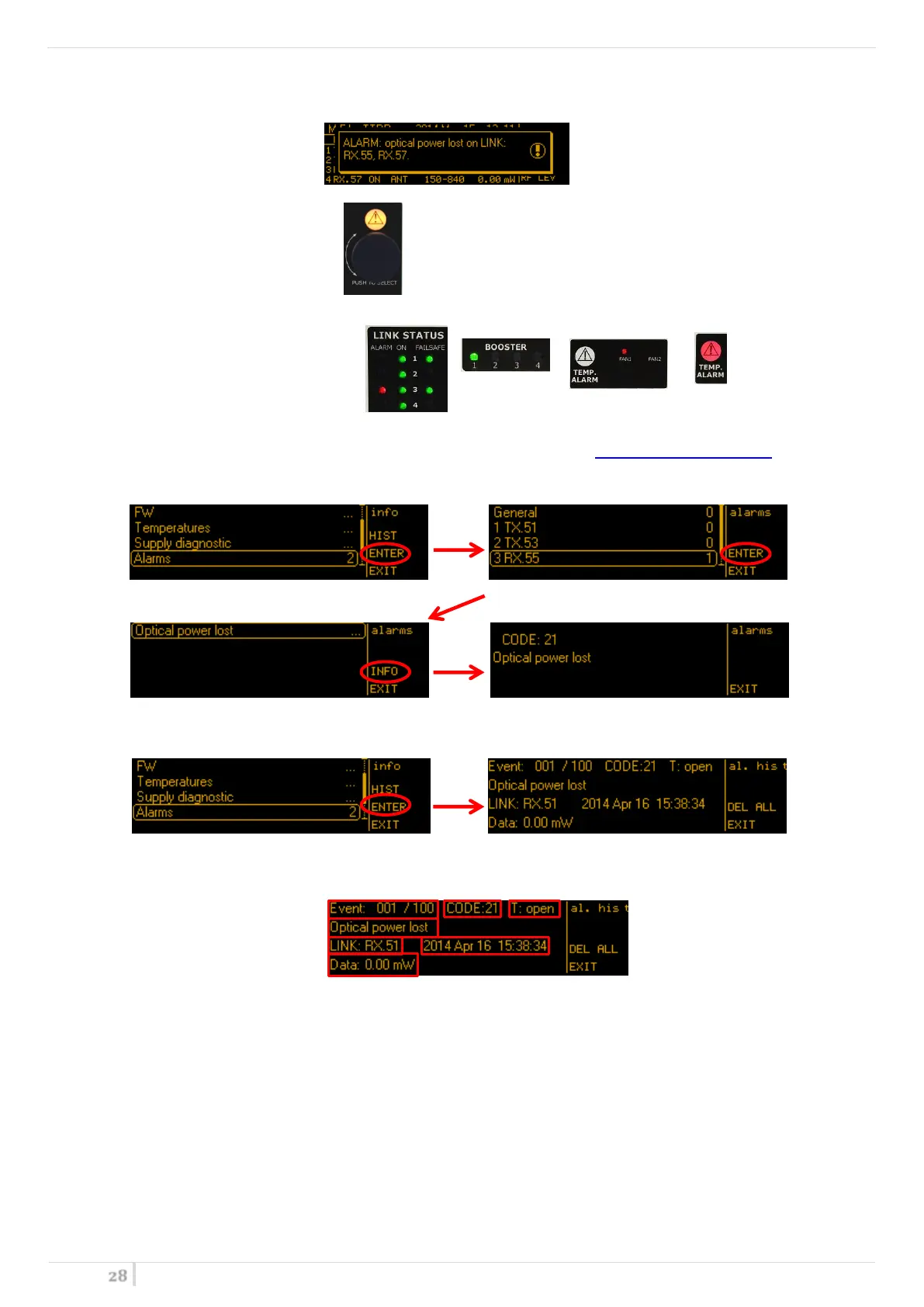
When an alarm occurs, the MFL can show one or more of the following warnings:
A. Show a message on the display
B. Turn on the yellow or red alarm led
C. Light up an auxiliary LED (in some cases)
D. Insert the alarm on the current alarm list and in the “history” alarm list (in MAIN>Info>Alarms menu)
Current alarm list: pushing the rotary knob, it’s possible to enter in the current alarm list where are
displayed the number and type of current alarms in the general apparatus or in each module
History alarm list: pushing the upper right button, it’s possible to enter in the “history” alarm list where
the alarm previously stored is displayed
The informations that are displayed in the history alarm screen are:
1 Progressive number of the alarm
2 Alarm CODE
3 Type of alarm:
- open: when the alarm started
- close: when the alarm stopped
4 Alarm description
5 Where the alarm occurred
6 When the alarm occurred
7 Other informations


 To Next Page