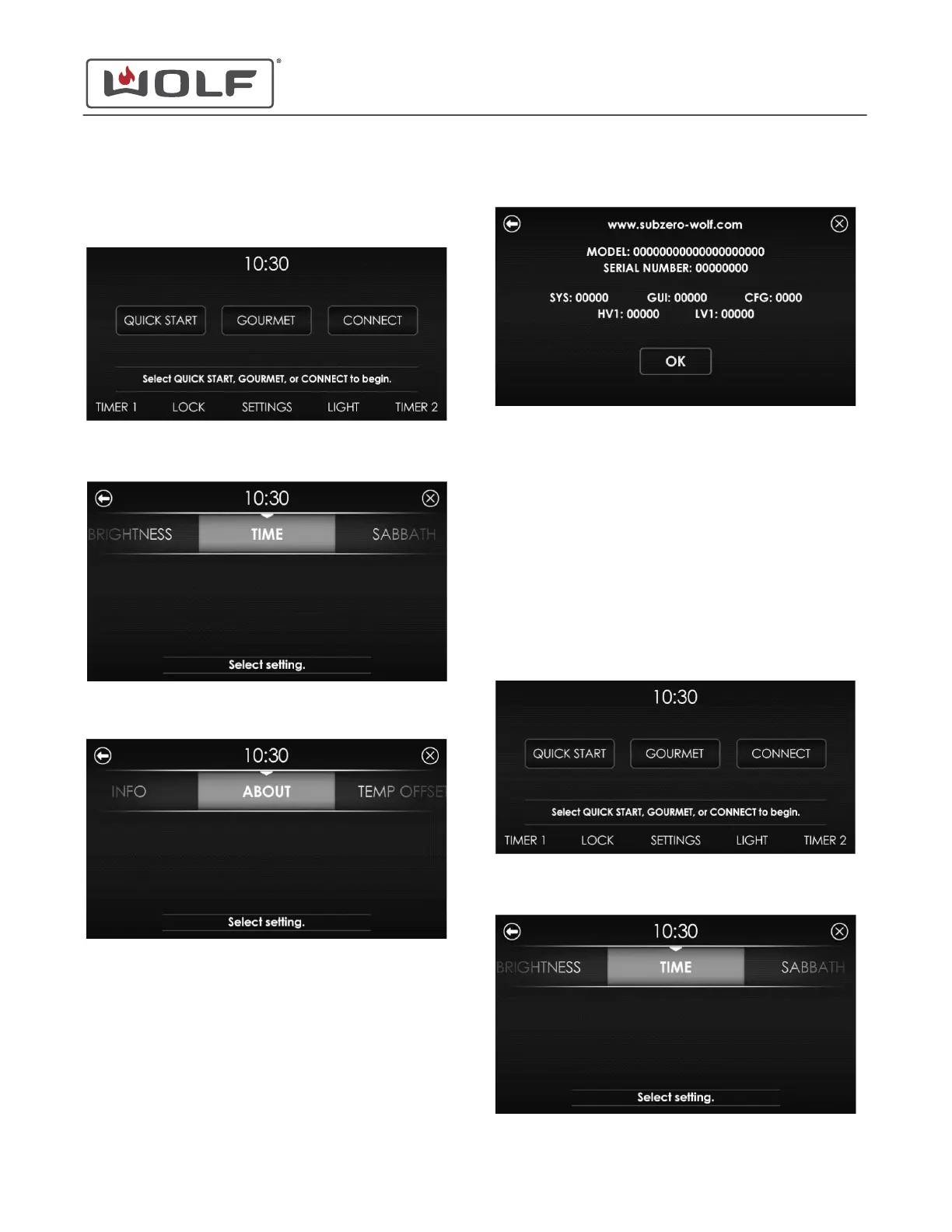
ABOUT (UNIT INFORMATION)
1 Touch the time on the display. The Home screen appears.
2 Touch Settings. The Settings screen appears.
3 Scroll to About on the UIM. Touch About . The About screen
appears.
4
The About screen provides information on the unit.
• Company internet address.
• Unit model number.
• Unit serial number.
• SYS (system) version number.
• GUI (graphic users interface) version number.
• CFG (configuration) version number.
• HV1 (high-voltage 1) version number.
• LV1 (low voltage 1) version number.
ADJUST TEMPERATURE OFFSET
1 Touch the time on the display. The Home screen appears.
2 Touch Settings. The Settings screen appears.
30" and 36" Induction Range
Settings
About (Unit Information) (continued)
service.subzero.com
829191 REVA
13



 To Next Page