L9-S5
M9540Low Profile, WSM
ELECTRICAL SYSTEM
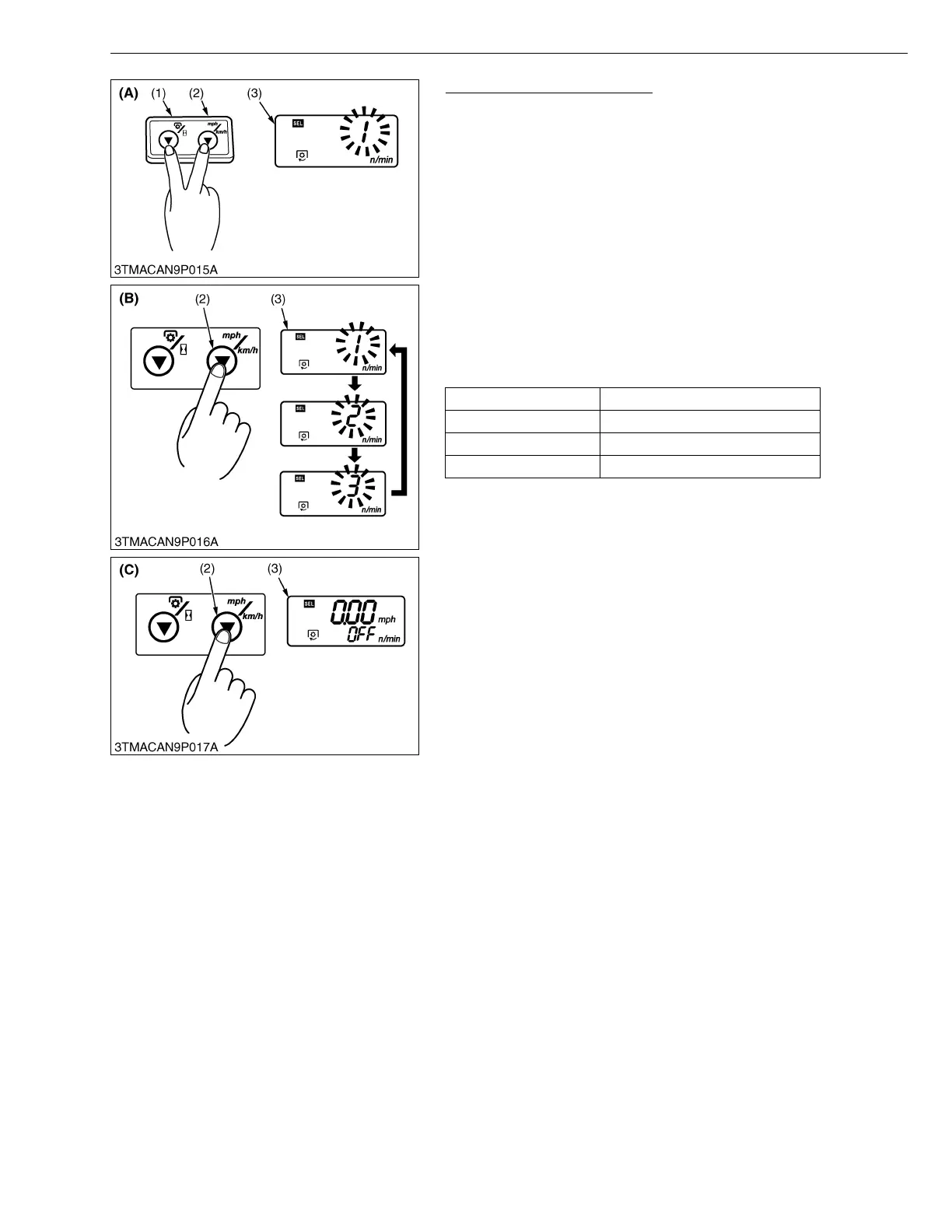
Model Select (Setting Mode)
1. While pressing the PTO/Hour meter select switch (1) and
traveling speed select switch (2), turn the key switch to “ON”
position.
The current numerical code starts flashing.
2. Each time the traveling speed select switch (2) is pressed, the
code changes in order of [1] → [2] → [3] → [1]. Select the
appropriate code according to the table below.
3. Press and hold the traveling speed select switch (2) longer than
2 seconds. The setting is put in memory, and the LCD monitor
(3) goes back to the PTO speed display or hour meter display
mode.
4. Turn the key switch to “OFF” position to exit.
NOTEQ
• The setting will be cancelled if the key switch is turned OFF
halfway in the procedure.
W1023923
Numerical code Tractor model
1 M8540, M9540 (LP)
2 M6040(N), M7040(N), M8540N
3Void
(1) PTO/Hour Meter Select Switch
(2) Traveling Speed Select Switch
(3) LCD Monitor
(A) Procedure to enter model select
mode
(B) Procedure to select numerical
code
(C) Procedure to put in memory
LP : Low Profile Model
N : Narrow Model



 To Next Page