Multi 9420
ba75964e04 04/2015 15
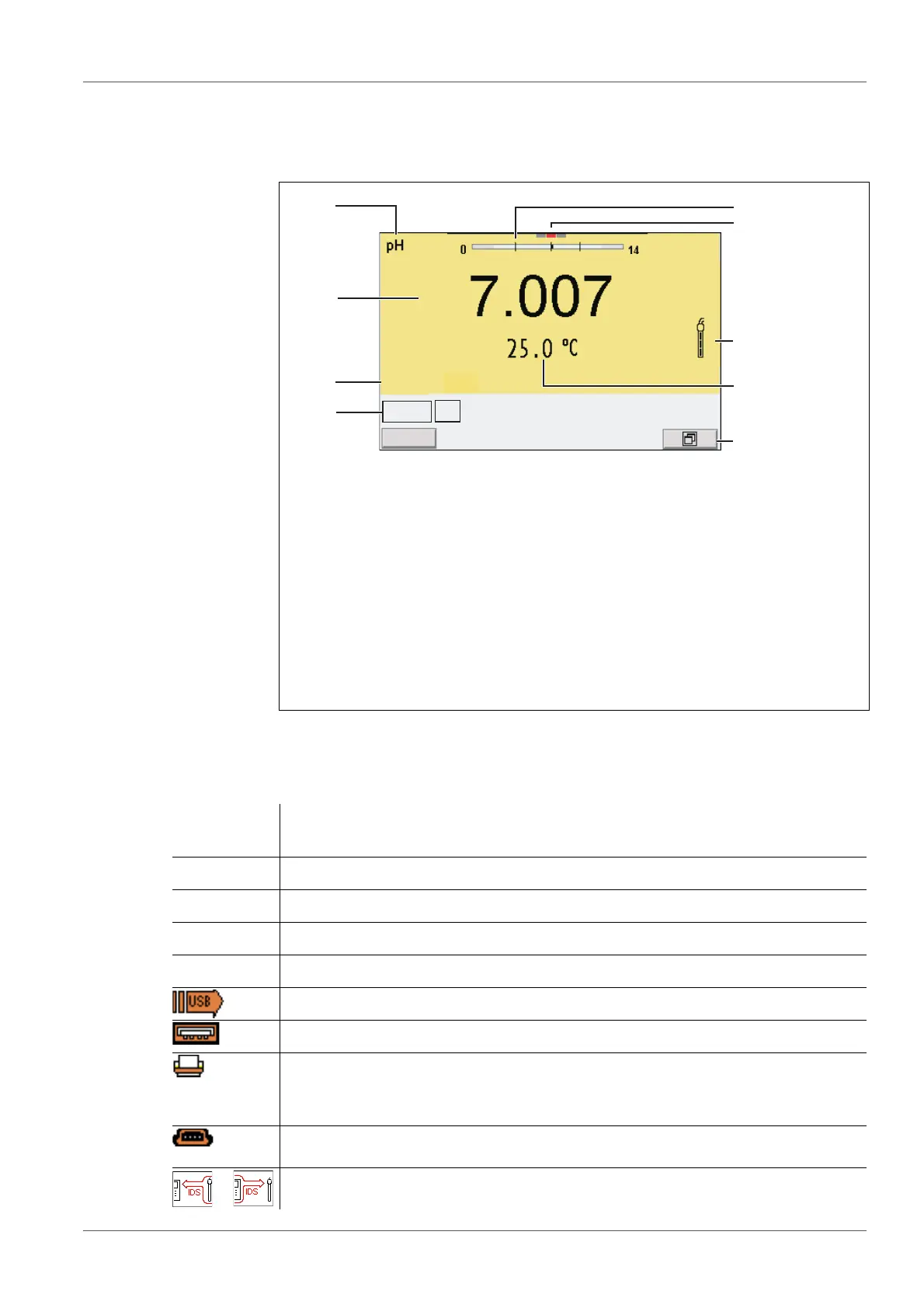
3.4.2 Display
Example (pH):
3.4.3 Status information
1 Status information (meter)
2 Status information (sensor)
3 Measured value
4 Measured parameter
5 Continuous measurement control (CMC function)
6 Channel display: Plug position of the sensor
7 Sensor symbol (calibration evaluation, calibration interval)
8 Measured temperature (with unit)
9 Softkeys and date + time
4
3
2
5
7
8
9
6
1
HOLD AR
AutoCal TEC
AutoCal
e.g. TEC
Calibration with automatic buffer recognition, e.g. with the buffer set: Tech-
nical buffers
ConCal Calibration with any buffers
Error An error occurred during calibration
AR Stability control (AutoRead) is active
HOLD Measured value is frozen (<AR> key)
Data are automatically output to the USB-B interface at intervals
Data are output to the USB-A interface (USB flash drive)
Data are output to the USB-A interface (USB printer). If there is a USB-B
connection at the same time (e.g. to a PC), the data are output to the USB-
B interface only.
Connection to a PC is active (USB-B interface)
Data transfer from/to a IDS sensor is active



 To Next Page