C-5000 Pilot’s Guide
Publication No. 150-041103 Page 9 of 51
Rev. C C-5000 Pilot’s Guide
Nov 2013
Basic Operation
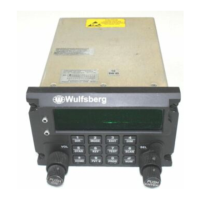
Front Panel & Controls
DISPLAY - The C-5000 has a 2 line display, with 20 characters on each line. It provides the visual
feedback for the system. Exactly what is displayed depends on the current operating mode of the C-
5000. During normal operation, the top line shows information for transceiver #1 and the bottom line
shows information for transceiver #2.
UPPER SOFT key – This key’s use depends on the current operating mode of the C-5000. Some
examples of its use are: increasing the display brightness and selecting radio 1’s guard receiver.
LOWER SOFT key - This key’s use depends on the current operating mode of the C-5000. Some
examples of its use are: decreasing the display brightness and selecting radio 2’s guard receiver.
OUTER VOLUME knob – This rotary switch is used to control the volume of radio 2.
INNER VOLUME knob – This rotary switch is used to control the volume of radio 1.
ON button – This button is used to turn the C-5000 on or off.
CURSOR knob – This rotary switch is used to move the cursor around the display.
VALUE knob – This rotary switch is used to modify values above the cursor.
ENTER button – This button’s use is dependent on the C-5000’s current operating mode, but is primarily
used to finalize data entry operations.
DATA TRANSFER PORT – This serial port is used to transfer data between the C-5000 and the
Wulfsberg Remote Programmer software. While preset channels can be programmed from the front
panel, the best method is to use a PC and the Wulfsberg Remote Programming (RP) software.



 To Next Page
 Loading...