XAG AUSTRALIA
Battery Status
Battery ON/OFF
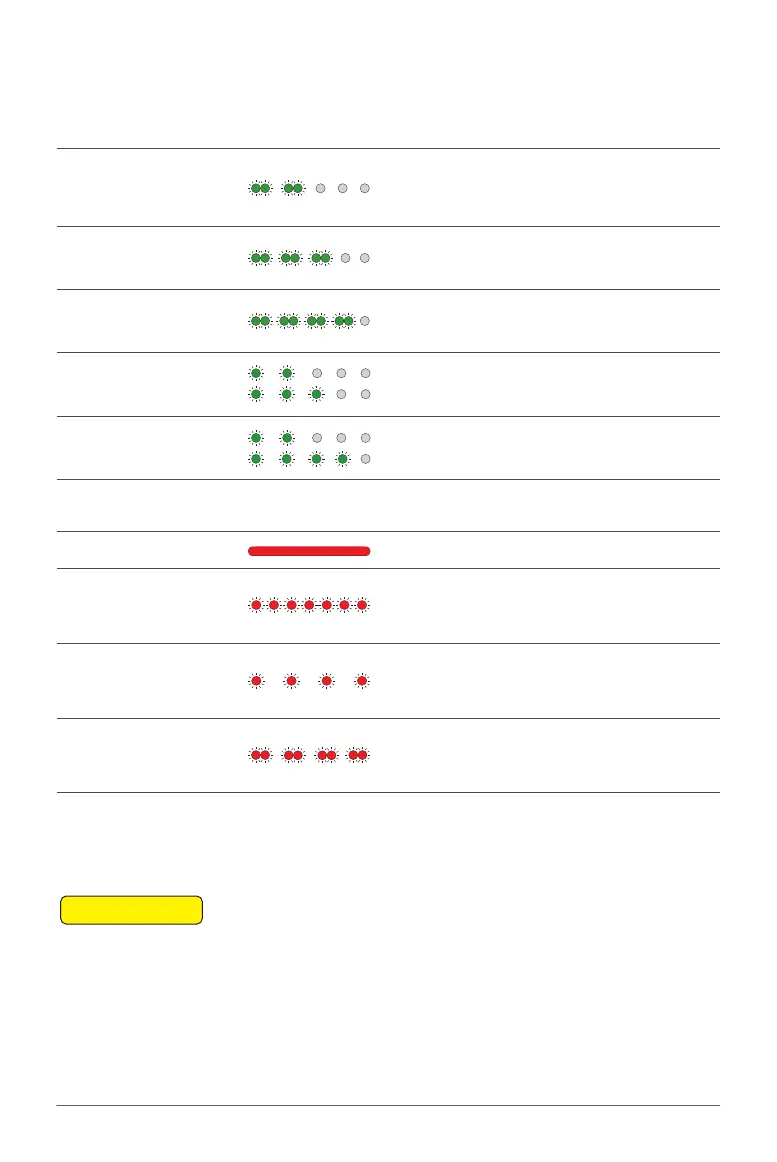
Battery Level Indicator Status Description
2 Green – Double Flash
Battery Locked
(Fault)
Cell Over-discharge / Cell Failure
/ Temperature Failure
Contact After-sales Support to
Unlock
3 Green – Double Flash
Battery Locked
(Remote)
Battery is locked Remotely
Contact After-sales Support to
Unlock
4 Green – Double Flash
Battery Locked
(Anti-Dismantling)
Failed to verify Cell
Contact After-sales Support to
Inspect
2 / 3 Green – Alternate Flash
Overcurrent
Protection
Overcurrent Protection
Contact After-sales Support to
Unlock
2 / 4 Green – Alternate Flash Power Disabled
Dual-Battery Disabled
Similar Battery Level on both
batteries required
Battery Status Indicator Status Description
Red Solid Normal Normal
Red Quick Flash Too HOT
Temperature is too HOT
Charging / Discharging
temporary Disable
Red Slow Flash Too COLD
Temperature is too COLD
Charging / Discharging
temporary Disable
Red Double Flash Anomalous
Over discharge / Cell Failure /
Temperature Failure
Contact After-sales Support
01. When the Battery is OFF, press the Power button once to check the current battery level
indicated by the Battery level LED. If the battery is too low, recharge before use.
02. Connect the battery to a device, then press the Power button once for at least 1 second until
all the indicator lights flashes, then press and hold the power button again for at least 1 second
until you hear a beep from the battery.
03. Repeat Step 02 to turn OFF the Battery.
📖
INSTRUCTION



 To Next Page