XAG AUSTRALIA
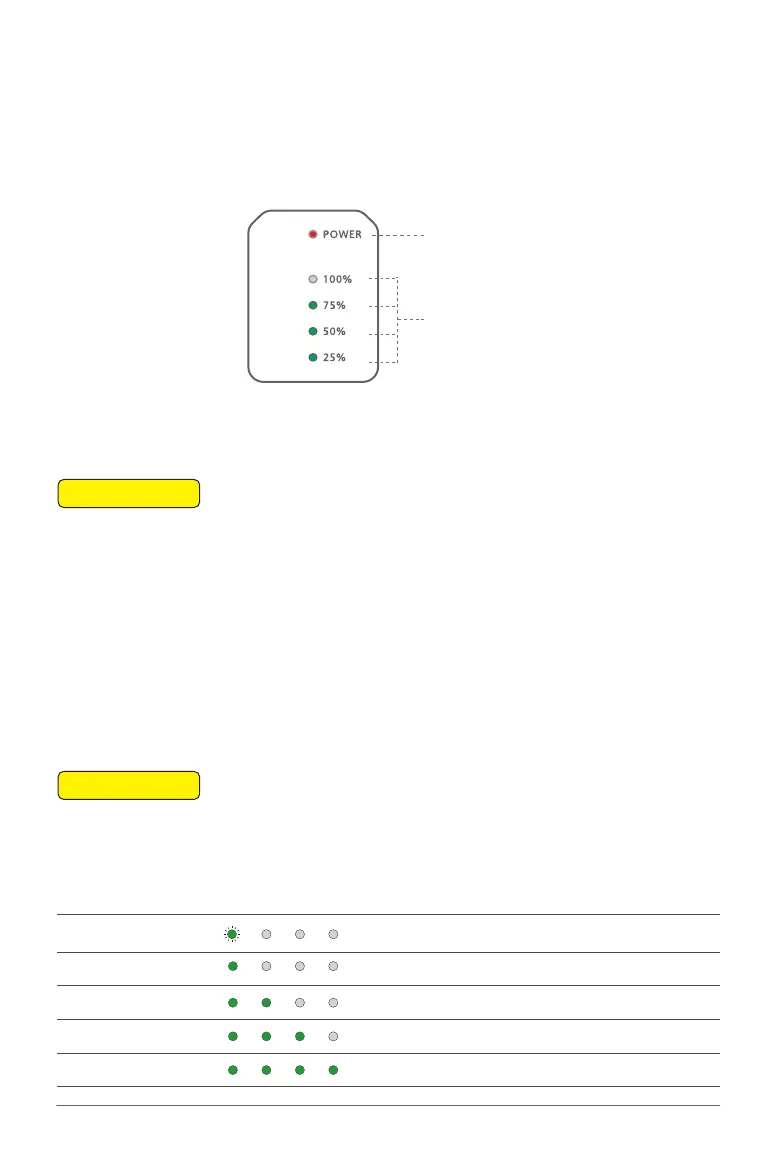
The B4100 Battery Extension Rod has a built-in 7500mAh/14.4V lithium battery. The Extension Rod is
integrated with a battery level/status display panel (see below figure), a power button, and a Type-C
charging port.
The functions of the button/indicator lights are defined as follows:
Status Indicator
(Battery)
Battery Level Indicators
01. When the Battery is OFF, press the Power button once to check the current battery level
indicated by the Battery level LED. If the battery is too low, recharge before use.
02. Connect the battery to a device, then press the Power button once for at least 1 second until
all the indicator lights flashes, then press and hold the power button again for at least 1 second
until you hear a beep from the battery.
03. Repeat Step 02 to turn OFF the Battery.
📖
INSTRUCTION
When the battery is OFF, press the power button once to display the battery level.
When the battery is ON, observe the battery level indicators to see the battery level.
📖
INSTRUCTION
Battery Level Indicator LED Description
1 Green Flash 00 -09 %
1 Solid Green 10 – 24 %
2 Solid Green 25 – 49 %
3 Solid Green 50 – 74 %
4 Solid Green 75 – 100 %
Battery Level
Battery ON/OFF
Battery Extension Rod Console



 To Next Page