77
XAG AUSTRALIA
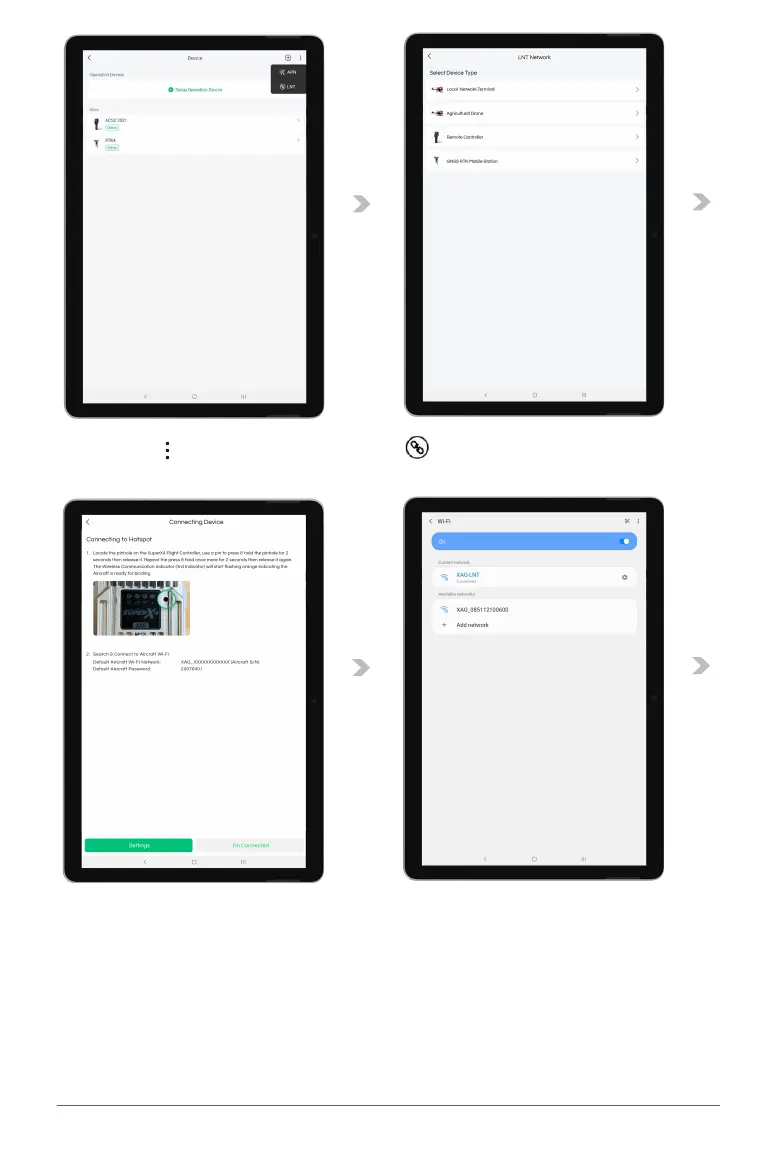
04. Tap on “ ” for more options, then Tap on “ ” for Device Binding.
05. Tap on “Agricultural Drone” to start Binding.
06. Locate the pinhole on the SuperX4 Flight Controller, use a pin to press & hold the pinhole for 2
seconds, then release it. Repeat the press & hold once more for 2 seconds, then release it again.
The Wireless Communication indicator (3rd Indicator) will start flashing orange indicating the
Aircraft is ready for binding.
07. Tap on “Settings” to bring up the Available Wi-Fi List.
08. Select the corresponding Aircraft Wi-Fi.
Default Aircraft Wi-Fi Network: XAG_XXXXXXXXXXXX (Aircraft S/N)
Default Aircraft Password: 20070401



 To Next Page