XAG AUSTRALIA
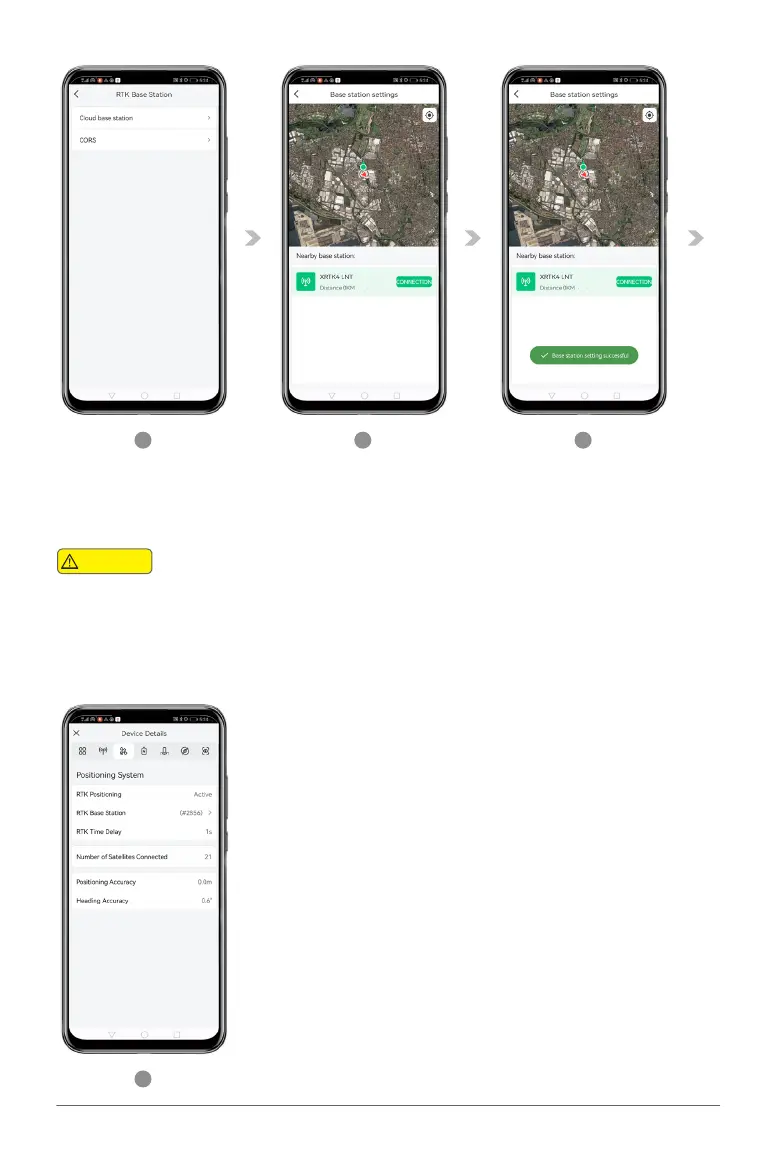
04. Select & Tap on the “Cloud base station” to bring up the list of nearby available stations.
05. The APP will automatically search for the available & nearby GNSS RTK Station, select the
corresponding Station from the list and tap “CONNECTION” to connect
APP searches for nearby station based on the positioning of the Aircraft. If the Aircraft is placed
indoor or area where it can’t be positioned, the APP may not be able to search for Nearby Station.
Warning
07. Return to the Device Detail and confirm:
• RTK Positioning is now Active
• RTK Base Station is now displaying Station ID (Similar to #XXXX)
• Number of Satellites Connected > 16
•
4
5
6
7
06. When the Connection is successful, it will display “Base Station setting successful”.



 To Next Page