CAMERA SYSTEM (LooksCAM) 20 www.xenosys.co.kr
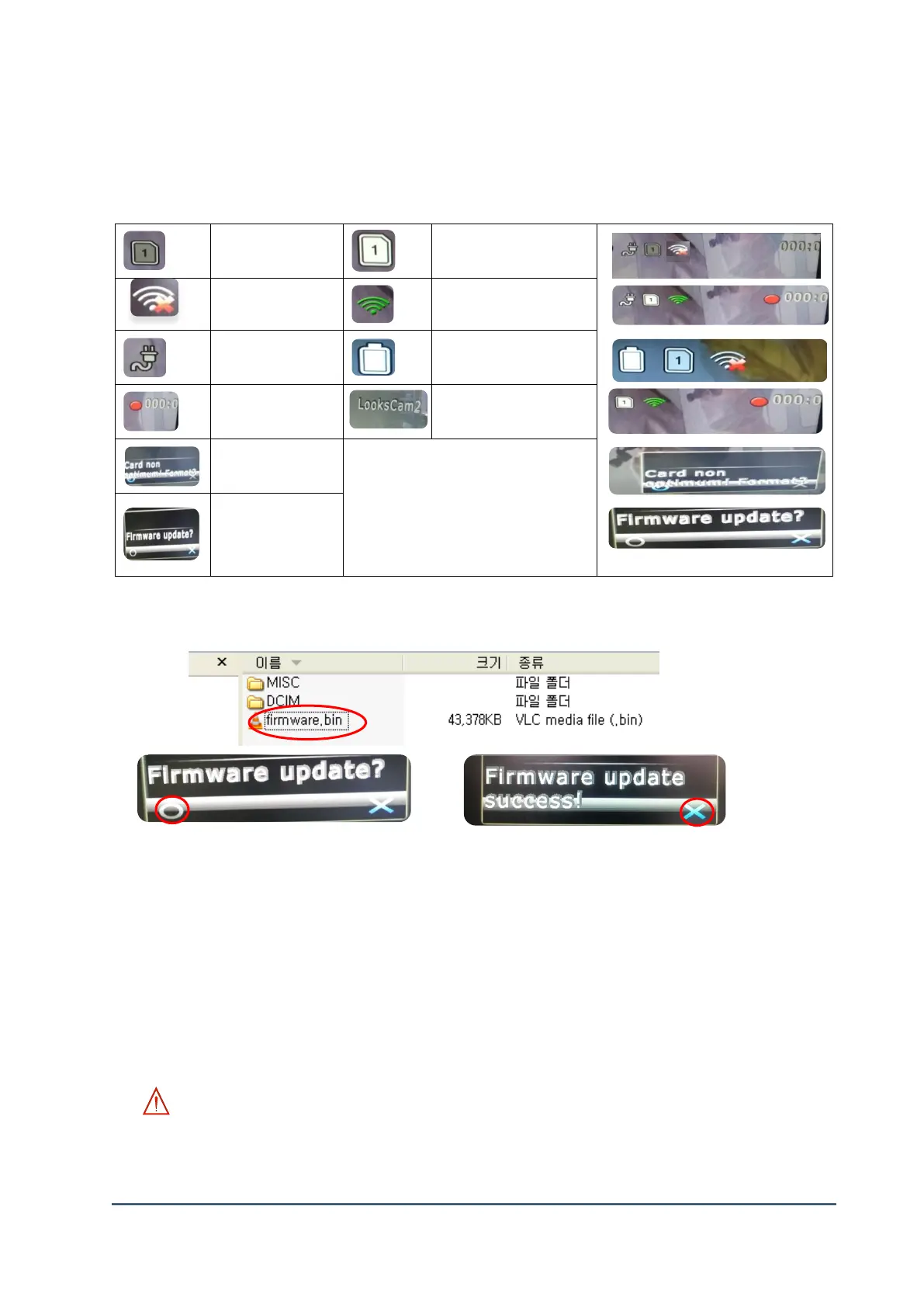
(2) OSD (On Screen Display) Explanation
Below signal can be shown when it’s connected to Video-Out port.
(3) How to Update the Firmware
1) Store the file “firmware.bin” (update file) in Micro SD card.
2) Prepare TV with HDMI port supported and change the input source as HDMI (HDTV).
3) Connect Video-Out port of main body to TV HDMI port with Video-Out cable.
4) Connect the head assembly unit to the main body and turn on with Micro SD card inserted.
5) The message of “Firmware update?” will be shown in TV after power on.
6) The firmware update will be started automatically (about 1 minute).
7) The unit will be power off after the message of “Firmware update success!” and the update
will be finished. “firmware.bin” file will be deleted automatically.
8) If there is any error occur, start the process from number 1).
WARNING:
- You should be careful on power save during the firmware update which may cause the system
damage. Important files & videos should be transferred to another computer before the update.
Use REC & LED button to move
and choose (select).
REC - Select
LED - Move



 To Next Page