Bike Setting
___________________________________________________________________________________________________________________________
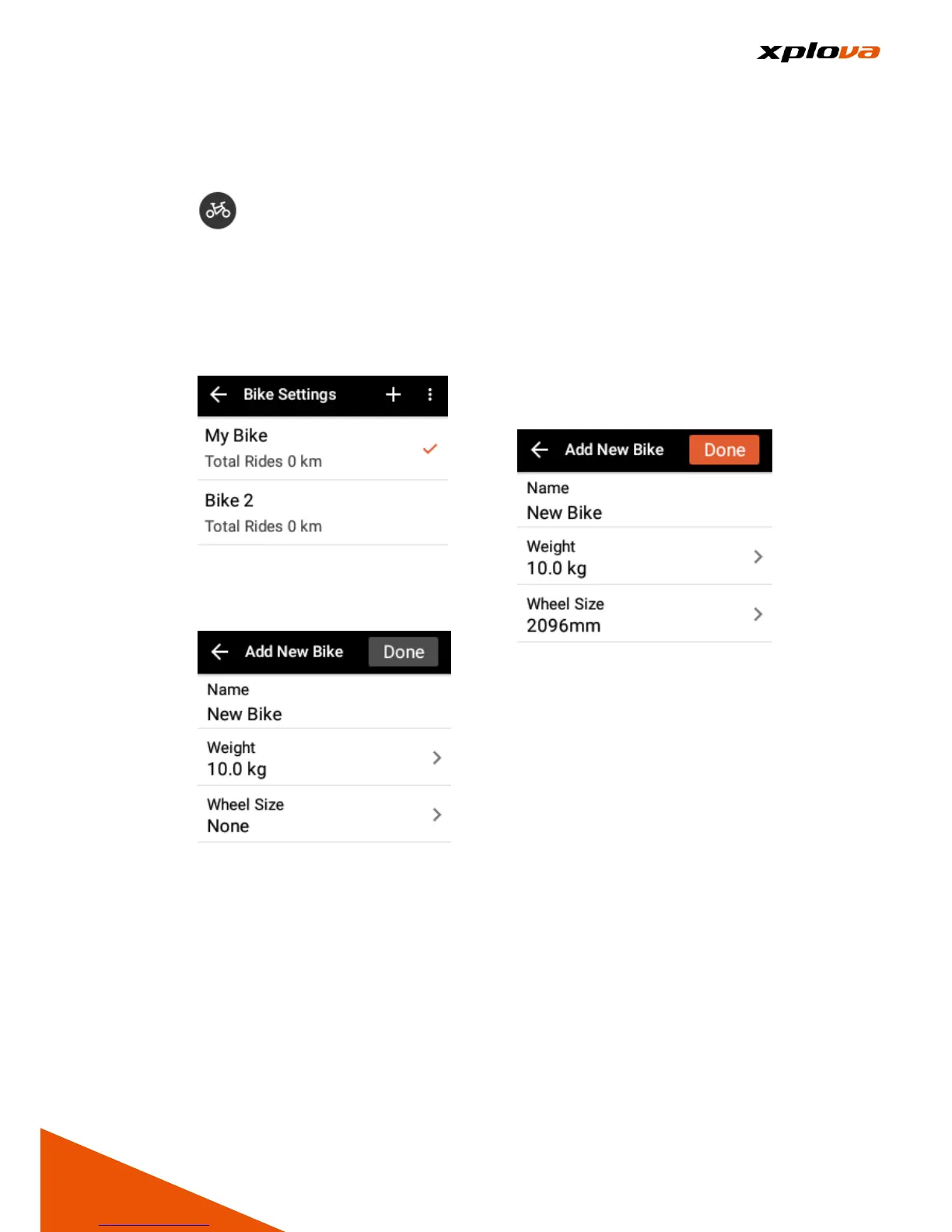
1. Enter Quick Access Menu. Tap
to enter Bike Settings. You
will see all bike names that have
already been set up before and
the accumulated kilometers are
displayed below for each bike.
You also have options to add,
select, or delete a bike on this
page.
2. Tap the current bike name directly
to edit the information, or tap [+]
on the upper right corner to add a
new bike.
3. Enter your bike information,
including: Bike Name, Bike
Weight and Wheel Size. After
data is completed, [Complete] on
the upper right corner will turn
orange, tap [Complete] to save
the settings.
*Note: Name / Weight / Wheel
Size are required before adding
other information.
4. To delete a bike, tap [Trash] icon
on the upper right corner.
5. Select a Bike: Tap [...] option on
upper right corner, tap [Select a
Bike] to select the bike you want
to use. Then confirm the selection
by tapping [x] on upper left and
exit the page.



 To Next Page