Xtralis Pty Ltd XCC Product Guide
www.xtralis.com 23
6.3 Replacing the Filter Cartridge
The lifetime of an air filter depends on the environment. The system will generate a minor fault when the filter
reaches 80% capacity and an urgent fault when it reaches 120% capacity. We recommend that the
installation date and replacement date are written on the air filter cartridge label as a physical reminder of when
the next service is expected.
Note: The detector must have the power turned on when the air filter cartridge is being replaced.
1. Open the front cover (Figure 6-2).
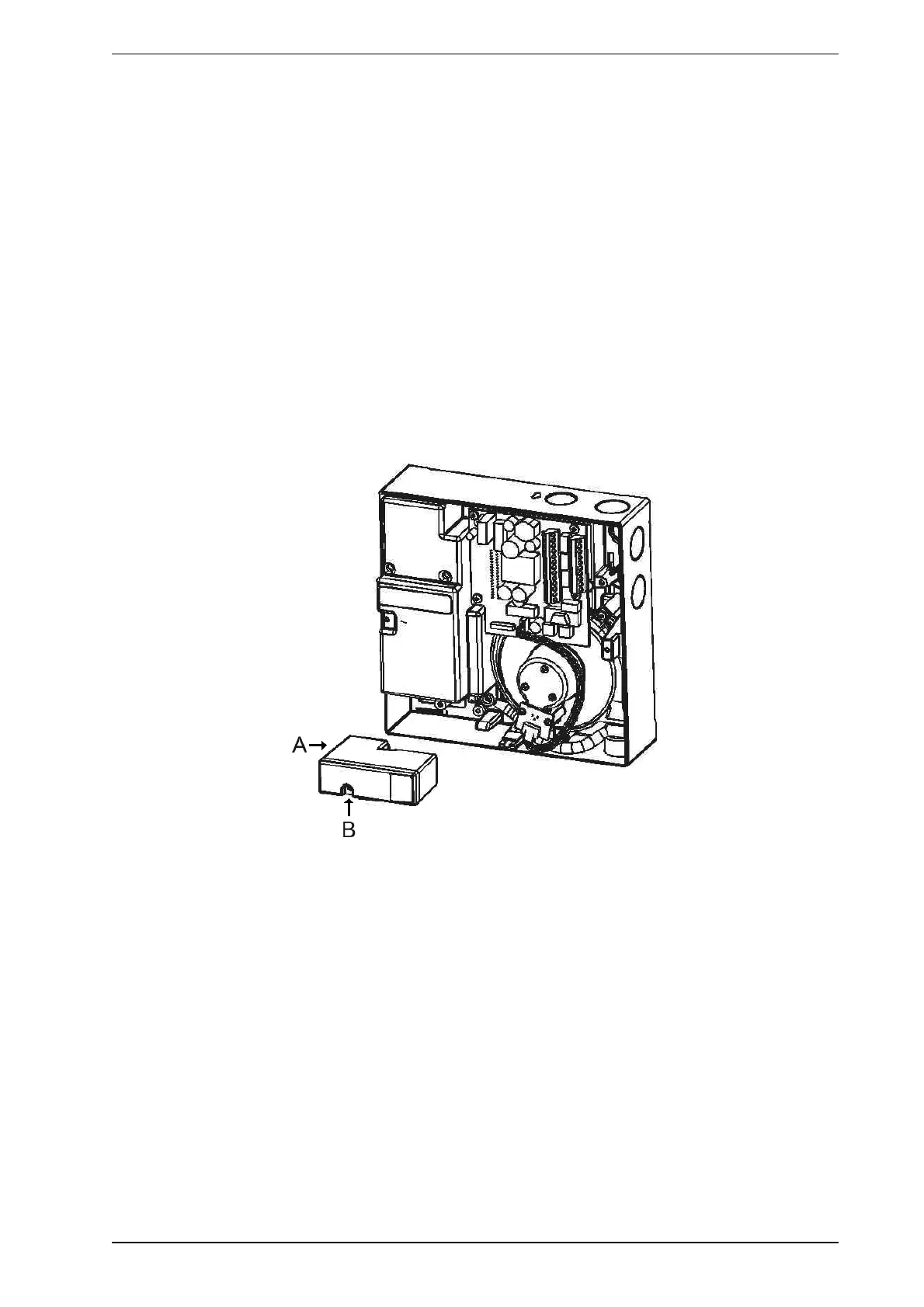
2. Locate the air filter cartridge (A), inside the detector compartment (refer to Figure 6-3).
3. Undo the recessed Phillips head filter screw (B).
4. Lift out the air filter cartridge.
5. Insert a new air filter cartridge.
6. Tighten the filter screw (B).
7. Connect to a PC with Xtralis VSC software to the programming socket via an RS232 cable.
8. Enter your user level and PIN number to log on to the detector.
9. Initiate the Reset Filter Settings command located under the Device menu.
10. Log off and remove the RS232 cable.
11. Close the detector (Figure 6-2).
Figure 6-3: Replacing the air filter cartridge









 To Next Page