31
English Chapter 8: Repeat Playback
Segment A~ (Return &
Pause) Repeat
In Segment A~ Repeat, playback can be
repeatedly restarted from a specified point in a
song. This is similar to Segment A~B Repeat
except that only point A is specified. Like
Segment A~B Repeat, this function is useful for
practicing.
Note: This function can be set with the remote
control only.
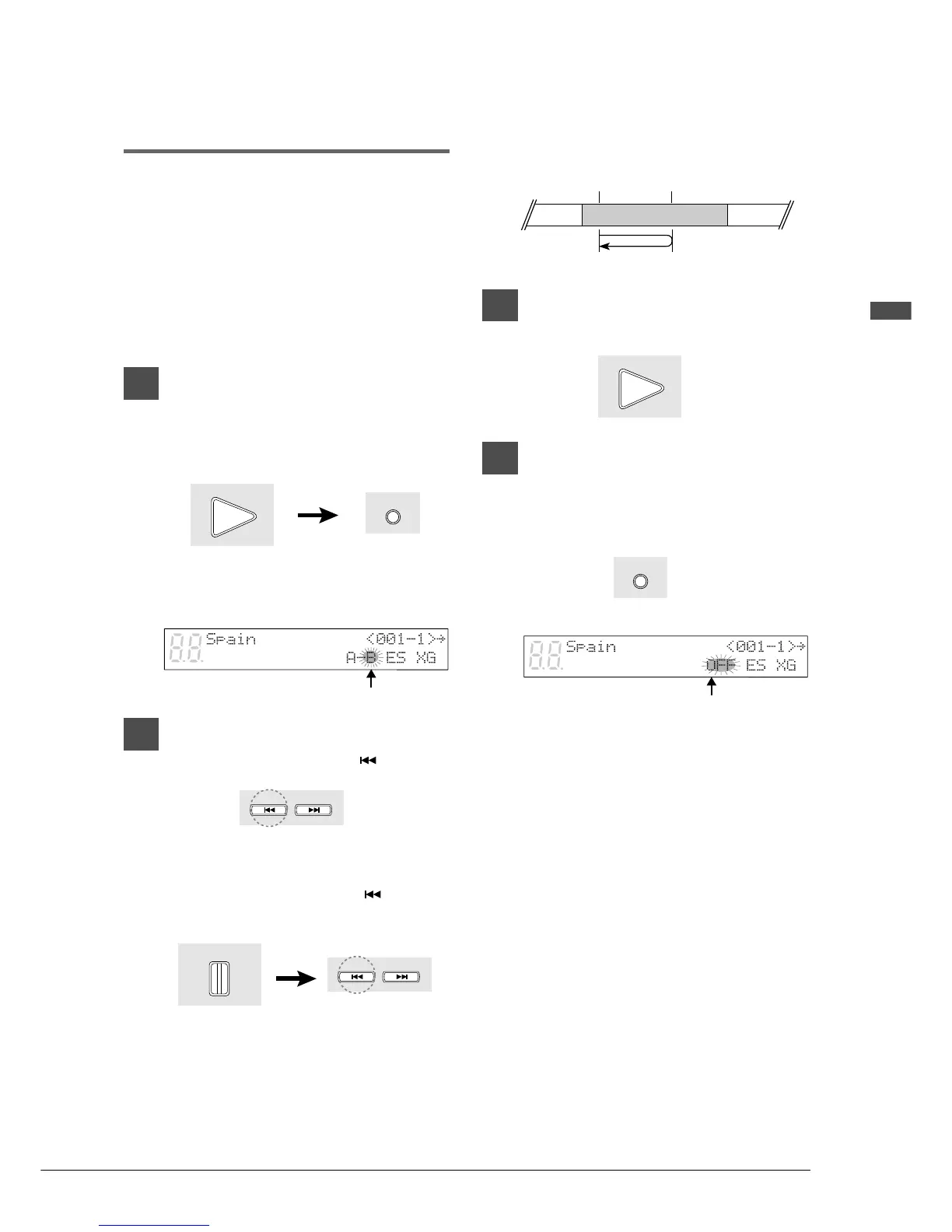
1
To set point A, play back a song
and press [A-B] on the remote
control when the desired point is
reached.
Point A is memorized and the “B” of “A-B”
flashes on the display.
2
When you want to return to point
A, press [SONG SELECT ].
Alternatively, you may press [PAUSE]
followed by [SONG SELECT
] to return
to point A.
In this case, playback stops, the song
returns to point A, and Pause mode is
engaged.
3
Press [PLAY] to start playback
from point A.
4
To cancel Segment A~ Repeat,
return to point A, and in Pause
mode press [A-B] so that “OFF”
flashes on the display.
Note: Segment A~ Repeat cannot be canceled
during playback.
Flashes
Flashes
Remote Control
PLAY
A - B
Remote Control
Remote Control
SONG SELECT
Remote Control
PAUSE
Remote Control
SONG SELECT
Press the [REV] button
SONG 1 SONG 2 SONG 3
Point A
Start
Pause
Remote Control
PLAY
A - B
Remote Control







 To Next Page