72
Connecting to a Personal Computer
Specifically, Apple Macintosh, IBM PC/AT, and NEC PC-9801/9821 series computers can be directly
connected to the Disklavier. Connect the RS-232C or RS-422 connector on your computer to the TO
HOST connector on the Control Unit using the specified cables shown below (available separately). Also
refer to your computer’s operating manual to make sure the connection is made properly.
Your computer may also require a serial port driver for this function. This software is used for controlling
the MIDI interface. For further information, please consult your Yamaha dealer.
Note: Be sure to turn the computer and Disklavier power switches off before making the connections and setting
the HOST SELECT switch.
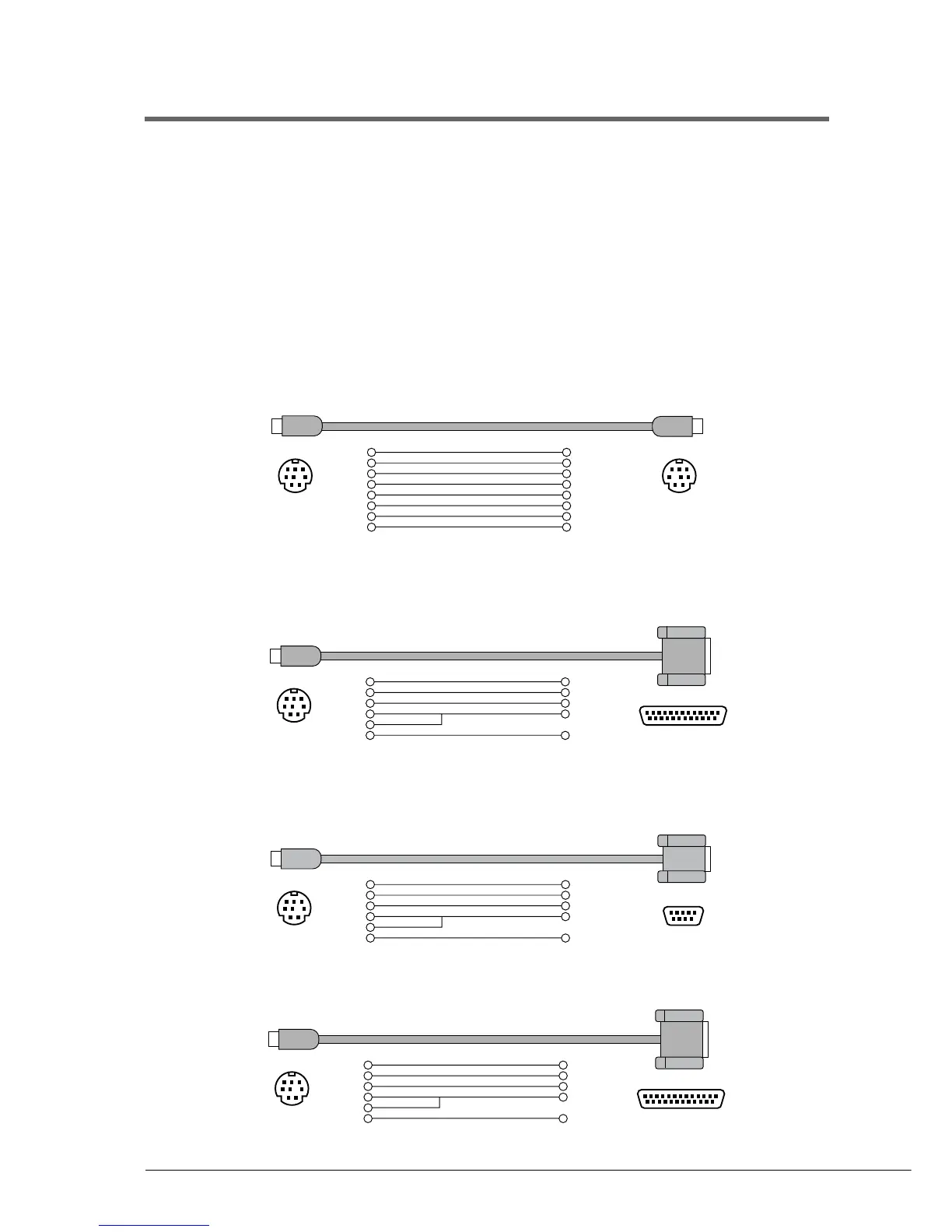
Connecting to an Apple Macintosh Series Computer
Use a standard Macintosh 8-pin system peripheral cable.
Connecting to an NEC PC-9801/9821 Series Computer
Use a standard 8-pin MINI DIN ➔ 25-pin D-SUB cross cable.
Connecting to an IBM PC/AT Series Computer
(a) Use a standard 8-pin MINI DIN ➔ 9-pin D-SUB cross cable.
(b) Use a standard 8-pin MINI DIN ➔ 25-pin D-SUB cross cable.
Mini DIN 8-pin Mini DIN 8-pin
Mini DIN 8-pin
D-SUB 25-pin
Male connector
Mini DIN 8-pin
D-SUB 9-pin
Female connector
Mini DIN 8-pin
D-SUB 25-pin
Female connector
1
2
3
4
5
6
7
8
2 (HSK 1)
1 (HSK 0)
5 (RxD-)
4 (GND)
3 (TxD-)
8 (RxD+)
7 (GP 1)
6 (TxD+)
1
2
3
4
8
5
5 (CTS)
4 (RTS)
3 (RxD)
7 (GND)
2 (TxD)
1
2
3
4
8
5
8 (CTS)
7 (RST)
2 (RxD)
5 (GND)
3 (TxD)
1
2
3
4
8
5
5 (CTS)
4 (RTS)
3 (RxD)
7 (GND)
2 (TxD)







 To Next Page