Edit Search Utility Live SetPerformance
Normal Part (AWM2) Drum Part Normal Part (FM-X) Common/Audio
MODX Reference Manual
Common/Audio Edit
Common/Audio
General
Audio In
Mixing
Routing
Ins A
Ins B
EQ
Motion Seq
Common
Lane
Control
Control Assign
Control Number
Effect
Routing
Variation
Reverb
Master FX
Master EQ
USB Monitor
166
Reference
Same as the Element Common Edit parameters for Normal Parts (AWM2) (page 100), except for the
following parameters.
Destination
When “Source” is set to “AsgnKnob 1–8,” “Part 1–16 Assign 1–8” are added as this parameter values. In
this case, “Curve Type” and “Curve Ratio” are not selectable.
Settings: See the “Control List” in the Data List PDF document.
Source
When “Destination” is set to “Part 1–16 Assign 1–8,” only “AsgnKnob 1–8” can be set for this parameter.
Settings: AsgnKnob 1–8, MS Lane 1–4, EnvFollow 1–16, EnvFollowAD, EnvFollowMst
Display Filter
Determines the Controller to be displayed. When “Super Knob” is selected, all Assignable Knob settings in
which “Super Knob Link” is set to On are displayed.
Settings: AsgnKnob 1–8, Super Knob, MS Lane 1–4, EnvFollow 1–16, EnvFollowAD, EnvFollowMst, All
The following parameters are displayed only when “Destination 1–16” is set to “Part 1–16 Assign 1–8.”
Also, when Destination is not set to any Assignable Knobs for the Part, only the shortcut buttons are
available.
Destination
Determines the controller settings for the Part to be displayed.
Settings: 1–16 (The number of Destinations for the Assignable Knobs for the Part which is selected in “Destination 1–16” is
displayed.)
Parameter
Determines the parameters for the Part to be controlled.
Settings: Refer to the “Control List” in the Data List.
Control
Control Assign
Operation
[PERFORMANCE (HOME)] [EDIT] [Control] [Control Assign]
or
Touch [Edit Super Knob] in the Super Knob display.
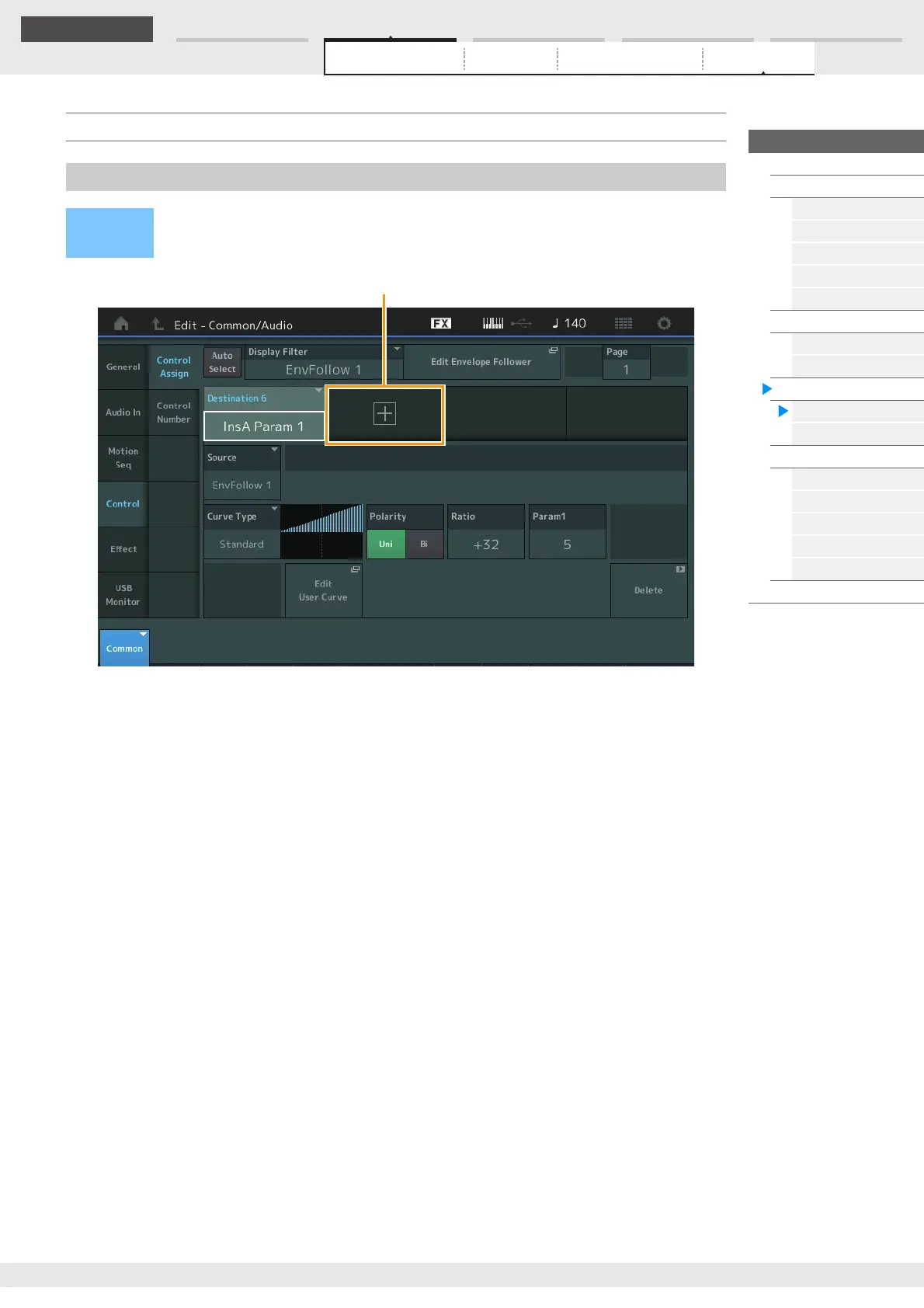
Touching the “+” button adds a Part parameter to be used as a control target.



 To Next Page