Owner’s Manual
12
Setting Up
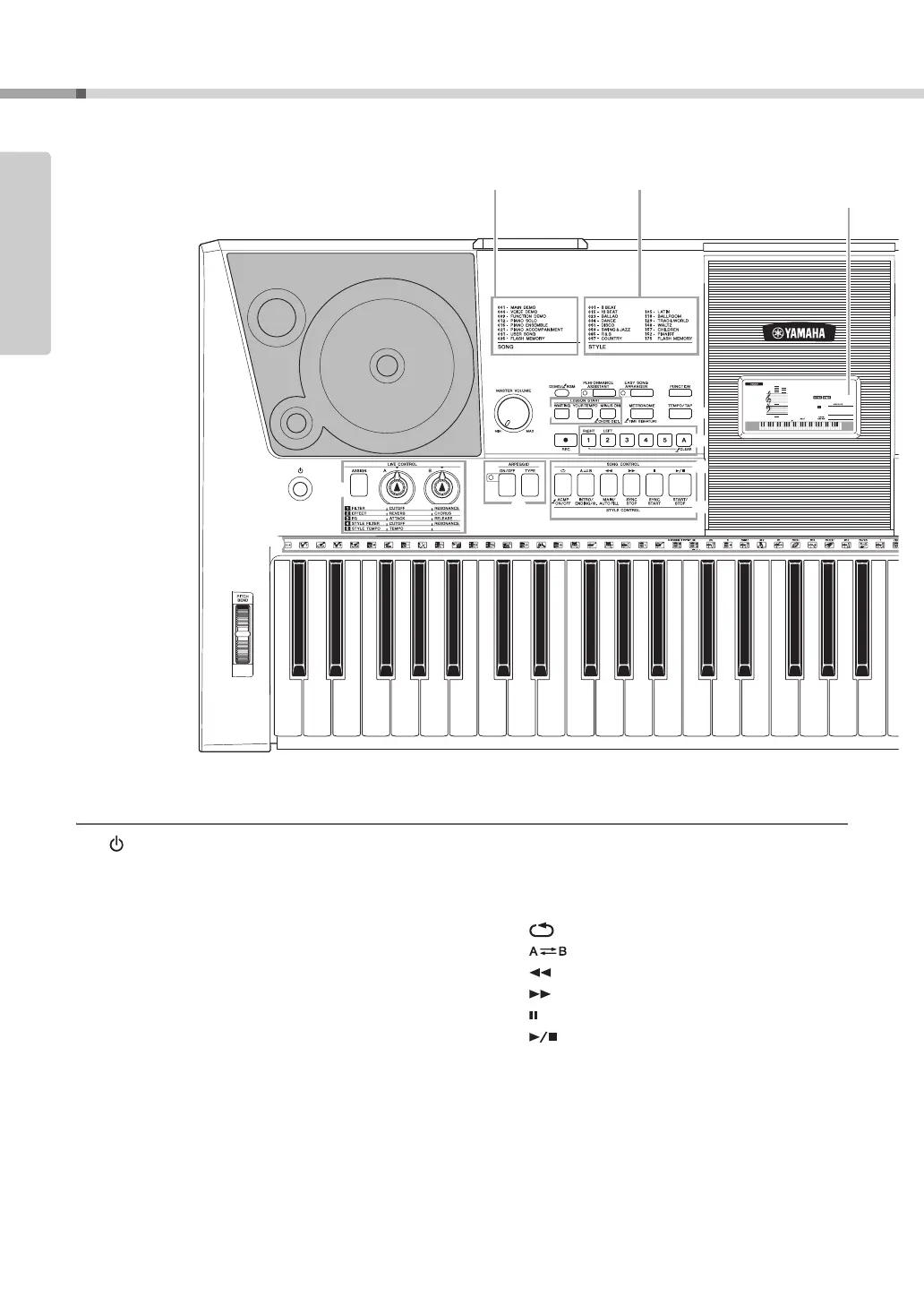
Panel Controls and Terminals
Front Panel
q [ ](Standby/On) switch...................... page 11
w LIVE CONTROL
[ASSIGN] button ...............................page 22
[A] and [B] knobs .............................page 22
e [MASTER VOLUME] control ................ page 11
r [DEMO/BGM] button ............................page 31
t [PERFORMANCE ASSISTANT]
button ....................................................page 37
y [EASY SONG ARRANGER] button......page 41
u [FUNCTION] button..............................page 70
i LESSON START
[WAITING] button..............................page 33
[YOUR TEMPO] button .....................page 35
[MINUS ONE] button.........................page 36
o [METRONOME] button................. pages 19, 53
!0 [TEMPO/TAP] button.. pages 19, 62, 63, 67, 69
!1 [REC] button.........................................page 43
!2 [1]–[5], [A] buttons ...............................page 44
!3 ARPEGGIO
[ON/OFF] button ...............................page 20
[TYPE] button ................................... page 21
!4 SONG CONTROL
[ ] (REPEAT & LEARN) button ... page 36
[ ] (A-B REPEAT) button .......... page 68
[] (REW) button........................... page 32
[ ] (FF) button............................... page 32
[ ] (PAUSE) button .......................... page 32
[ ] (START/STOP) button............page 32
!5 STYLE CONTROL
[ACMP ON/OFF] button.................... page 27
[INTRO/ENDING/rit.] button .............page 61
[MAIN/AUTO FILL] button ................page 61
[SYNC STOP] button ........................ page 61
[SYNC START] button....................... page 60
[START/STOP] button....................... page 26
!6 Dial ................................................ pages 14, 16
!7
CATEGORY [ ] and [ ] buttons
.. pages 14, 70
001
001
GrandPno
q
w
e
r
t
y
@6
@7
u
i
o
!0
!1
!3
!2
!5
!4
Front Panel
Song List (Data List) Style List (Data List) Display
(page 15)



 To Next Page