Playing Styles
Owner’s Manual
27
Quick Guide
You learned how to select a style rhythm on the preceding page.
Here we’ll see how to add bass and chord accompaniment to the basic rhythm to produce a full,
rich accompaniment that you can play along with.
1
Press the [STYLE] button and select the desired
style.
For this example select the “042 Euro Trance” style.
2
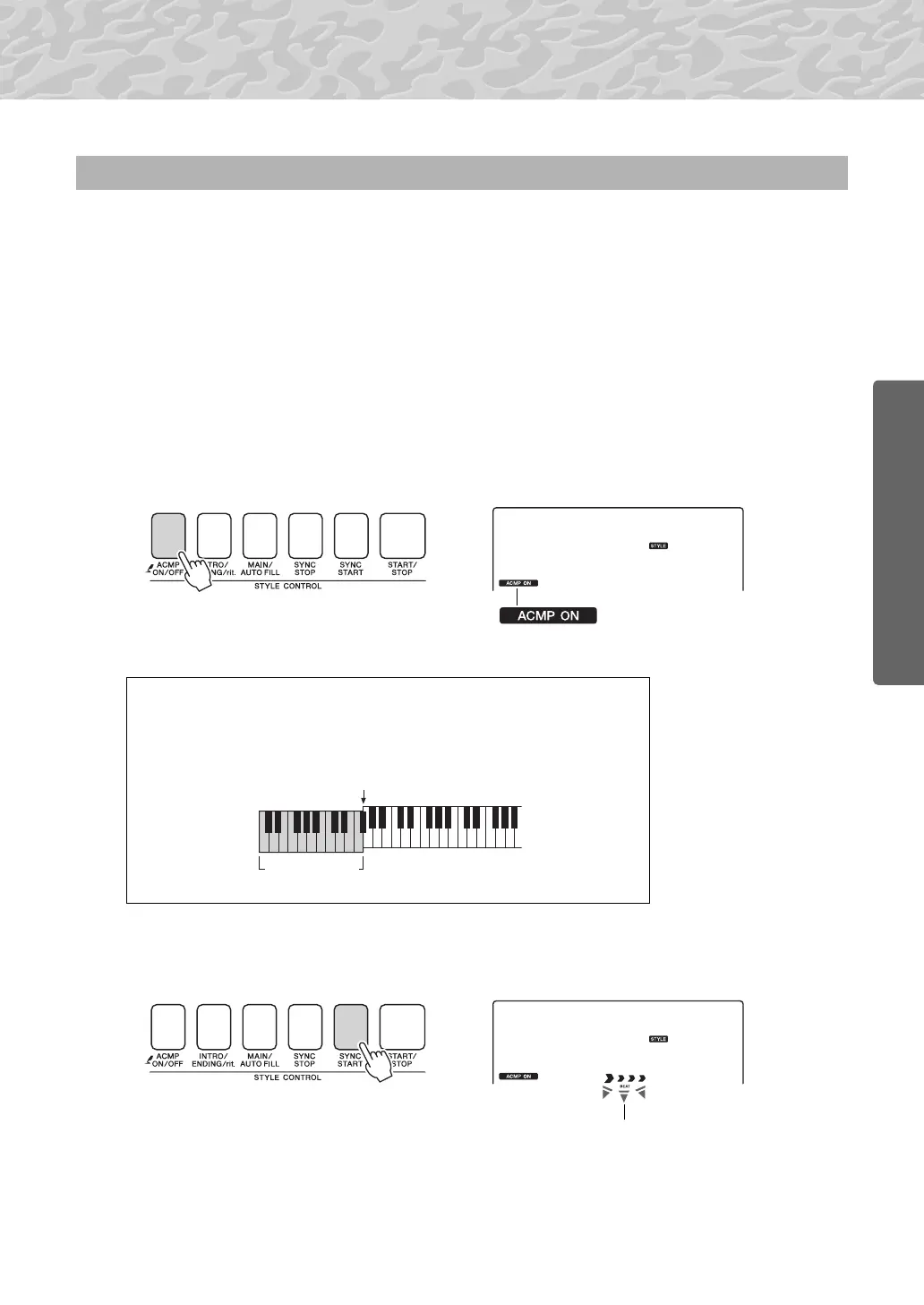
Turn automatic accompaniment on.
Press the [ACMP ON/OFF] button.
Pressing this button a second time will turn automatic accompani-
ment off.
3
Turn sync start on.
Press the [SYNC START] button to turn the sync start function on.
When sync start is on, the bass and chord accompaniment included in
a style will start playing as soon as you play a note to left of the key-
board split point. Press the button a second time to turn the sync start
function off.
Play Along with a Style
This icon appears when automatic
accompaniment is on.
When automatic accompaniment is on ...
The area of the keyboard to the left of the split point (54 : F#2) becomes the
“auto accompaniment range” and is used only for specifying the accompani-
ment chords.
Auto accompa-
niment range
Split point (page 63)
Flashes when sync start is on.



 To Next Page