Owner’s Manual
14
Setting Up
Basic Operation and Displays
Basic Operation
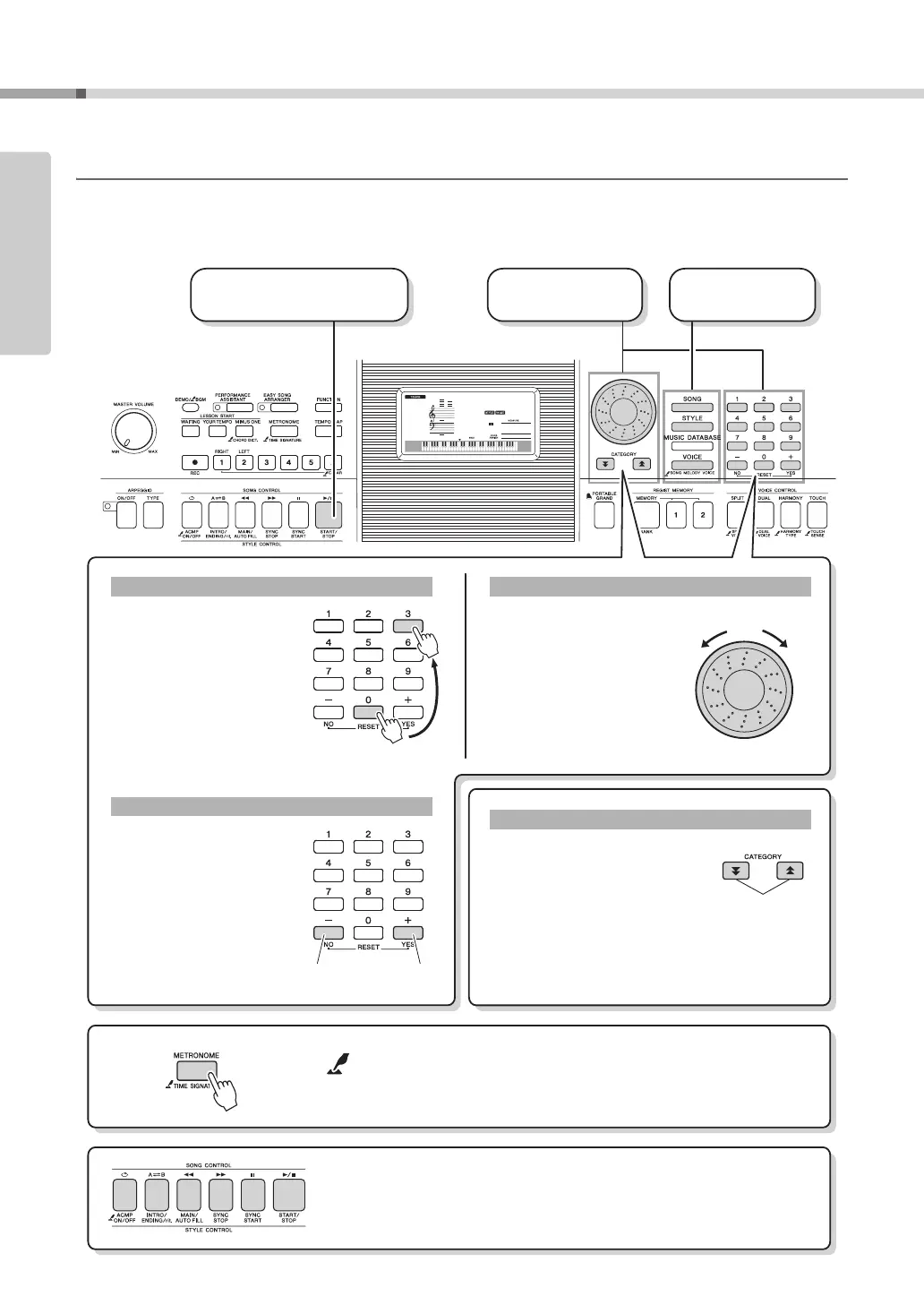
Press a button to select a basic function: Voice, Style or Song. To change the instrument voice that sounds when
you play the keyboard, press the [VOICE] button. If you want to play along with auto accompaniment, press the
[STYLE] button. If you want to listen to a song, press the [SONG] button.
001
001
GrandPno
Press briefly
to increase.
3 Start a function or play
the keyboard.
2 Select an item
or value.
1 Select a basic
function.
Rotate the dial clockwise to
increase the value of the
selected item, or counter-
clockwise to decrease it’s
value. Rotate the dial con-
tinuously to continuously
increase or decrease the
value.
Dial
Increase
When selecting a song or style,
you can use these buttons to jump
to the first item in the next or previ-
ous category.
The CATEGORY [ ] and [ ]
buttons can also be used to select
function items sequentially after
pressing the [FUNCTION] button.
CATEGORY [ ] and [ ] buttons
The number buttons can be
used to directly enter a Song,
Style or Voice number or
parameter value.
For numbers that start with
one or two zeroes, the first
zeroes can be omitted.
Example:
Selecting Voice 003, Bright
Piano.
Number buttons [0]–[9]
Press the [+] button briefly
to increase the value by 1, or
press the [-] button briefly to
decrease the value by 1.
Press and hold either button
to continuously increase or
decrease the value in the cor-
responding direction.
[+], [-] buttons
Decrease
Press briefly
to decrease.
Jump to the
first item in
the next or
previous cat-
egory.
Press number but-
tons [0], [0], [3].
The “Press & Hold” Symbol
Buttons having this indication can be used to call up an alternate func-
tion when the relevant button is pressed and held.
Hold down this button until the function calls up.
Press the [SONG] button to access the SONG functions (printed above the
buttons), and press the [STYLE] button to access the STYLE functions
(printed below).



 To Next Page