Toolbar
User Guide
-
17
-
9 Delay setting
Determines the delay time by specifying distance (meters and feet) or time (milliseconds).
Click a text box to enter a value.
0 Monitor source selection buttons
Allow you to select the sources that will be monitored.
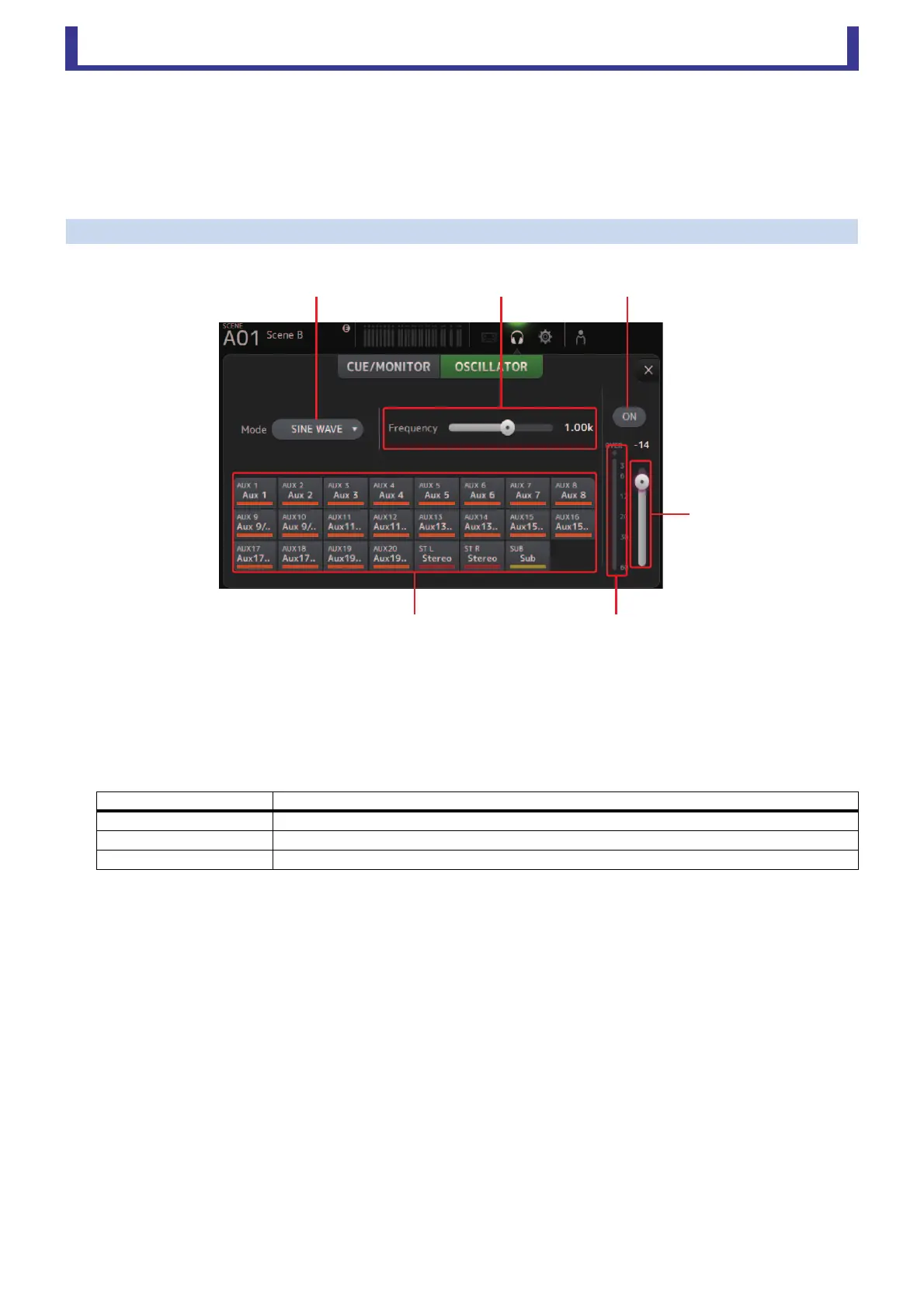
OSCILLATOR screen
Allows you to configure the oscillator.
1 Oscillator mode button
Allows you to select the oscillator mode.
SINE WAVE: A sine wave will be output continuously.
PINK NOISE: Pink noise will be output continuously.
BURST NOISE: Pink noise will be output intermittently.
2 Parameter sliders
Allows you to adjust parameters for the oscillator.
3 Oscillator output button
Turns the oscillator output on and off. When the oscillator is turned on, the oscillator signal is sent to the input channels that
are selected by the oscillator assignment buttons.
4 Oscillator output level slider
Adjusts the oscillator output level.
5 Oscillator output meter
Displays the oscillator output level.
6 Oscillator assignment buttons
Determine which channels the oscillator is sent to. You can select multiple channels.
Oscillator mode Available parameters
SINE WAVE Frequency
BURST NOISE Width (duration of each noise burst) and Interval (length of silence between noise bursts)
PINK NOISE None
ձղճ
մ
յն




 To Next Page