Main display area
User Guide
-
66
-
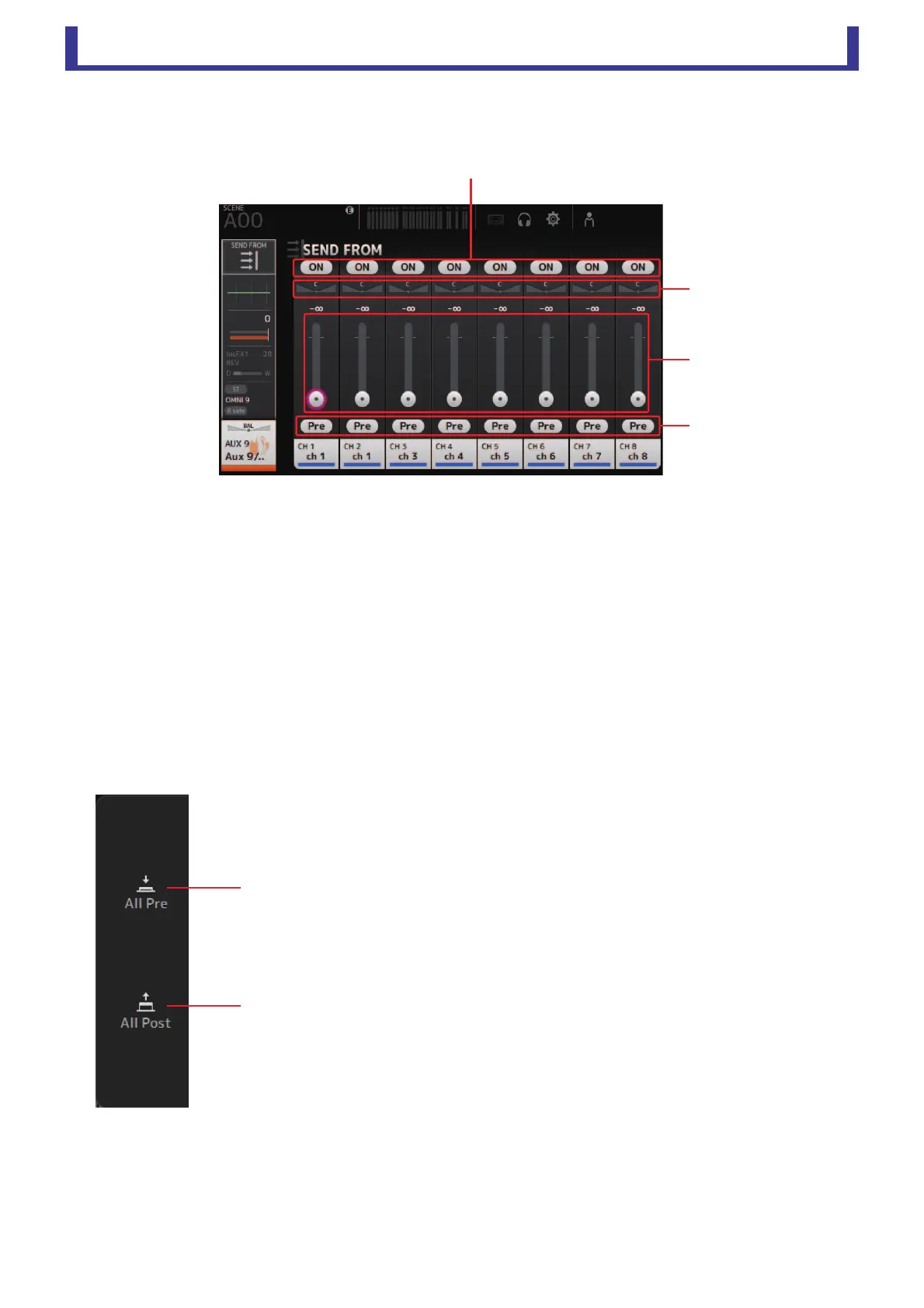
SEND FROM screen
Allows you to send signals from the input channels.
1 ON button
Determines whether a signal is sent (on) or not sent (off) from the corresponding input channel.
2 Send pan slider
Adjusts the pan of the input channel signal that is sent.
For AUX 1–8, this slider is only displayed if the signal type is set to stereo.
3 Send level slider
Determines the amount of signal sent from the corresponding input channel.
4 Pre button
Allows you to select whether the pre-fader or post-fader signal is sent from the corresponding input channel.
On: Before the fader
Off: After the fader
SEND FROM screen menu
The following items are displayed in the menu area when the SEND FROM screen is displayed.
1 All Pre
Turns on all Pre buttons.
2 All Post
Turns off all Pre buttons.
ձ
ճ
ղ
մ




 To Next Page