Main display area
User Guide
-
39
-
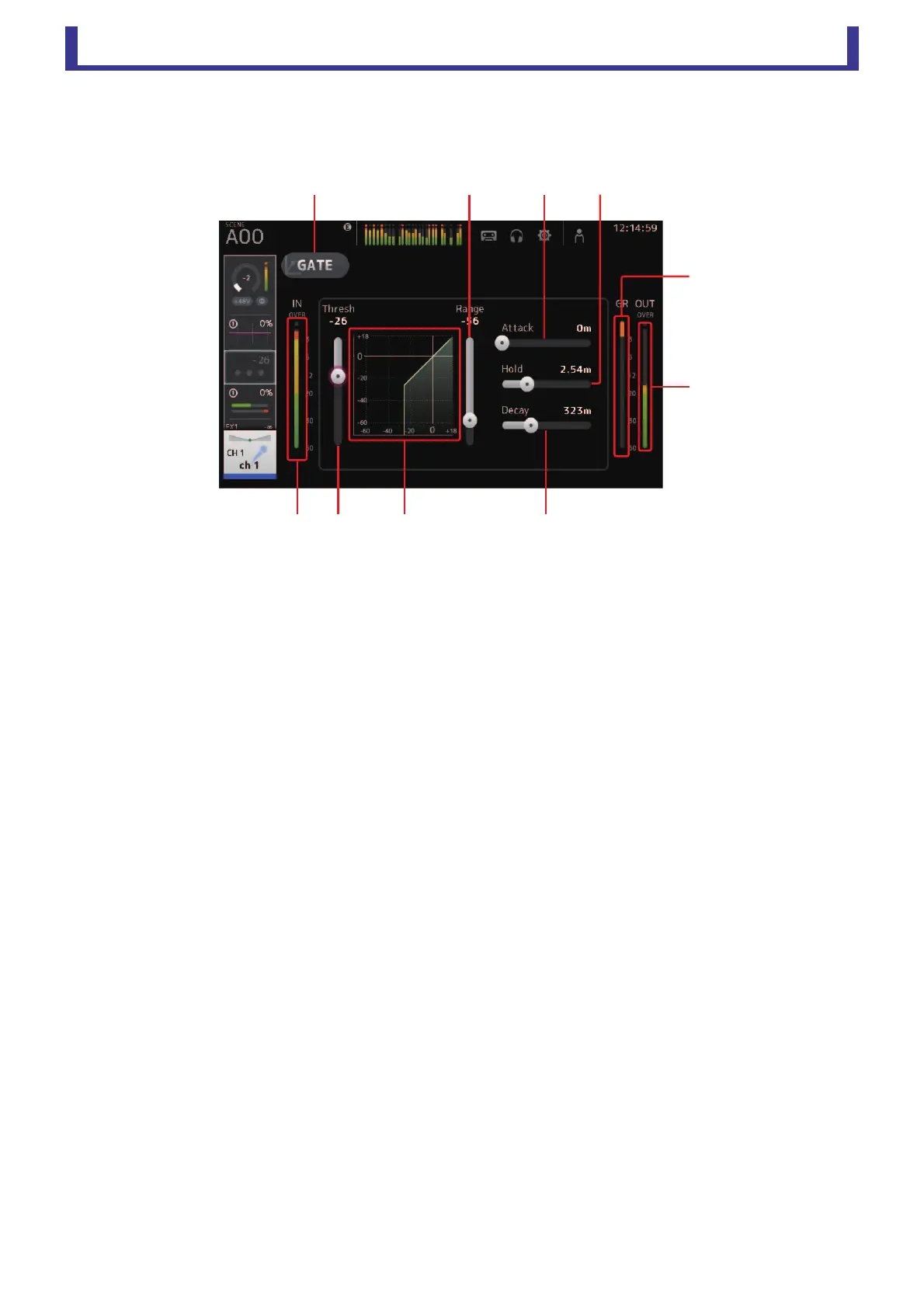
GATE screen
Allows you to configure the noise gate for each channel. When the input signal level is lower than a specified amount (threshold),
the output signal is reduced by a specified amount (range). GATE is available for CH 1–32.
1 GATE button
Turns the gate on and off.
2 Gate input level meter
Displays the pre-gate level.
3 Threshold slider
Determines the level at which the gate is applied.
4 Gate graph
Displays a visual representation of the gate level.
5 Range slider
Determines the amount by which the signal will be lowered when the gate is applied.
6 Attack slider
When the input signal exceeds the threshold, this setting determines how quickly the gate opens.
7 Hold slider
When the input signal drops below the threshold, this setting determines how much time passes before the gate closes.
8 Decay slider
After the hold time passes, this setting determines how quickly the gate closes. The value here is expressed as the time
required for the level to change by 6 dB.
9 GR (gain reduction) meter
Displays the amount by which the signal's gain is reduced.
0 OUT (gate output) meter
Displays the post-gate level.




 To Next Page