Main display area
User Guide
-
34
-
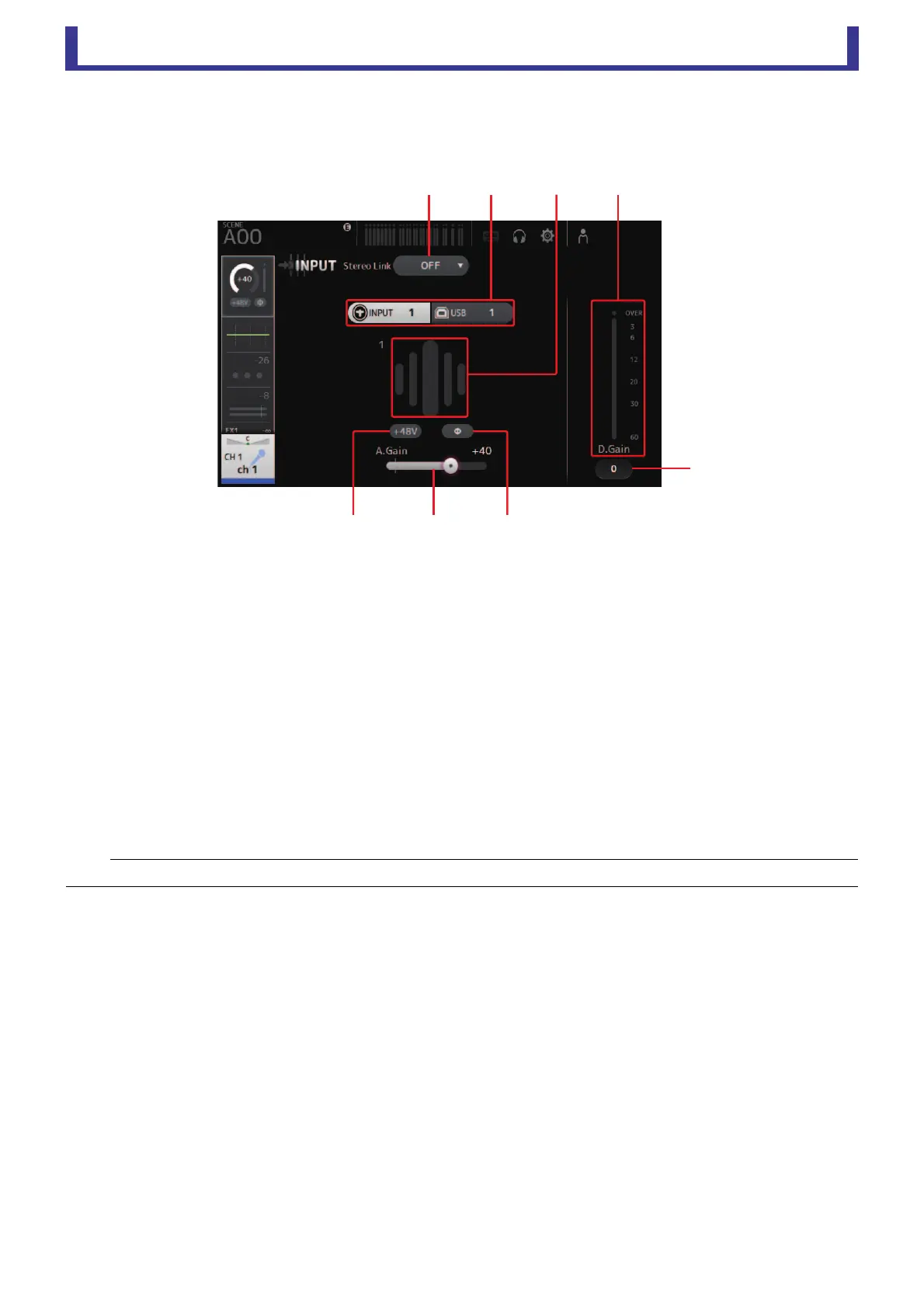
INPUT screen
Allows you to change the stereo link setting, select an input source, turn phantom power on and off, turn phasing on and off, and
adjust input gain.
1 Stereo link selection button
Allows you to select whether two adjacent mono input channels are linked as a stereo pair, or behave as two separate mono
channels.
Click to display the popup menu.
OFF: Stereo link is disabled.
CH1&2: Stereo link is enabled. When stereo link is enabled, the odd numbered channel is the left side of the stereo pair, and
the even numbered one is the right. The channel numbers displayed in the popup menu depend on the channel
whose settings you are editing.
CH2&3: Stereo link is enabled. When stereo link is enabled, the even numbered channel is the left side of the stereo pair, and
the odd numbered one is the right. The channel numbers displayed in the popup menu depend on the channel
whose settings you are editing.
2 Input selection buttons
Allows you to select the channel's input source (input port). The available sources depend on the channel whose settings you
are editing.
INPUT: The device connected to the INPUT jack will be used as the input source.
USB: The computer connected to the USB TO HOST connector will be used as the input source.
3 GainFinder
Displays the input level. When adjusting the input gain, adjust it so that the center of the GainFinder lights up.
4 Level meter
Displays the post gain adjustment level.
5 Digital gain text box
Allows you to adjust digital gain. The default setting is 0 db.
You can click the text box to highlight it, then use your mouse wheel to adjust the setting. You can also click the text box
again to adjust the setting using your computer keyboard.
6 Φ (phase) button
Allows you to reverse the phase.
When turned on, the input signal's phase is reversed.
7 Gain sliders
When the INPUT button is selected, the slider adjusts the analog gain of the head amp.
The PAD (-24 dB) will be switched on or off when the analog gain is adjusted between +17 dB and +18 dB.
When the USB button is selected, the slider adjusts digital gain.
NOTE
When USB is selected, the gain slider (7) adjusts digital gain, and the +48V button (8) is not displayed.





 To Next Page