Main display area
User Guide
-
63
-
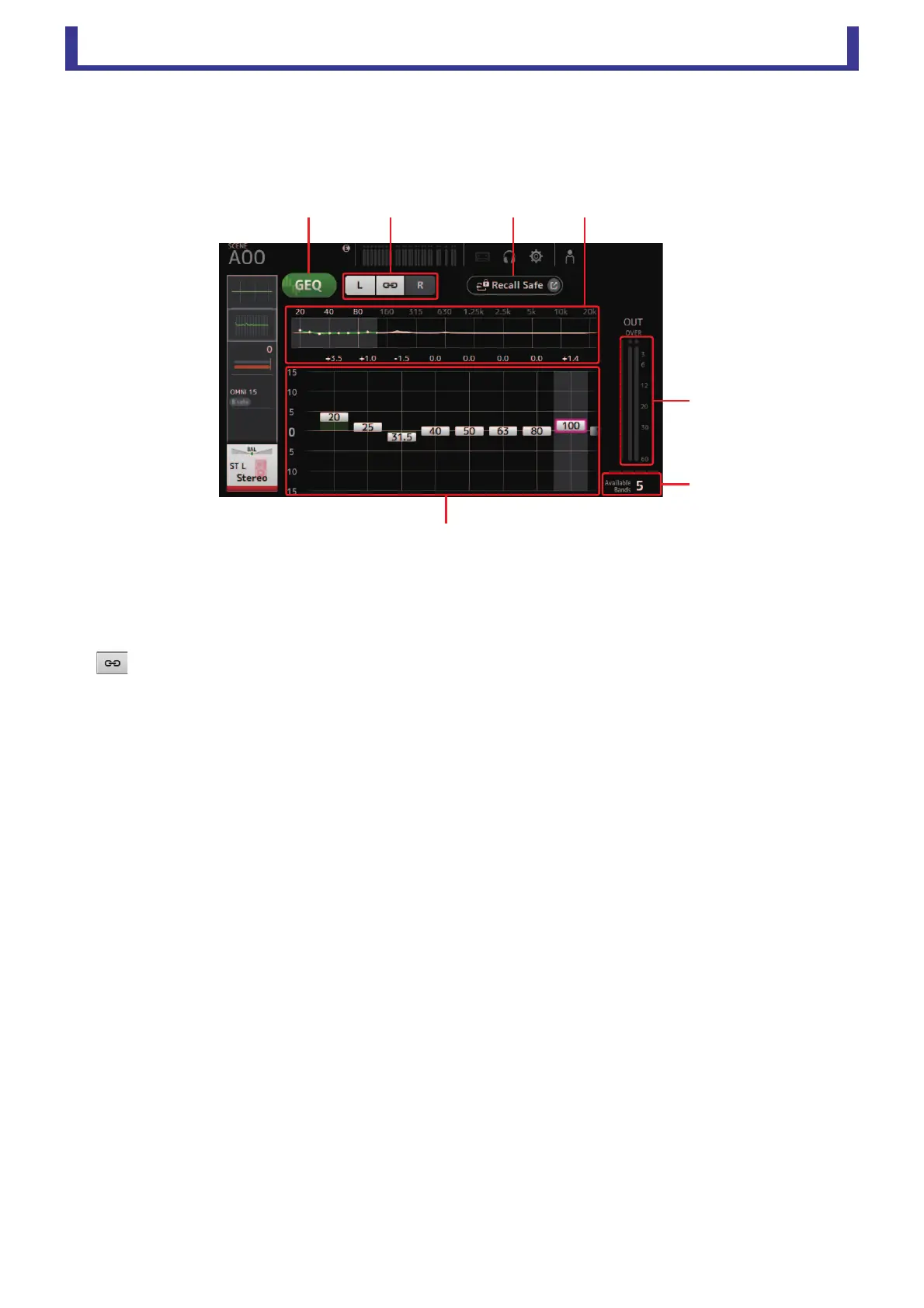
GEQ screen
You can use the internal graphic equalizer (GEQ) to process AUX 1–8 and STEREO channel signals.
The GEQ is a mono, 12-band EQ. Each band is 1/3 octave wide, with an adjustable gain range of ±15 db.
31 bands are available; you can adjust gain for up to 12 bands.
1 GEQ button
Turns the GEQ on and off.
2 GEQ channel selection buttons
These buttons are displayed only when configuring the GEQ for stereo AUX buses or the STEREO channels.
They are not displayed for mono AUX buses.
:Turns the GEQ left/right channel link on and off.
L/R: Allows you select the left and right GEQ channels.
3 Recall Safe button
Displays the RECALL SAFE screen. (page 20)
4 EQ graph, band selection
Displays the EQ settings.
Drag left or right or click an area to display the gain sliders for other bands.
5 Gain sliders
Adjusts the gain for the corresponding band.
Drag left or right to display the gain sliders for other bands.
6 Output level meter
Displays the GEQ output level.
7 Available bands display
Displays the number of additional bands that you can adjust.





 To Next Page