Main display area
User Guide
-
30
-
OVERVIEW screen
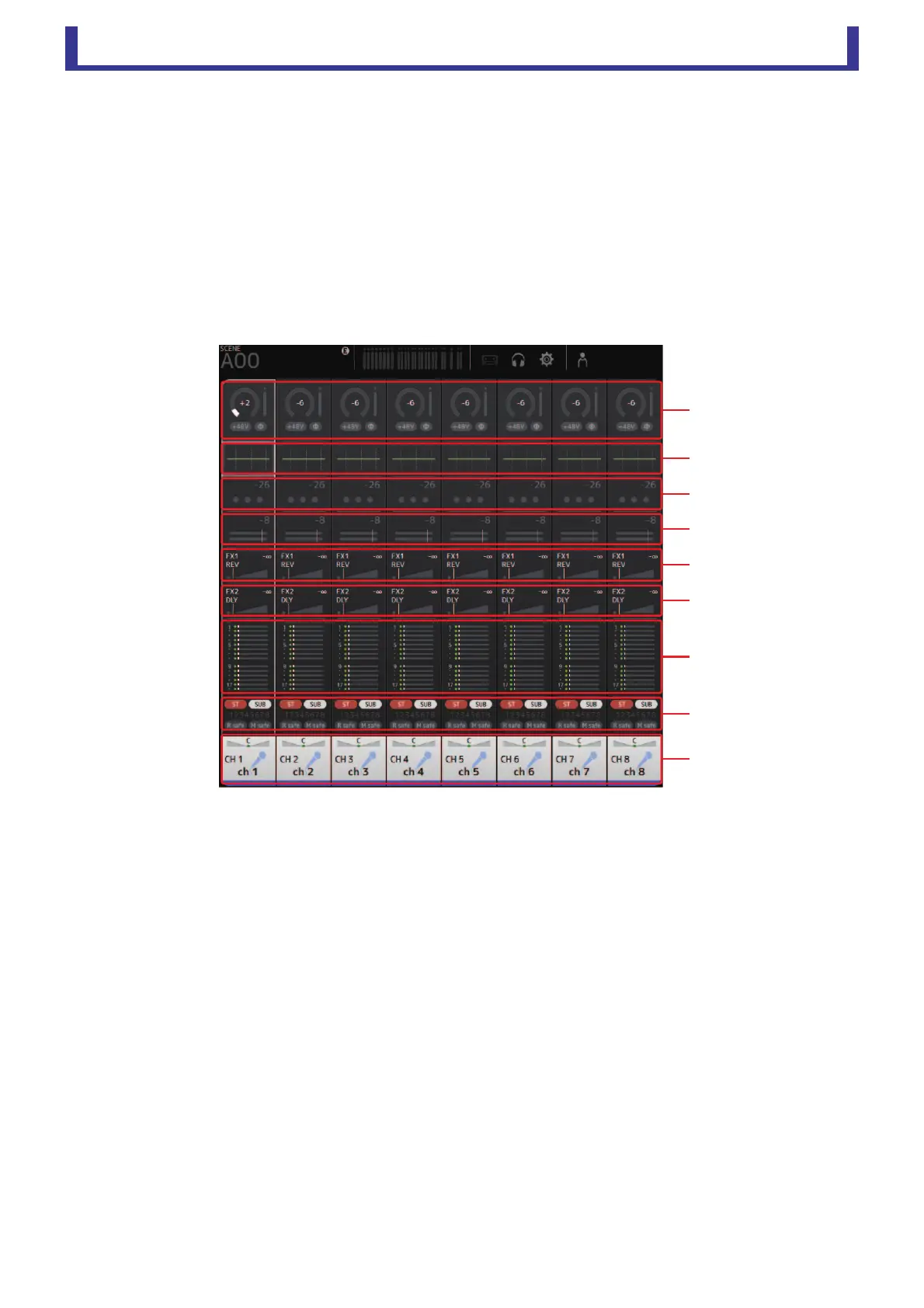
Displays information about the channel strips. This is the screen displayed after startup.
From here you can move to other screens depending on the operations that you want to perform.
You can return to the OVERVIEW screen at any time by pressing the HOME button in the HOME/LIBRARY area.
You can drag up and down to see other areas of the OVERVIEW screen.
You can also drag left and right to see other channels.
The content of the OVERVIEW screen varies depending on the type of channels you are displaying.
Input channels
1 Displays the INPUT screen. (page 34)
2 Displays the EQ screen. (page 36)
3 Displays the GATE screen. (page 39)
4 Displays the COMP screen. (page 41)
5 Displays the FX1 screen. (page 43)
6 Displays the FX2 screen. (page 43)
7 Displays the SEND TO AUX screen. (page 49)
8 Displays the ASSIGN screen. (page 50)
9 Displays the CH VIEW screen. (page 51)





 To Next Page