Toolbar
User Guide
-
26
-
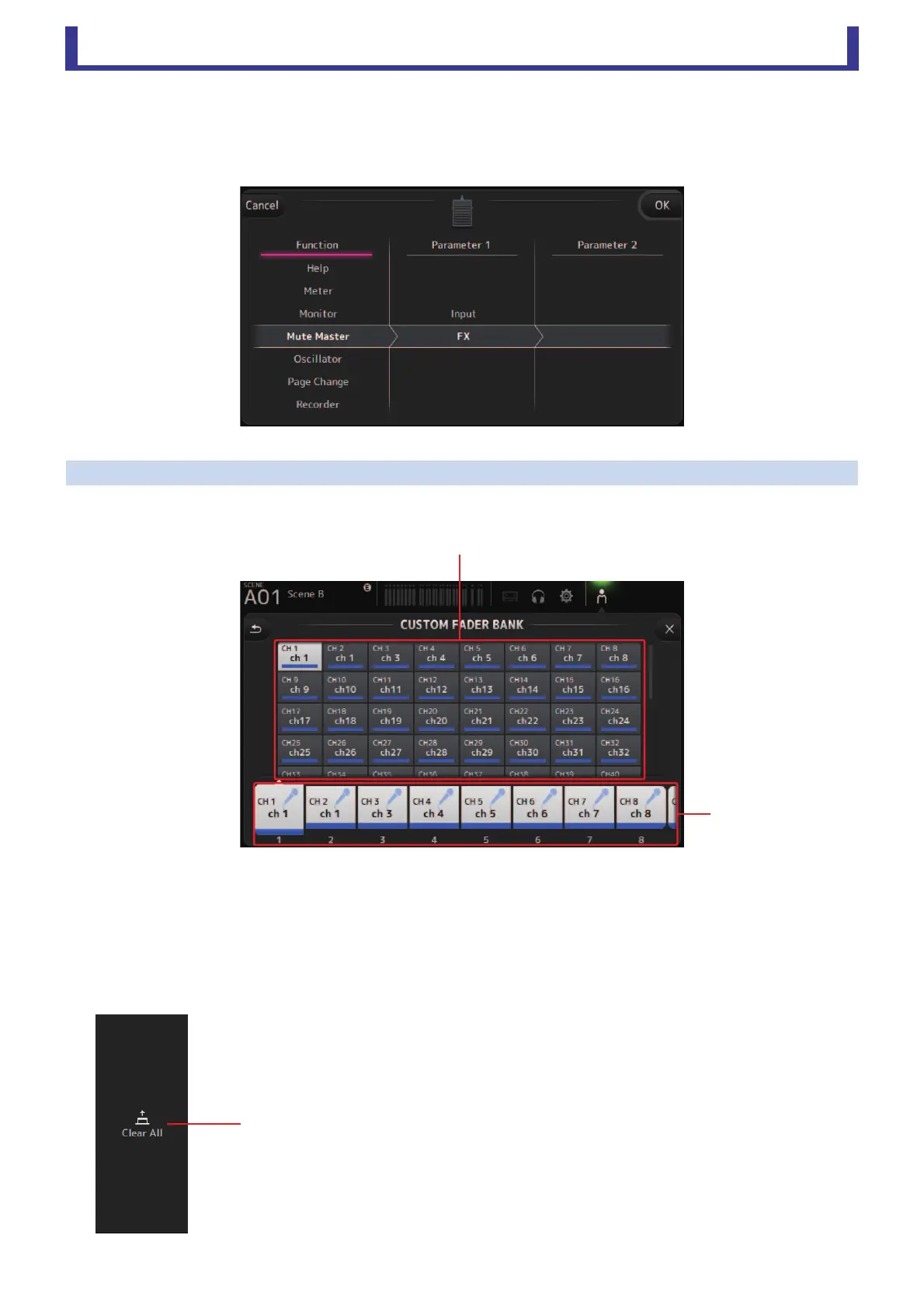
Feature assignment screen
When you select a Function, the items available for Parameter 1 are displayed. Likewise, when you select an item for Parameter 1,
the items available for Parameter 2 are displayed. Some Functions may not have items available for Parameter 1; some Parameter
1 items may not have items available for Parameter 2.
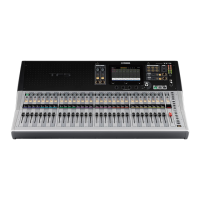
CUSTOM FADER BANK screen
The custom fader bank allows you to choose different channels, regardless of type (input channels, AUX buses, DCA groups, etc.),
and group them into a bank of faders.
1 Fader buttons
Allow you to select which fader will be configured.
2 Channel buttons
Determines which channel will be assigned to the fader you selected for
1. If you select None, nothing will be assigning to
the corresponding fader.
CUSTOM FADER BANK screen menu
The following items are displayed in the menu area when the CUSTOM FADER BANK screen
is displayed.
1 Clear All
Clears all assignments for each fader (all will be set to None).
ղ
ձ
ձ





 To Next Page