Smart key system
3-7
3
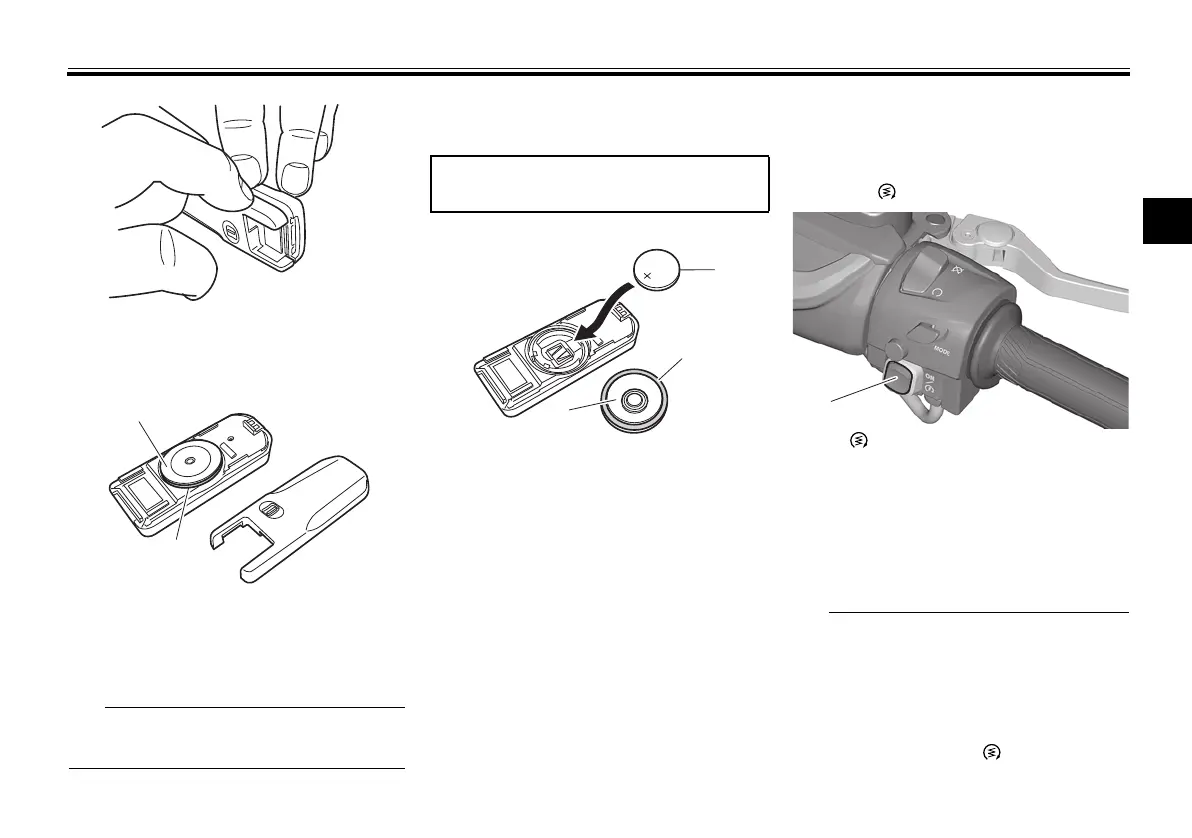
2. Remove the battery cover and O-
ring.
3. Remove the battery.
Dispose of the removed battery in ac-
cordance with local regulations.
4. Install a new battery as shown.
Note the polarity of the battery.
5. Install the O-ring and battery cov-
er.
6. Gently snap the smart key case
closed.
EAU77233
Powering on the vehicle
1. With the smart key on and in oper-
ating range, briefly press the
“ON/ ” switch.
2. Upon authentication of the smart
key, the beeper will sound twice
and the smart key system indica-
tor light will come on briefly. All
locks will release automatically.
The smart key system indicator
light will flash if the steering lock
cannot automatically release it-
self. Try moving the handlebars
gently to the left or right and then
press the “ON/ ” switch one
more time.
1. Battery cover
2. O-ring
Specified battery:
CR2025
1. Battery
2. O-ring
3. Battery cover
1. “ON/ ” switch
UB3TE0E0.book Page 7 Tuesday, September 17, 2019 9:35 AM









 To Next Page